$385.99
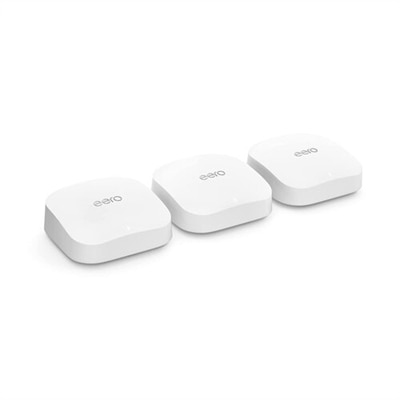
A tri-band Wi-Fi 7 wireless router delivering 9.2Gbps, 2.5Gbps ports, beamforming, EasyMesh, and HomeShield security.
Transform your digital experience with seamless home network upgrades that cater to all your connectivity needs. As our reliance on smart devices and streaming services grows, having a robust and efficient home network is essential for uninterrupted performance. Whether you're looking to enhance your Wi-Fi coverage, boost internet speeds, or support multiple devices simultaneously, exploring the latest advancements in networking technology can elevate your home setup. Discover a range of innovative solutions designed to optimize your network's efficiency and reliability, ensuring you stay connected with ease.
A tri-band Wi-Fi 7 wireless router delivering 9.2Gbps, 2.5Gbps ports, beamforming, EasyMesh, and HomeShield security.
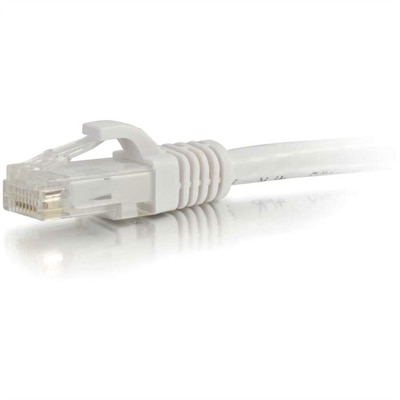
A white copper Cat6 Ethernet cable with a snagless boot supporting Gigabit networking and bandwidth-intensive applications.
Home network upgrades can make everyday technology feel more dependable, responsive, and easier to manage. A modern connection supports far more than browsing: households may be streaming high-resolution video, joining video meetings, backing up photos, using smart home devices, playing online games, and connecting laptops, desktops, monitors, printers, phones, and accessories at the same time. The first step is to understand the role of each component. Many internet providers supply a combination modem and router, but a dedicated router can offer stronger traffic management, broader configuration options, and better support for a busy household. When coverage is inconsistent from room to room, a mesh system or additional wired access point can help extend the network across larger homes, finished basements, upper floors, and areas separated by thick walls. Placement matters: the primary router generally performs best in a central, open location rather than inside a cabinet, behind a television, or at the far edge of the home. For dependable performance, connect stationary devices such as desktop computers, gaming systems, televisions, and workstations with Ethernet whenever practical. Category 6 or better cabling can provide a stable wired path and reduce congestion on wireless connections, while keeping a few spare cables available can make future rearrangement much simpler. Homes with several wired devices may also benefit from a network switch, which adds connection ports without requiring a new router. A switch with Power over Ethernet can supply both data and power to compatible access points, cameras, or other devices through a single cable, helping keep installations tidy. The right combination depends on the home’s layout, internet plan, wall construction, number of connected devices, and preference for wireless convenience or wired consistency.
Before choosing equipment, consider the internet speed entering the home, the number of people using the connection, and the types of activity taking place during the busiest periods. A household with occasional browsing may have different needs from one where several people work remotely, attend online classes, stream simultaneously, or transfer large files. Wi-Fi standards, supported frequency bands, Ethernet port speeds, processing capacity, and the number of simultaneous connections can all influence the experience. Coverage claims are estimates, so a larger floor plan, multiple levels, dense building materials, and neighboring wireless networks may require a carefully positioned mesh node or a wired access point for the best result. Wireless repeaters can help in limited situations, but a wired backhaul generally offers more consistent performance because each access point does not have to share the same wireless connection for both receiving and retransmitting data. For a clean installation, label cables, keep networking equipment ventilated, and avoid routing Ethernet alongside power cables over long distances where possible. It is also wise to check compatibility with the provider’s service, existing modem, preferred smart home platform, and any older devices that may connect to the network. Hardware that is several years old may not be prepared for newer speed tiers, heavier device loads, or recent security improvements; replacing a router about every three to four years is a practical guideline, while equipment that remains supported and performs well may not need immediate replacement. Shoppers building a broader technology setup can also explore Computer Upgrades to coordinate connectivity improvements with laptops, desktops, displays, and accessories used throughout the home. These additions can be useful for a home office refresh, a student’s study area, a shared entertainment space, or a thoughtful gift for someone moving into a new apartment or setting up a first workspace.
Security and maintenance are equally important parts of a home network upgrade. Replace default administrator usernames and passwords during setup, choose a long and unique passphrase, and enable the strongest practical wireless encryption supported by the equipment. Automatic firmware updates can help apply important fixes, although it is still sensible to review update settings and manufacturer support information periodically. A separate guest network allows visitors to connect without sharing the primary wireless password, while a dedicated network or VLAN for smart home devices can help isolate cameras, speakers, appliances, and other connected equipment from computers containing personal files. Not every household needs advanced configuration, but separating less-trusted devices is a useful consideration for privacy and organization. Review the list of connected devices from the router’s management app or web interface, remove equipment no longer in use, and change credentials promptly if a password has been shared widely. During the cooler months, when more time may be spent indoors working, learning, streaming, and connecting with family, a well-planned network can reduce interruptions in the rooms that matter most. Aim for a balanced setup rather than simply choosing the highest advertised number: reliable coverage, current security support, suitable wired capacity, sensible placement, and compatibility with the home’s internet service are the foundations of a network that feels fast and steady every day.
Add the products you would like to compare, and quickly determine which is best for your needs.