$3749.99
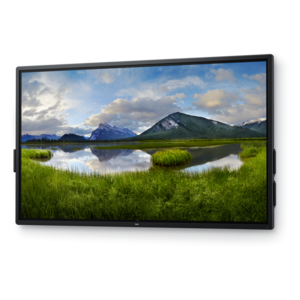
A 4K touchscreen monitor featuring 20-point InGlass Touch, palm rejection, and up to 90W USB-C power.
Interactive displays for schools are transforming classrooms into dynamic learning environments where students and teachers can collaborate more effectively. Designed to support a wide range of educational needs, these innovative solutions help create engaging lessons and interactive activities that inspire participation. Explore how interactive displays for schools can make it easier to share content, encourage group work, and foster a more connected classroom experience.
A 4K touchscreen monitor featuring 20-point InGlass Touch, palm rejection, and up to 90W USB-C power.
Interactive displays for schools are large touch-enabled screens that bring digital lesson materials, handwriting, and shared activities onto one classroom surface. Often called interactive flat panel displays, they combine the viewing area of a classroom screen with touch controls that let teachers and students write, draw, move objects, and interact with compatible applications. Unlike a conventional monitor, an interactive display accepts input directly on the screen; unlike a standard projection setup, a flat panel produces its own image without a separate projector. These capabilities support familiar classroom routines rather than requiring every lesson to become a technology exercise. A teacher might annotate a passage during a reading discussion, move shapes into groups during an elementary math lesson, or mark changes on a student’s draft with permission. In science classrooms, a large diagram gives students a shared place to label structures and compare observations. For older learners, a displayed spreadsheet, historical map, or design sketch can become the focus of a group explanation. Finger input suits quick selections and hands-on sorting, while compatible styluses can provide more precise control for handwriting, equations, and detailed diagrams. Supported input methods vary by display, and features such as palm rejection or automatic pen recognition depend on the hardware and software working together. Multi-touch capability allows more than one contact point to register at a time, but the number of supported touches does not necessarily equal the number of students who can comfortably work side by side. Screen space, application behavior, and the activity itself all shape that experience. Interactive classroom displays can serve elementary schools, middle schools, high schools, libraries, and teacher training spaces, with lesson content adapted to the age group and setting. Their practical value lies in making materials visible, editable, and easier to discuss together, whether the activity involves one teacher explaining a concept or several students contributing to a shared task.
Screen size, image quality, and physical placement influence how comfortably an interactive display fits into a school day. A screen that works well in a small resource room may feel undersized in a deep classroom, especially when lessons include dense text, map labels, or detailed charts. Higher resolution, including 4K on supported displays, provides room for sharper detail, but readable text still depends on font size, viewing distance, contrast, and the original material. A crisp worksheet shown at a very small scale can remain difficult to read from the back row. Brightness and surface treatment matter in rooms with overhead lighting or windows: an anti-glare finish can reduce distracting reflections, though it cannot eliminate every lighting problem. Wide viewing angles help students seated toward the edges of the room see the lesson more consistently. Touch responsiveness is equally noticeable during everyday use. When a handwritten line follows the stylus closely, a teacher can finish a calculation without pausing to check whether each stroke appeared. Glass writing surfaces and rigid frames are common construction features, while protective treatments and durability specifications differ. Tempered or otherwise strengthened glass may offer added resistance to classroom wear, but no surface should be treated as impact-proof. The mounting arrangement deserves the same attention as the screen. Wall mounts need to match the display’s mounting pattern and weight, with installation appropriate to the wall structure. Mobile stands require compatible weight ratings, stable bases, and secure wheel locks; they also need clear routes through doorways and between desks. Height-adjustable arrangements can help accommodate different users, provided the mechanism and installation are suitable for the display. In classrooms where students approach the screen, reachable controls and an unobstructed floor area make participation more practical. Cable routing should keep connections protected and walking paths clear. These physical details affect whether a display feels like a natural part of the teaching space or an obstacle around which the room must be arranged.
Connections, software compatibility, and routine care determine how an interactive display works alongside the computers and accessories already used in a school. A laptop may send an image through one connection while requiring a separate USB connection for touch control. Some USB-C configurations can carry video, touch data, and power through a single cable, but those functions depend on the ports, cable, and connected computer; a matching connector alone does not confirm support. Wireless screen sharing, where included, can let a teacher present from different parts of the room or bring a student’s work onto the main screen. Device compatibility, school access settings, and controls for approving shared content affect how smoothly that process works. Built-in computing and applications are also model-dependent, so browser access, document support, whiteboarding tools, and required subscriptions warrant attention alongside the screen specifications. Annotation features may allow notes to be saved or exported, making it possible to revisit yesterday’s worked example rather than reconstruct it from memory. Saving options and file formats vary, and student information should remain within school-approved workflows. Shared displays benefit from clear sign-out routines, appropriate account permissions, and a defined process for software updates. For coordinated classroom setups, Hardware For Schools provides a related place to explore laptops, desktops, monitors, and accessories that may support teaching and learning. Audio is another everyday consideration: built-in speakers may suit spoken instruction in a smaller room, while larger or noisier spaces can require compatible external audio equipment. For remote participation, camera and microphone support should be confirmed rather than assumed. Regular care helps preserve the writing surface and dependable touch response. Cleaning should follow the manufacturer’s directions, using approved materials rather than abrasive pads or unapproved chemicals, and liquids should not be sprayed directly onto the screen. Compatible stylus tips, tidy accessory storage, accessible support information, and occasional checks of mounts and cables all contribute to a classroom setup that stays ready for the next lesson.
Add the products you would like to compare, and quickly determine which is best for your needs.