Internal SSDs
Upgrade your computer's performance and storage capacity with our selection of internal SSDs. Designed to offer faster data access and improved reliability over traditional hard drives, internal SSDs are an essential component for anyone looking to enhance their computing experience. Whether you're a gamer seeking quicker load times or a professional needing efficient file management, our range of internal SSDs provides the perfect solution for all your storage needs. Discover the benefits of these powerful drives and find the ideal match for your system today.
This product is not available
Check out the following recommendations.




Internal SSDs
An internal solid-state drive (SSD) is a compact component installed inside a compatible laptop, desktop computer, or gaming system to hold the operating system, applications, games, photos, videos, and other files. Unlike a traditional hard disk drive, an SSD has no spinning platters or moving read heads. That solid-state design helps it respond quickly, operate quietly, and handle the ordinary bumps and movement that can happen when a laptop travels between home, school, work, and a coffee shop. Replacing an older hard drive with an SSD can make a familiar computer feel remarkably more responsive: the operating system can start sooner, applications can open with less hesitation, and large games or creative projects can load more smoothly. An SSD can also complement a newer computer by adding room for a growing photo library, a collection of digital games, or demanding software used for video editing, design, engineering, and music production. For people comparing options, the first step is confirming the device’s supported drive type, physical dimensions, interface, and maximum capacity. A laptop may accept a slim M.2 drive, while an older desktop or notebook may require a 2.5-inch SATA SSD connected with a cable. M.2 describes the shape of the drive, not automatically its performance, so it is important to check whether the computer supports SATA-based M.2 drives or NVMe drives that communicate over PCIe. A drive that physically fits may still be incompatible if the connector, keying, firmware, or interface does not match the system. Reviewing the computer manufacturer’s specifications or service manual before purchasing can help prevent an installation that looks simple but does not work as expected.
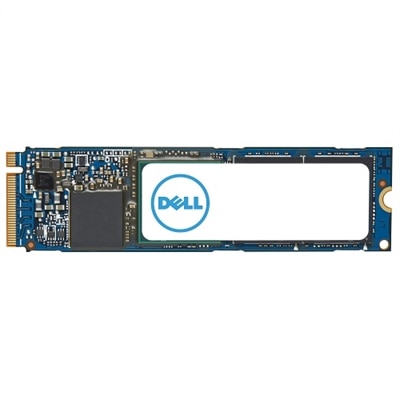
M.2 NVMe SSDs are narrow circuit boards that install directly into a compatible motherboard, often resembling a small stick of gum. They are available with different PCIe generations, and newer generations can provide higher sequential read and write speeds when the computer supports them. Those headline figures are useful for moving very large files, rendering projects, and other sustained workloads, but everyday responsiveness also depends on the processor, available memory, operating system, and the way a program uses data. A PCIe Gen 4 drive, for example, may be an excellent match for a computer designed around that interface, while placing a newer-generation drive in an older system may limit it to the older system’s supported speed. A 2.5-inch SATA SSD is a practical choice for many upgrades, especially when replacing a conventional 2.5-inch hard drive in an older laptop or refreshing a desktop with an available drive bay. SATA models generally offer a noticeable improvement over mechanical drives while using a familiar connection and often making installation straightforward. Capacity deserves equal attention. A smaller drive can suit a basic computer used for documents, browsing, and a handful of applications, while a larger capacity gives games, high-resolution media, creative programs, and working files more breathing room. Leaving some unused capacity can help a system maintain consistent performance, and keeping personal files organized makes future upgrades easier. Before replacing a boot drive, users should decide whether to perform a clean operating system installation or clone the existing drive. Cloning can preserve programs, settings, and the familiar desktop, but it requires careful preparation, enough destination capacity, and a reliable backup. A clean installation takes more time yet can remove years of unused software and clutter. In either case, important files should be copied to a separate location before opening the computer or beginning the migration.
Internal SSDs can be useful for a wide range of people. A student may use one to speed up a laptop filled with lecture recordings, research papers, and creative assignments. A remote worker may appreciate quicker access to large presentations and smoother multitasking during a busy afternoon of calls and spreadsheets. A photographer, designer, or video editor can benefit from a fast working drive for active projects, while a PC gamer may use additional capacity to keep more frequently played titles ready to launch. They can also be a thoughtful technology gift for someone whose computer has become frustratingly slow, provided the recipient’s device compatibility is confirmed first. Installation varies by computer. Some desktops provide generous access and a simple mounting bracket, while thin laptops may require delicate handling, small screwdrivers, and careful removal of a bottom panel. Static electricity, tightly routed cables, and manufacturer-specific procedures are worth considering, and professional installation may be the most comfortable option for people who would rather avoid opening a computer. Laptop owners comparing compatible upgrades can also browse Laptop SSDs for options suited to portable systems. During the warmer months and into cooler weather, an SSD can support the everyday routines that move between rooms, classrooms, offices, and entertainment spaces without adding noise or mechanical movement. Choosing the right capacity and interface matters more than selecting the most ambitious speed rating, and a well-matched drive can extend the useful life of a computer while making familiar tasks feel lighter, quicker, and less interrupted.
FAQs:
Upgrading to an internal SSD offers significantly faster boot times, quicker file transfers, and improved overall system responsiveness. SSDs are also quieter, more energy-efficient, and more resistant to physical shock compared to traditional hard drives, making them ideal for both laptops and desktops.
Yes, many gaming consoles such as PlayStation 4 and Xbox One support internal SSD upgrades. Installing an SSD can reduce loading times and provide smoother gameplay, especially for large titles and frequent game updates. Always check your console’s compatibility requirements before upgrading.
Most internal SSD installations require only basic tools like a small screwdriver and some patience. Many laptops and desktops have accessible drive bays, and there are numerous online guides and tutorials available. If you’re comfortable handling computer hardware, the process is straightforward; otherwise, a professional technician can assist.
Internal SSDs are more energy-efficient than traditional hard drives, which can contribute to longer battery life in laptops. Because SSDs have no moving parts, they consume less power during operation and help extend the time between charges, especially during heavy multitasking or frequent file access.
Absolutely. Many desktops and some laptops support multiple internal drives, allowing you to use an SSD as a primary system drive for the operating system and applications, while keeping your existing hard drive for additional file storage. This setup combines speed and capacity for an optimal computing experience.