$34.99
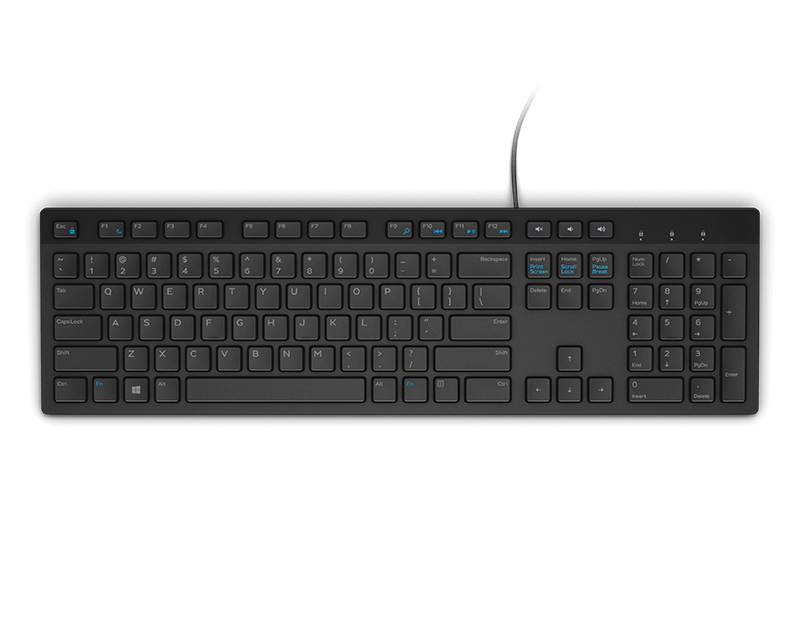
A wired productivity keyboard with built-in collaboration keys, designed for comfortable, efficient typing.
Discover a wide range of keyboard options designed to enhance your computing experience. Whether you’re looking for a comfortable typing solution for your home office or a reliable addition to your workspace, there are selections to match every preference and need. Explore different styles and layouts to find the perfect fit for your setup, all while enjoying quality craftsmanship and thoughtful design. With so many keyboard options available, it’s easy to find one that complements your work or play.
A wired productivity keyboard with built-in collaboration keys, designed for comfortable, efficient typing.
A comfortable keyboard offering smooth typing and up to 48 months of battery life for productive work.
A tri-mode wireless gaming keyboard with magnetic snap-on charging and customizable controls for enhanced performance.
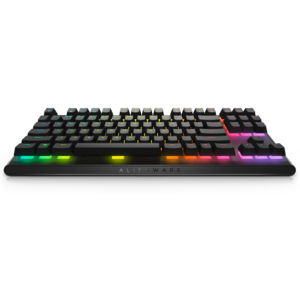
A compact tenkeyless gaming keyboard with Cherry MX Red switches and integrated cable routing for portability.
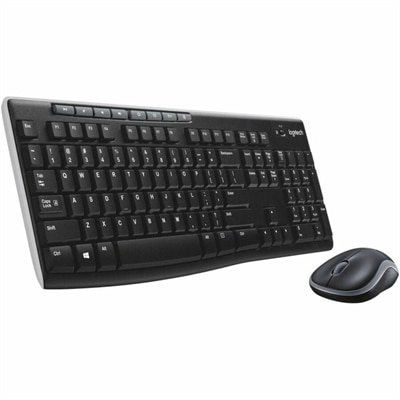
A black wireless keyboard and mouse combo with 2.4 GHz connectivity and long battery life.
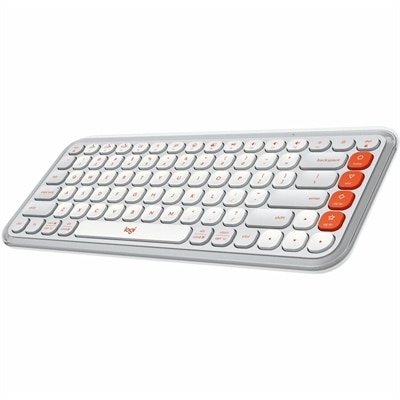
A compact off-white and orange Bluetooth keyboard with quiet low-profile keys, programmable controls, and three-device switching.
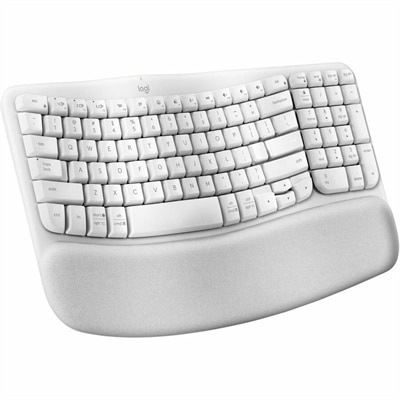
An off-white wireless ergonomic keyboard with memory-foam wrist support, Bluetooth, Logi Bolt, and recycled plastic.
Keyboard options include physical choices such as size, key layout, connection type, and typing feel, as well as software settings that control language, input layout, and key behavior. A physical keyboard determines how the keys feel beneath the fingertips and how much room the device occupies on a desk; the operating system determines how those keystrokes become letters, symbols, and commands. Both matter when matching a keyboard to everyday work, study, or entertainment. Full-size keyboards typically include a dedicated number pad, making them practical for entering figures into spreadsheets, recording expenses, or working through calculations. Tenkeyless designs omit that pad while generally retaining navigation and function keys, leaving more space for a mouse beside the keyboard. Smaller layouts reduce the footprint further, although some commands may require key combinations rather than dedicated buttons. That distinction becomes noticeable during a long afternoon of editing documents or moving between applications. A compact keyboard can fit neatly beside a laptop on a narrow apartment desk, while a larger layout may suit someone who regularly enters numbers or prefers separate controls. Key spacing, keycap shape, and the position of frequently used keys all contribute to fit. Someone accustomed to a laptop may feel at home with shallow, low-profile keys, while another typist may prefer taller keys with more movement. Familiar legends and a clearly marked layout can make shared household computers easier to use, particularly when several people have different levels of typing experience. For anyone comparing the purpose of keyboard keys with other everyday controls, Computer Buttons provides related context. Physical key labels are also worth distinguishing from input settings: changing the keyboard language or layout changes what the computer interprets, but it does not change the characters printed on the keys. For multilingual typing, a physical layout that matches the most frequently used input language can reduce the need to remember where punctuation and special characters are located.
Typing feel comes from several parts working together, including the switch mechanism, key travel, keycap surface, and stiffness of the keyboard housing. Mechanical keyboards use individual switches beneath the keys, with designs that may provide a smooth press, a noticeable tactile bump, or an audible click. Membrane and scissor-switch designs can offer a softer or shallower action, depending on their construction. No single mechanism is best for every setting. A pronounced click may feel satisfying during independent work but become distracting at a shared desk or near a microphone during a video call. Someone writing lengthy reports may value a consistent response more than a dramatic sound, while a person playing fast-paced games may pay closer attention to reliable recognition of simultaneous key presses. Plastic housings are common and can keep a keyboard relatively light; metal plates or frames may add rigidity and weight. Keycap materials and the method used to apply lettering influence how surfaces and legends hold up to repeated contact. Textured tops can feel different from smooth ones, and frequently used keys may develop a polished appearance over time. Comfort also depends on the overall workspace rather than the keyboard alone. A low front edge, a suitable desk height, and room to keep the mouse nearby can help support a relaxed position. Split or contoured layouts offer another approach to hand placement, though they may take time to learn and do not guarantee comfort for everyone. Adjustable feet change the typing angle, but a steeper slope is not automatically a better fit. For an external keyboard used with a laptop, separating the screen from the typing surface allows more freedom to arrange both. A student drafting papers, a remote worker answering messages, and a family member organizing household records may all use the same basic functions, yet prefer very different combinations of size, key resistance, and layout. As a gift, a keyboard is most personal when those familiar habits, desk dimensions, and connection needs are understood.
Connection and control features round out the differences among keyboard options. A wired keyboard provides a direct connection and generally avoids the need to recharge the keyboard or replace its batteries. Wireless designs reduce cable clutter and can make it easier to reposition a keyboard between tasks, though their power requirements and connection methods vary. Some use a dedicated receiver, while others connect through the computer’s built-in wireless capabilities; compatibility depends on the keyboard and the device. Multi-device switching can be useful when moving between a desktop and a laptop, provided both support the required connection. Backlit keys may make legends easier to see in a dim room, and dedicated media controls can keep volume adjustments within reach. Extra functions, programmable keys, and lighting adjustments may require compatible software, so their behavior can differ across operating systems. Keyboard language and layout options are generally managed in the device’s system settings, under sections for language, keyboard, or input. Adding an input language, selecting a layout, and choosing a switching shortcut affect text entry rather than the physical keyboard itself. When a key produces an unexpected symbol, the selected input layout is one possible cause. Accessibility settings may also change how held keys, repeated presses, or key combinations are recognized, which can help accommodate different ways of typing. These software choices complement the hardware rather than replace it. Day-to-day care helps preserve that hardware: crumbs, dust, and spilled drinks can interfere with keys, especially on a keyboard used throughout meals or carried between locations. Cleaning should follow the manufacturer’s directions, with the keyboard disconnected or powered off and liquids kept away from openings. A lightly dampened cloth may be appropriate for exterior surfaces when permitted, but soaking keys or spraying cleaner directly into the housing risks damage. Removable keycaps and spill resistance should never be assumed. For travel, a protective sleeve or a separate compartment can limit rubbing and accidental key pressure. With the right combination of physical fit, compatible connections, and familiar input settings, a keyboard can feel like a natural part of the workspace rather than another adjustment to make throughout the day.
Add the products you would like to compare, and quickly determine which is best for your needs.