
Laptop Back Covers

Elevate your laptop's style and protection with our diverse selection of laptop back covers. Designed to add a touch of personality while safeguarding your device, these covers are perfect for anyone looking to make a statement. Whether you're a student, professional, or casual user, our range of laptop back covers offers something for everyone. Discover vibrant colors, sleek designs, and durable materials that will keep your laptop looking fresh and secure.

Filters

$50.99

A replacement laptop rear cover made from original components for a precise, reliable fit.

$50.99
$24.99

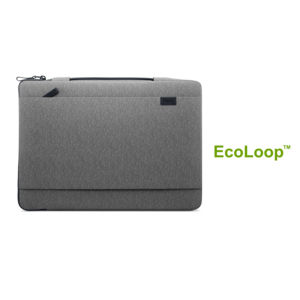
A lightweight laptop sleeve made with recycled materials, featuring a retractable handle for convenient protection.

$24.99
$49.99

A sustainable, lightweight protective case offering custom-fit coverage and exceptional usability for detachable laptops.

$49.99

Laptop Back Covers

Laptop back covers form or protect part of a laptop’s exterior, usually the rear of the display lid or the underside of the computer. The term can describe two different categories: replacement housing panels that become part of the laptop itself, and protective covers that fit over the existing housing. That distinction matters because a scratched but intact lid has different needs from a cracked panel or a damaged bottom cover. A replacement display back cover restores the outer housing behind the screen, while a replacement bottom panel closes the underside of the chassis. Depending on the laptop’s construction, these parts may also provide mounting points, ventilation openings, or attachment locations for internal components. Snap-on covers, by contrast, add an exterior layer without replacing the original panel. Thin adhesive skins offer another approach, primarily helping limit light surface scratches and changing the appearance with very little added thickness. Materials influence how each type feels and performs. Rigid plastics, including polycarbonate and other engineered blends, can provide lightweight coverage, while aluminum and magnesium-alloy housings are used in some laptop designs for their balance of weight and rigidity. Textured finishes can make handling feel more secure, and smooth finishes may be easier to wipe clean. Clear protective shells leave the original exterior visible; opaque finishes create a more uniform appearance. None of these options makes a computer immune to impact, and a decorative skin does not provide the cushioning of a padded carrying sleeve. For a laptop that moves between a kitchen counter, a desk, and a crowded backpack, the right type of back cover depends on whether the goal is everyday surface protection, a different finish, or replacement of damaged housing. A cover intended for cosmetic protection should not be treated as a repair for loose hinges, a bent chassis, or cracks around structural attachment points.

Fit is the most important consideration for laptop back covers because a shared screen size does not mean two computers share the same exterior dimensions. Laptops with similar displays can differ in lid curvature, chassis depth, hinge placement, corner shape, and the position of clips or screws. Even different generations within the same laptop family may use different panels. For a replacement housing component, compatibility depends on the exact model and configuration, along with the relevant part identification when provided. A display lid may need to accommodate a particular camera arrangement, antenna routing, trim, or hinge design; a bottom cover must align with the chassis, ventilation system, feet, and fastening points. Details such as included brackets, rubber feet, screws, or trim also vary, so a panel should not be assumed to include every piece needed for installation. Protective shells require similarly precise shaping. A properly matched shell should sit securely without forcing the lid, pressing against the display, covering ports, or interfering with the laptop’s normal opening range. Convertible laptops need particular attention because a cover that works in a conventional typing position may obstruct the hinge movement used for tablet or presentation modes. Ventilation is just as important as the fit around the edges. Openings in a bottom cover or protective shell need to correspond with the computer’s air intake and exhaust paths; an attractive exterior is not a substitute for unobstructed airflow. Added thickness can also affect how a laptop slides into a fitted sleeve or rests in a stand. Surface texture matters for adhesive skins, too, since pronounced textures, damaged finishes, and curved edges can affect adhesion. Replacement housing work can involve delicate cables, display assemblies, or internal components, making professional installation appropriate for repairs beyond routine user-accessible maintenance. These fit and installation details help distinguish a compatible back cover from one that merely looks similar in a photograph.

Everyday use puts different demands on a laptop’s exterior. A student carrying a computer between lectures may value a lightweight protective layer that slips easily into a backpack, while someone moving between meeting rooms may prefer a low-profile finish that is comfortable to hold and easy to keep clean. A home laptop used mostly at a desk may need a replacement panel after accidental damage rather than an additional outer shell. For frequent travel, a fitted cover can complement a padded sleeve or a dedicated laptop compartment, but it does not replace cushioning around the computer. Keys, charger plugs, and other hard objects can still mark exposed edges or press against the lid inside an overfilled bag. Care is generally straightforward, although the material and finish determine which cleaning methods are appropriate. A soft, lint-free cloth removes ordinary fingerprints and dust, and a lightly dampened cloth may suit surfaces whose care instructions permit it. Abrasive pads, harsh solvents, and excess moisture can damage finishes or adhesives. Removable protective covers can also trap fine grit along their edges, where repeated movement may rub against the underlying housing. Occasional inspection and cleaning, following the cover and laptop care instructions, helps prevent that buildup. Changes in fit deserve attention as well: a shell that begins lifting, a panel that no longer sits flush, or a hinge area that starts separating may indicate something more than cosmetic wear. Unexpected bulging around the lower housing can signal an internal problem and warrants professional assessment rather than pressure to force the cover closed. For someone refreshing a well-used computer, exterior panels and Laptop Keyboards address different areas of wear, with compatibility remaining essential for both. A protective back cover can also make a practical gift when the recipient’s exact laptop model and preferred style are known. Whether the priority is a cleaner appearance, scratch resistance, or restoring damaged housing, a well-matched cover should suit the laptop’s construction and the way it is carried, handled, and used each day.

FAQs:

Add the products you would like to compare, and quickly determine which is best for your needs.
Add the products you would like to compare, and quickly determine which is best for your needs.