$570.00
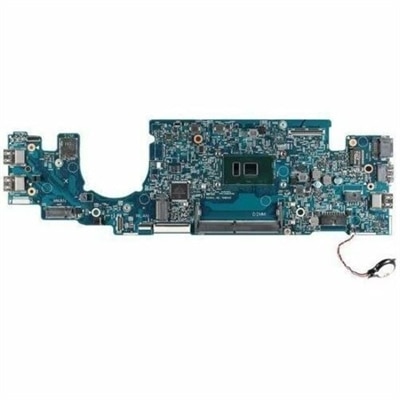
A durable, serviceable Chromebook designed for K–12 learning environments.
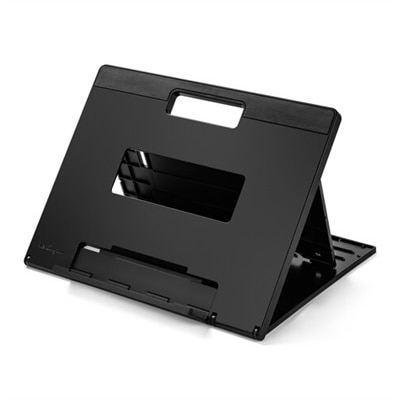
Laptop bases provide a convenient solution for enhancing your workspace, helping to support your device and optimize comfort during use. Whether you're working from home, studying, or gaming, the right laptop base can make a noticeable difference in your daily routine. Explore a wide selection of laptop bases designed to suit various needs and preferences, ensuring stability and versatility for every setup. Find the ideal option to complement your laptop and elevate your computing experience.
A durable, serviceable Chromebook designed for K–12 learning environments.
A durable, serviceable laptop or 2-in-1 designed specifically for K-12 learning environments.
Laptop bases are supports that hold a laptop above a work surface, position it at a more comfortable viewing angle, or keep it upright beside an external monitor. The category includes fixed desktop risers, adjustable laptop stands, folding supports, vertical holders, and mobile platforms, each suited to a different kind of workspace. A raised base can bring the screen closer to eye level, making text and video calls easier to view without leaning as far forward. For longer sessions, an external keyboard and mouse allow the screen to sit higher while the hands remain at a comfortable working height. A stand alone does not guarantee better posture; the chair, desk height, screen distance, and placement of other accessories all contribute to how the setup feels. Fixed risers provide a consistent platform for a dedicated desk, while adjustable designs let the screen move up or down as tasks change. A modest tilt may suit a short session using the laptop’s own keyboard, whereas greater elevation generally works better with separate input devices. Vertical laptop bases serve a different purpose: they hold a closed laptop on its edge to free up desk space when it is connected to an external display. That arrangement depends on the computer supporting closed-lid operation and having the necessary power, display, and peripheral connections. A folding base fits naturally into a routine that moves between a home office, shared workspace, and classroom. Mobile platforms can bring a supported work surface closer to a chair or sofa, although wheel locks, floor clearance, and a stable footprint matter as much as mobility. Across these styles, the most useful distinction is how the laptop will be used: open as the main screen, elevated beside another monitor, or closed as part of a larger desktop setup.
Materials and construction affect a laptop base’s weight, stability, feel, and ability to stand up to daily handling. Aluminum is common because it combines relatively low weight with rigidity, and its clean surface works well in both professional and home settings. Although aluminum conducts heat, a metal stand does not automatically cool every laptop; the amount of contact, the computer’s design, and the surrounding airflow all influence the result. Steel can provide a firm, substantial structure, particularly for a base that stays on one desk. Molded plastic can keep a portable support light, while wood adds a warmer texture to a room and needs the same attention to ventilation and fit as any other material. Mesh platforms and open frames leave more of the laptop’s underside exposed to air. For shoppers comparing airflow-focused designs, Laptop Cooling Stands include supports intended to help air circulate around the computer, sometimes with powered fans. Cooling performance varies with room temperature, workload, vent placement, and the laptop’s internal cooling system; a stand cannot guarantee protection from overheating or correct a blocked internal fan. Fit also goes beyond the screen measurement. The laptop’s width, depth, thickness, and weight need to match the base’s supported dimensions and load capacity. A broad workstation laptop may require a deeper platform than a compact notebook, even when both sit securely within a stated screen-size range. Retaining lips should support the front edge without pressing against wrists or interfering with opening the lid. Nonslip contact pads help cushion the chassis and resist movement, while feet underneath the base help it stay planted on a smooth desk. Side supports should leave charging connections, headphone jacks, and other frequently used ports accessible. For vertical holders, the slot width and protective lining are especially important because they determine whether the laptop sits securely without excessive pressure on its outer surfaces.
Everyday use brings smaller details into focus. On a narrow apartment desk, a raised platform can create room underneath for a keyboard when work is finished, provided the base has enough clearance. In a shared study area, a folding support that opens quickly and sits flat without rocking is easier to move between work surfaces. Someone working with an external monitor may appreciate height adjustment that brings the laptop display closer to the neighboring screen, reducing repeated changes in viewing angle. For a student attending online lectures, a stable base can keep the camera at a more natural height while leaving space for handwritten notes. A laptop base can also be a thoughtful graduation or new-job gift when the recipient’s computer dimensions and work habits are known. Comfort on a sofa or bed calls for a platform intended for that setting, with a firm surface beneath the computer rather than fabric that could cover its vents. Soft bedding is not a stable foundation for an ordinary desktop riser, and tall configurations need particular care around children, pets, and busy walkways. Durability depends on more than the frame material: hinges should hold their position, locking mechanisms should engage fully, and contact pads should remain attached through repeated adjustments. Frequent travelers may value protected hinges and a compact folded shape, while a permanent desk setup may benefit more from a broad footprint and fewer moving parts. Routine care is usually straightforward but should follow the manufacturer’s directions. Dust can be removed with a soft cloth, and accessible mesh openings can be kept clear without pushing debris toward the laptop’s vents. Powered cooling bases should be disconnected before cleaning, with moisture kept away from fans and electrical connections. Abrasive cleaners can damage finishes or rubberized surfaces, and loose screws or worn pads deserve attention before the laptop is placed back on the stand. Cable routing matters, too: charging and display cords need enough slack for height adjustments without pulling on ports or catching beneath the base. These practical details help a laptop support remain a dependable part of the workspace, whether it is opened for an hour at the kitchen table or used throughout the day at a dedicated desk.
Add the products you would like to compare, and quickly determine which is best for your needs.