$121.91
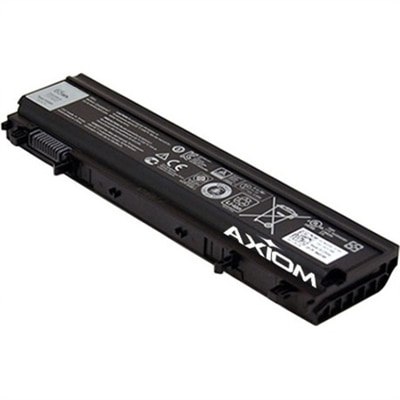
A high-capacity notebook battery offering OEM-compatible performance with overcharge, overheating, short-circuit, and overvoltage protection.
Power up your productivity and keep your device running smoothly with reliable laptop battery replacements. Whether you’re at home, in the office, or on the go, having a dependable battery is essential for uninterrupted performance. Explore a wide selection of laptop battery replacements designed to help you stay connected and get more done throughout your day. Find the right fit to extend the life of your laptop and experience convenience with every charge.
A high-capacity notebook battery offering OEM-compatible performance with overcharge, overheating, short-circuit, and overvoltage protection.
A reliable 3-cell 42 Wh Lithium-Ion battery ensures seamless laptop performance while on the move.
A dependable laptop battery replacement can restore the freedom to work, study, create, stream, and stay connected away from an outlet. Over time, a rechargeable battery naturally loses capacity. A laptop that once lasted through a full workday may eventually need frequent charging, shut down unexpectedly, or display a battery percentage that drops sharply during ordinary tasks. Replacing the battery can be a practical alternative to replacing the entire computer, particularly when the laptop still performs well, has a comfortable keyboard, and meets your needs for everyday applications. These replacement parts are useful for remote workers moving between a desk and a kitchen table, students carrying a computer between classes and libraries, travelers who spend long stretches in transit, and families that share a laptop for homework, planning, and entertainment. They can also make a thoughtful, practical gift for someone who relies on a familiar laptop and would appreciate more dependable unplugged use. For additional ways to refresh or replace a computer, browse Laptop Replacements. A replacement battery is not universal, so compatibility should be the first consideration. Locate the laptop’s exact model name and number, along with its service tag, serial number, or other identifying information, depending on the computer. This information may appear on a label on the underside of the laptop, inside the battery compartment on older designs, on the original packaging, or in the operating system’s system information. Searching by the complete model designation is more reliable than relying on a general screen size or product family name, since similar-looking laptops can use batteries with different shapes, connectors, mounting points, or electrical specifications.
Before choosing a replacement, compare the original battery’s part number, voltage, and capacity with the listed specifications. Voltage, shown as V, should match the laptop’s requirements. Capacity may be listed in milliamp-hours, or mAh, and watt-hours, or Wh; a higher capacity is not automatically compatible if the physical design, voltage, connector, or charging circuitry differs. Check the number of cells, battery chemistry, dimensions, connector position, and whether the part is intended for the exact laptop configuration. Some computers use internal batteries that are secured beneath the bottom cover, while others use removable packs that release with a latch. Slim laptops can have tightly fitted internal components, and a battery that appears close in shape may still be unsuitable if its cable does not reach the motherboard connector or its mounting holes do not align. Look for clear specifications, compatibility information, and appropriate handling guidance rather than selecting a part based only on appearance. Battery age and storage conditions also matter. Rechargeable batteries gradually lose capacity even when they are not used, so confirm that the replacement is new or properly stored and inspect the packaging for signs of damage. A swollen battery, a lifted trackpad, a bulging bottom panel, unusual heat, a chemical odor, or hissing sounds may indicate damage. Stop using a laptop with these symptoms, disconnect it from power if it is safe to do so, and seek qualified service. Do not bend, puncture, crush, open, or place a damaged battery in household trash. Follow local recycling instructions for rechargeable batteries and electronic components.
Installation can be straightforward on some laptops and more involved on others. If the battery is user-replaceable, turn the computer off completely, disconnect the charger and all accessories, and work on a clean, dry, well-lit surface. A small screwdriver set and a nonmetallic pry tool may be needed for an internal replacement. Touch a grounded metal object or use suitable static-control practices before handling internal components. Remove the bottom cover according to the laptop’s service instructions, keeping screws organized because they may differ in length. The battery cable should be disconnected by its connector or tabs, never by pulling on the wires. Remove the retaining screws, lift the old battery out carefully, and position the replacement without forcing it into place. Reconnect the cable securely, reinstall the screws and cover, and inspect the edges for pinched cables before starting the computer. Exact procedures vary, and some manufacturers recommend professional installation, especially when the battery is glued in place or access requires removing other components. If you are not comfortable working inside a laptop, a qualified repair technician can verify the model, test the existing battery, source a compatible replacement, install it safely, and help recycle the old one. After installation, connect the charger and allow the operating system to recognize the new battery. Battery life depends on screen brightness, wireless connections, applications, temperature, and power settings, so adjust those controls when practical. Avoid leaving the laptop in a hot car or using it on bedding that blocks ventilation. During cooler months and periods of changing routines, reliable battery power can make a laptop easier to carry from room to room, bring on a commute, or use wherever the day takes you. Choosing the correct replacement and handling it carefully helps protect the computer while providing the consistent portable power that everyday work and personal tasks require.
Add the products you would like to compare, and quickly determine which is best for your needs.