Mini DisplayPort Adapters
Mini DisplayPort adapters offer a simple way to connect your devices to a wide range of external displays and peripherals. Whether you’re setting up a workstation, expanding your screen real estate, or enhancing your multimedia experience, these adapters provide versatile connectivity options for laptops, desktops, and other compatible devices. Explore our selection of mini DisplayPort adapters to find the ideal solution for seamless integration with your technology setup.
This product is not available
Check out the following recommendations.




Mini DisplayPort Adapters
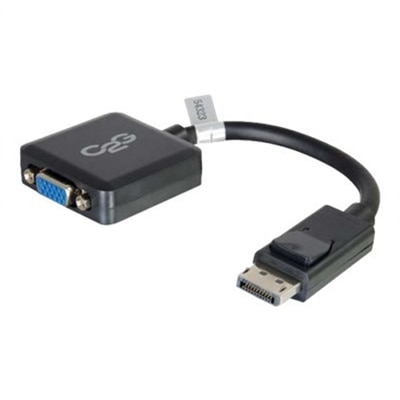
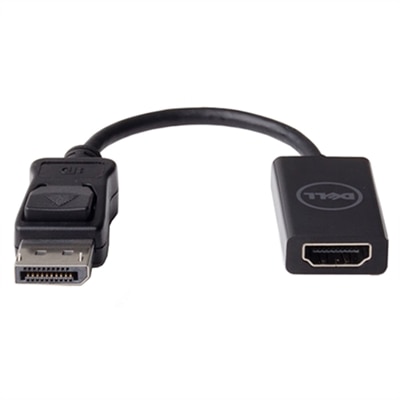
Mini DisplayPort adapters provide a practical way to connect older laptops and compact computers to today’s external displays. A Mini DisplayPort connection is smaller than a full-size DisplayPort connector, but it can carry digital video and, on many compatible systems, digital audio as well. Because newer monitors, televisions and projectors may use different input types, an adapter helps bridge the connection between the computer you already own and the display you want to use. Common formats include Mini DisplayPort to HDMI for televisions and many modern monitors, Mini DisplayPort to full-size DisplayPort for higher-resolution computer displays, and Mini DisplayPort to DVI or VGA for older office monitors, classroom projectors and conference-room equipment. The right choice depends first on the output port on the computer and the input port on the display. Mini DisplayPort and Thunderbolt connections can look similar, yet compatibility may vary by device generation, so checking the computer’s specifications is an important first step. It is also worth confirming whether the adapter supports the resolution, refresh rate and audio features you plan to use. Someone connecting a laptop to a basic office monitor may need only a straightforward video connection, while a home office with a larger screen, built-in speakers and high-resolution content may benefit from an adapter designed to support both digital sound and the display’s native resolution. For a Mini DisplayPort connection leading to an HDMI-equipped screen, browsing DisplayPort To HDMI Converters can help identify related connection options.
When comparing Mini DisplayPort adapters, pay close attention to the direction of the signal. Most adapters are designed to send video from a Mini DisplayPort output on a computer to an HDMI, DisplayPort, DVI or VGA input on a monitor or projector. They generally are not intended to reverse that path, and a cable that fits physically may not work when used in the opposite direction. Resolution support is another important consideration. An adapter may support standard high-definition output, while another may be designed for higher resolutions or faster refresh rates; the computer, adapter, cable and display all need to support the desired setting. Digital connections such as HDMI and DisplayPort are typically the better fit for sharp text, detailed photographs and moving video, while DVI and VGA can remain useful when working with older equipment that has not been replaced. VGA is an analog format, so image quality can depend more heavily on cable length, signal conditions and the display itself. Some adapters carry audio through HDMI or DisplayPort, but older video standards may require a separate audio connection from the computer. A passive adapter can be a simple and economical choice when the computer’s Mini DisplayPort output supports the necessary dual-mode function, sometimes identified as DP++. An active adapter includes internal signal-conversion electronics and may be required when the source does not provide that support, when converting to certain legacy display formats, or when building a multi-display arrangement. Multi-monitor users should verify the computer’s graphics capabilities, the number of supported screens and whether the adapter is approved for the intended configuration rather than assuming that one adapter will work in every setup. Other details, including support for protected content, color depth, screen mirroring and extended desktop modes, can also affect the experience.
These adapters are useful in settings where dependable screen connectivity matters more than adding a new computer. A remote worker might keep a compact laptop on a stand while sending documents, spreadsheets or video calls to a larger monitor positioned at eye level. A student can use an older notebook with a classroom projector for presentations, while a family can connect a computer to a television for shared viewing or photo browsing. In a small business, an adapter can help a staff member use an available monitor in a meeting room without replacing otherwise serviceable equipment. Creative professionals may use one to extend a desktop for timelines, reference images or editing tools, and travelers often keep a lightweight adapter in a computer bag for unfamiliar displays in workspaces, hotels or lecture rooms. Mini DisplayPort adapters can also make thoughtful practical gifts for someone setting up a home office, returning to school or preparing a flexible workspace, particularly when the recipient has an older laptop and a newer monitor. Before choosing one, inspect the available ports, determine whether the display uses HDMI, full-size DisplayPort, DVI or VGA, and note any requirements for audio, high resolution, multiple displays or protected video. Consider the length and quality of the connected cable as well; an adapter cannot overcome limitations in the source device, the display or an unsuitable cable. A compact, securely fitting design is helpful for travel, while strain relief and a sturdy connector can make a difference when the adapter is connected and disconnected regularly. With the signal direction, conversion type and display specifications matched carefully, a Mini DisplayPort adapter can extend the useful life of an older computer and create a clean, capable connection for work, learning and entertainment through the cooler months and beyond.
FAQs:
Mini DisplayPort adapters are commonly compatible with laptops, desktops, and tablets featuring a Mini DisplayPort or Thunderbolt port. Many Dell laptops and desktops include this port, allowing users to connect to a wide range of external displays and projectors.
Yes, most Mini DisplayPort adapters, such as a mini displayport → hdmi adapter, support both video and audio transmission. However, the connected device must also support audio output over Mini DisplayPort for sound to be transmitted to the external display.
Active Mini DisplayPort adapters contain built-in electronics to convert digital signals to analog or to support higher resolutions and refresh rates. Passive adapters are simpler and rely on the device's native signal, making them suitable for straightforward digital connections where conversion is not needed.
Yes, there are multi-port Mini DisplayPort adapters that offer outputs for HDMI, VGA, and DVI in a single device. This makes it easy to connect your device to a variety of displays without needing separate adapters for each connection type.
Many Mini DisplayPort adapters support high resolutions, including 4K at 60Hz, making them ideal for connecting to modern high-definition monitors. Always check the adapter's specifications to ensure it meets your resolution and refresh rate requirements.