$299.99
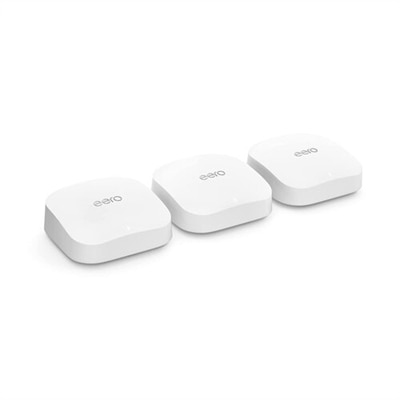
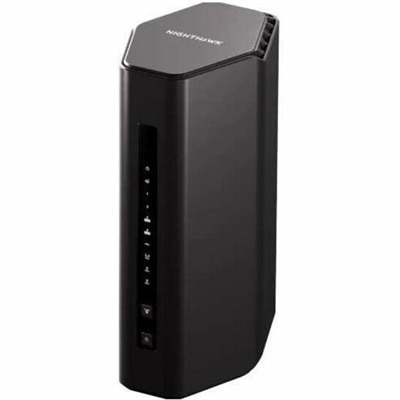
A tri-band Wi-Fi 7 router delivering 9.3Gbps, 320MHz channels, 6GHz connectivity, and 2.5Gbps Ethernet.
Network gateways play a vital role in connecting devices and managing data traffic within home and office environments. Designed to facilitate smooth communication between different networks, network gateways help ensure seamless internet access and reliable connectivity for various devices. Whether you’re setting up a new workspace or upgrading your current setup, exploring options in network gateways can support efficient networking and enhance daily productivity.
A tri-band Wi-Fi 7 router delivering 9.3Gbps, 320MHz channels, 6GHz connectivity, and 2.5Gbps Ethernet.
A connected workspace comes together around the devices people use every day: a laptop for moving between rooms, a desktop for a dedicated desk, a monitor that makes detailed work easier to see, and accessories that keep routine tasks comfortable. The right combination depends less on how many devices a space contains than on what happens there. A student working through research papers needs readable text, a comfortable keyboard, and enough battery life to move between study sessions. Someone handling spreadsheets and video calls from a spare bedroom may prefer a larger display, a clear webcam, and a headset that helps separate conversation from household noise. Creative work brings different priorities, including consistent color, responsive performance, and room to arrange editing tools without crowding the main image. These everyday activities provide a useful starting point for comparing laptops, desktops, monitors, and accessories without assuming that every workspace needs the same equipment. Computer performance and internet performance also affect different parts of the experience: a more capable processor can help an application respond quickly, but it cannot by itself fix a slow internet connection. Likewise, a sharp display can improve the appearance of a video call without changing the quality of the incoming video. Understanding those distinctions helps keep expectations grounded in how equipment actually works. For context beyond the computers and accessories on a desk, Network Infrastructure Devices provides a related category to explore. At the individual workspace level, the most useful considerations remain practical ones: whether the screen is comfortable to read, whether the computer supports the applications being used, whether accessories connect correctly, and whether the arrangement fits the room. A compact corner used for occasional email has different demands from a desk occupied throughout the workday, and equipment should suit that difference rather than simply fill the available surface.
Laptops and desktops support many of the same activities, but their physical design changes how they fit into daily life. A laptop combines the screen, keyboard, and computer in a portable form, making it useful for people who work at a kitchen table in the morning and settle into a quieter room later. Weight, dimensions, hinge construction, and the size of the power adapter all matter when that computer travels regularly. A protective sleeve should match the laptop’s actual measurements rather than rely only on its advertised screen size; a close fit helps limit movement inside a larger bag without putting pressure on corners or connected accessories. Metal and plastic enclosures each vary in quality and construction, so material alone does not establish durability. Reinforced edges, a stable hinge, and sensible handling can be more meaningful than a finish that merely looks rugged. For a computer that stays in one place, a desktop allows the display and input devices to be positioned independently. That flexibility can make a difference at a shared household desk, where one person prefers a higher screen and another needs more space for handwritten notes. Physical dimensions deserve attention here, too. The computer needs room for ventilation, accessible connections, and cables that are not sharply bent against a wall. Application requirements should shape performance choices, especially for photo editing, design work, large spreadsheets, or frequent multitasking. Memory capacity influences how comfortably a system handles multiple active applications, while graphics capabilities matter more for some visual workloads than for routine document work. Compatibility deserves equally careful attention: the operating system, required software, display connections, and accessory support all need to work together. A connector’s shape does not guarantee every function, and two ports that look alike may support different charging or display capabilities. Checking the documented specifications can prevent a common frustration, such as connecting a monitor through a port that does not support video output. For gifts, a laptop or desktop is usually most useful when its intended recipient’s applications, portability needs, and preferred working style are already understood.
Monitors and accessories determine much of the day-to-day comfort of a finished setup. Screen size is only part of that picture. Resolution affects how finely text and images are rendered, while scaling settings influence whether menus and labels remain easy to read at a normal sitting distance. A large display can make side-by-side documents easier to manage, but it also needs enough desk depth to avoid an uncomfortably close viewing position. An adjustable stand offers more flexibility than a fixed one, particularly when several people use the same space. Where a separate monitor arm is appropriate, its mounting compatibility, supported weight, and attachment requirements should match both the display and the desk. Surface finish and room lighting also interact: a bright window reflected across a screen can make an otherwise comfortable workspace tiring, so placement matters alongside display specifications. Keyboards and mice should fit the available space and the person using them. A compact keyboard leaves more room for mouse movement, while a number pad can be useful for frequent numerical entry. Headsets, webcams, and speakers serve different purposes rather than acting as interchangeable upgrades. A headset helps keep conversation private, a well-positioned webcam supports a more natural view during calls, and speakers can suit a room where listening will not disturb others. For shared spaces, controls that are easy to find can be especially helpful when adjusting volume or muting a microphone between meetings. Routine care helps preserve these everyday tools. Follow the manufacturer’s cleaning directions, use suitable cloths and cleaning materials, and avoid spraying liquid directly onto screens, keyboards, or openings. Keep ventilation areas clear, protect cables from chair wheels, and disconnect accessories carefully rather than pulling on their cords. Small habits like returning a headset to a stand or putting a mouse into a protective compartment before travel can reduce unnecessary wear. Accessories can also make thoughtful gifts when compatibility and preferences are known, particularly for someone starting a course, arranging a home office, or replacing an uncomfortable desk setup. The strongest combinations support those ordinary moments reliably: reading a dense document, joining a conversation clearly, moving a laptop safely, and finishing the day with a workspace that still feels comfortable to use.
Add the products you would like to compare, and quickly determine which is best for your needs.