Network Modems
Explore the world of seamless connectivity with our extensive selection of network modems, designed to keep you connected at all times. Whether you're setting up a new home office, upgrading your gaming setup, or simply looking to enhance your internet experience, our range of network modems offers something for every need. Featuring the latest advancements in technology, these devices ensure reliable and efficient internet access for both work and play. Dive into our collection to find the perfect modem that matches your lifestyle and enjoy uninterrupted browsing, streaming, and communication.
This product is not available
Check out the following recommendations.




Network Modems
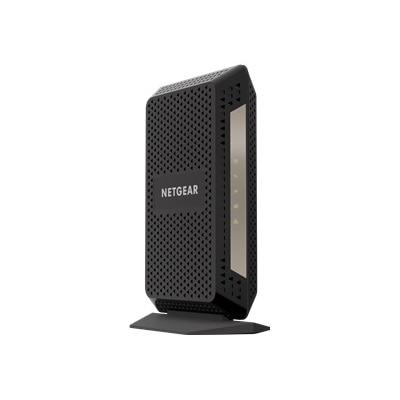
A network modem is the equipment that connects a home or small office to an internet service provider, translating the signals delivered through a coaxial cable, fiber connection, or another supported line into digital data that computers, phones, televisions, game consoles, and smart home devices can use. In a typical setup, the modem faces outward toward the provider, while a router shares the connection throughout the home. Many standalone modems include one Ethernet port for connecting to a separate router or directly to a single device. A modem-router combination unit brings both functions together in one enclosure, which can simplify setup and reduce the number of cables near a desk or entertainment center. Understanding that distinction is one of the most useful steps when comparing network modems, because a standalone modem may be the right fit for someone who already owns a router, while a combination unit can be more convenient for a new apartment, home office, or household replacing older equipment. The correct choice begins with the service plan and provider requirements. Compatibility is essential: cable service generally requires a modem that supports the provider’s approved standard and channel capabilities, while fiber service may use a provider-supplied optical terminal or a compatible gateway rather than a traditional cable modem. Check the provider’s equipment list before purchasing, then compare the modem’s supported speed with the plan’s advertised download and upload rates. Choosing equipment with capacity above the current plan can provide room for a future upgrade, but paying for capabilities that the service cannot deliver may not improve everyday performance. It is also helpful to confirm whether the provider permits customer-owned equipment, whether activation is required, and whether voice service needs a modem with a telephone port. These details can prevent the frustration of unpacking a new device only to discover that it cannot be registered or does not support a particular service.
Performance depends on more than the number printed on a product box. A modem should be able to handle the speed tier supplied by the provider, especially in homes where several people stream high-resolution video, attend video meetings, upload large files, play online games, or connect smart appliances at the same time. Cable customers may encounter terms such as DOCSIS, which identifies the communication standard used by compatible cable modems; newer standards are designed to support faster service and more efficient handling of busy connections. Look for clearly stated download and upload support, as well as multi-gigabit Ethernet capability when the internet plan exceeds traditional gigabit speeds. The Ethernet connection matters because it is the physical link between the modem and a router or computer, and an older port can limit the benefit of a faster service plan. A standalone modem is often a practical choice for someone who prefers a separate router with particular Wi-Fi coverage, parental controls, guest access, or device-management features. It can also make it easier to replace one part of a home setup without changing everything else. A combination unit may appeal to a renter, student, frequent mover, or family member who wants fewer components and a straightforward installation. Before selecting a combo unit, review its wireless coverage, available wired ports, supported Wi-Fi generation, and placement options. Thick walls, multiple floors, metal furniture, and crowded wireless surroundings can affect coverage, so the strongest results usually come from placing the equipment in an open, central location rather than inside a cabinet or behind a television. A modem by itself generally will not extend wireless coverage or connect several devices over Wi-Fi; those functions typically require a router or additional compatible equipment. Shoppers who need to expand coverage or connect equipment in distant rooms can also explore Network Expansion Devices that complement a home connection.
Network modems can be useful for more than a routine equipment replacement. They may help a remote worker establish a dependable connection at a new address, give a college student a more suitable setup for streaming and coursework, or help a household prepare a guest room or detached workspace for regular internet access. They can also be a thoughtful housewarming gift when the recipient is moving into a new apartment or settling into a first home, provided the giver knows the person’s internet provider and service type. Because compatibility is so specific, a modem is best chosen with the recipient’s plan details in hand rather than selected by appearance alone. During the cooler months, when more time is spent indoors on video calls, entertainment, online learning, and connected hobbies, a well-matched modem can become one of those quiet household essentials that works in the background all day. Reliable setup starts with reading the installation instructions, connecting the provider line securely, attaching the Ethernet cable to the correct port, and allowing time for the device to communicate with the provider during activation. Indicator lights can help identify power, connection, and data activity, while the provider’s support page or app may offer additional registration steps. Keep the modem’s firmware and the connected router’s software up to date when updates are available, use a strong administrator password, and avoid placing the equipment where heat can build up. If service problems continue after activation, restart the equipment as directed by the provider, inspect the cables for loose fittings or damage, and confirm that the issue is not affecting the service line itself. With the right compatibility, speed support, connection type, and companion equipment, a network modem can provide a stable foundation for everyday browsing, work, entertainment, and communication without adding unnecessary complexity to the room.
FAQs:
A standalone modem connects directly to your internet service provider and typically requires a separate router to distribute Wi-Fi throughout your home. A modem-router combo, also known as a gateway, combines both functions into a single device, simplifying setup and saving space.
Before purchasing, check the modem’s specifications and the approved device list provided by your internet service provider. Most ISPs publish a list of compatible models on their websites, making it easy to confirm compatibility.
DOCSIS 3.1 modems support faster internet speeds and improved performance compared to older standards. If you have a high-speed internet plan or want to future-proof your setup, a DOCSIS 3.1 modem is a smart choice.
Yes, many users choose to purchase their own computer modem to avoid monthly rental fees and gain more control over their network settings. Just make sure the modem is compatible with your ISP and supports your internet plan’s speed.
Most modems require standard Ethernet cables to connect to a router or computer. For optimal performance, especially with high-speed modems, it’s important to use quality cables. You can find a selection of suitable options on our Network Cables page.