$3418.00
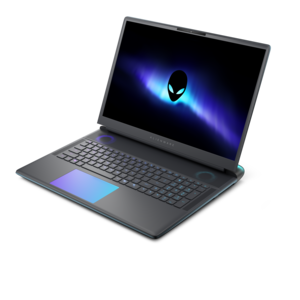
A sleek, lightweight laptop with Intel Core Ultra processors, NVIDIA graphics, and advanced on-device AI.
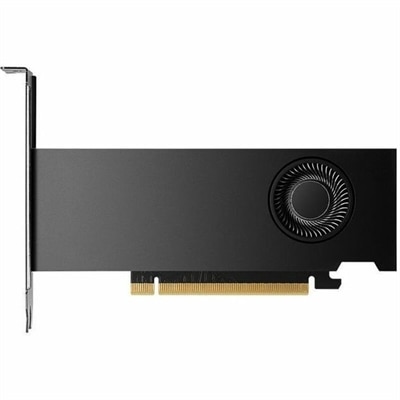
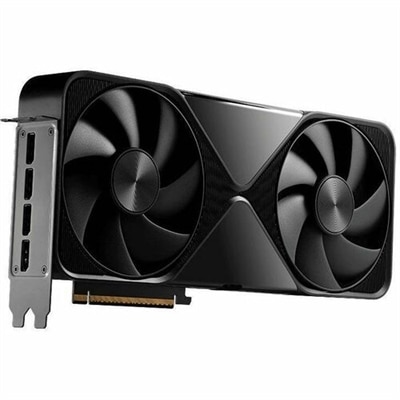
NVIDIA GPUs are at the forefront of graphics technology, offering unparalleled performance and efficiency for gamers, creators, and professionals alike. Whether you're building a high-performance gaming rig or need robust processing power for demanding applications, NVIDIA GPUs deliver exceptional visual experiences and computational capabilities. Explore a diverse range of options designed to meet various needs, from immersive gaming to advanced AI tasks. Embrace the future of graphics with NVIDIA GPUs, where innovation meets reliability in every pixel.
A sleek, lightweight laptop with Intel Core Ultra processors, NVIDIA graphics, and advanced on-device AI.
A streamlined gaming laptop delivering powerful performance with NVIDIA GeForce RTX 50 Series graphics.
A graphics processing unit, or GPU, is a specialized processor that handles many calculations at once, supporting everything from detailed PC games to video editing, 3D rendering, and compatible artificial intelligence applications. Its value becomes especially clear when a scene fills with moving objects, an editing timeline combines several visual effects, or a design project needs realistic lighting and shadows. A dedicated GPU has its own graphics memory, commonly called video memory or VRAM, which holds textures, frame buffers, and other working data close to the processor. More memory can accommodate larger assets and more demanding projects, but memory capacity alone does not determine speed. The processor’s architecture, memory bandwidth, power limits, cooling, and software support all influence performance. For gaming, the most useful starting points are the games being played, the monitor’s resolution, and the desired frame rate. A fast-paced competitive game at 1080p presents a different workload than a richly detailed adventure at 4K. Higher resolutions generally require more graphics processing, while advanced lighting effects can add substantial demands of their own. Ray tracing simulates how light interacts with surfaces to create effects such as more natural reflections and shadows in supported games and applications. Supported upscaling technologies can reconstruct a higher-resolution image from a lower-resolution render, helping improve performance, though results vary with the implementation and selected settings. Frame generation can increase displayed frame rates in compatible games, but it is not equivalent to rendering every frame conventionally and does not eliminate the importance of responsive input. These distinctions matter during everyday use: smooth camera movement, readable detail in distant scenery, and consistent animation can be more noticeable than a single peak performance figure. A balanced configuration also needs a capable CPU, sufficient system memory, and a suitable display. Together, these components shape whether the experience feels fluid during a busy multiplayer match, a complex animation preview, or an evening spent exploring a visually demanding game.
Desktop graphics cards and laptop graphics processors serve many of the same purposes, but their physical design changes how they fit into a computer and how they perform over time. A desktop graphics card typically combines a circuit board, graphics processor, memory chips, power components, and a cooling assembly. Metal heatsinks, often using aluminum fins and copper heat-transfer components, move heat away from the processor, while fans carry that heat into the surrounding airflow. Some designs include a backplate for protection or added rigidity, although a backplate alone does not establish cooling quality or durability. Physical fit deserves close attention when adding a card to a desktop. Card length, height, and thickness must leave clearance for the case, nearby components, and power cables, and a thicker cooler may occupy several expansion-slot positions. Compatibility also depends on the motherboard connection, power supply capacity, required power connectors, and the computer manufacturer’s upgrade provisions. A compact desktop may not accommodate a full-size graphics card even when the motherboard has a compatible slot. Display connections are another practical detail: the card, cable, and monitor must support the resolution and refresh rate being used. For portable systems, Laptop GPUs are generally integrated into the computer’s overall thermal and electrical design rather than installed as easily replaceable cards. Two laptops with similarly named graphics processors can deliver different sustained performance because their power settings and cooling systems differ. A thinner machine may suit someone carrying a computer between classrooms or meetings, while a larger chassis may provide more cooling capacity for extended gaming or rendering sessions. Neither size alone guarantees a particular result. Fan noise, surface temperature, battery life, and charger requirements all contribute to the experience. Demanding graphics work usually performs best with a laptop connected to its appropriate power adapter, and battery operation may reduce performance. For a shared study space or a quiet home office, acoustic behavior can matter almost as much as processing speed.
The right graphics capability depends on the work that fills the screen, not simply whether a computer is described as powerful. A photographer adjusting large images may benefit from GPU-accelerated effects and responsive previews, while a video editor working with high-resolution footage should also consider graphics memory, supported media formats, and application-specific hardware acceleration. Hardware encoding and decoding can help with compatible video workflows, including recording and streaming, but support varies by GPU generation, format, and software. A student building a 3D scene, an illustrator experimenting with complex effects, or a designer rotating a detailed model may each place different demands on the same graphics processor. In compatible local AI applications, a GPU can accelerate supported calculations, and available graphics memory may limit which models or workloads fit on the device. That does not mean every AI task requires a dedicated GPU or that every application uses one equally well. Software requirements and representative performance testing offer more useful context than broad claims about speed. Long-term satisfaction also depends on installation and care. Desktop cards should be installed according to the computer and component instructions, with power disconnected and appropriate precautions against static electricity. Heavy cards may require an approved support bracket to reduce strain on the connection. Once installed, unobstructed intake and exhaust paths help the cooling system operate effectively; a computer tucked tightly against a wall or placed on a soft surface can struggle to move warm air. Dust buildup should be addressed using the manufacturer’s recommended cleaning method, without introducing liquids or touching delicate components unnecessarily. Keeping graphics drivers and creative applications current can support compatibility and resolve known issues, while professional workflows may benefit from driver versions validated for the software in use. For a gift recipient who enjoys gaming, digital art, or editing family videos, compatibility with the existing computer and preferred applications is more important than an impressive specification in isolation. Thoughtful matching of graphics performance, memory, cooling, physical fit, and intended use helps create a system that stays comfortable and dependable through both quick everyday tasks and longer, more demanding sessions.
Add the products you would like to compare, and quickly determine which is best for your needs.