Laptop GPUs
Laptop GPUs are essential components that power high-quality visuals, smooth gaming experiences, and efficient performance for a wide range of tasks. Whether you're a creative professional, a dedicated gamer, or someone who values fast and responsive computing, choosing the right laptop GPU can make all the difference. Explore options designed to enhance graphics capabilities and support your daily needs, from content creation to entertainment and beyond. Find the ideal laptop GPUs to elevate your device’s performance and unlock new possibilities.
This product is not available
Check out the following recommendations.




Laptop GPUs
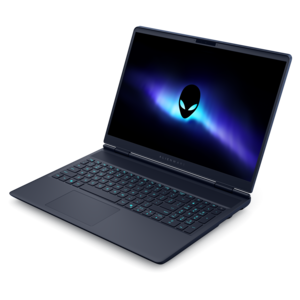
Laptop GPUs are the graphics processors that turn software instructions into the images, animation and video displayed on a laptop screen. They are especially important for PC gaming, 3D design, video editing, photography, architecture, engineering and other workloads that involve detailed visuals or large media files. A laptop with a capable GPU can render game environments with smoother motion, process high-resolution footage more efficiently and keep creative applications responsive while several windows are open. Graphics capability also affects everyday details, including support for multiple monitors, high-resolution displays, fast refresh rates and advanced visual effects. Some laptops use integrated graphics built into the processor, which share system memory and are designed for efficient performance in web browsing, streaming, office work, schoolwork, light photo editing and casual games. Others include a dedicated GPU with its own graphics memory and additional processing resources. Dedicated graphics are generally the better fit for demanding games, real-time 3D work and creative applications, although they typically use more power and may add weight, heat and fan noise. A laptop with integrated graphics can be a practical choice for a student carrying a computer between classes, a traveler who values long battery life or a home user who mainly streams video and manages documents. A dedicated graphics laptop may suit a gamer, designer, developer or creator who needs more visual performance in a portable format. It can also be a thoughtful gift for someone building a digital art portfolio, learning game development or spending cooler months exploring new creative software, provided the laptop’s complete configuration matches the recipient’s needs.
When comparing laptop GPUs, look beyond the graphics name and consider the way the chip is implemented in the laptop. The same GPU family can perform differently from one computer to another because manufacturers set different power limits and pair the graphics processor with different cooling systems, processors, memory configurations and displays. Portable designs have less room for airflow than desktop computers, so laptop GPUs are often tuned to balance performance, battery life and temperature. A mobile version with the same model designation as a desktop graphics card should not automatically be expected to deliver identical results; in many cases, the laptop version runs slower because of lower power limits and tighter thermal conditions. The wattage assigned to the GPU, sometimes listed as total graphics power, can provide useful context, though it should be considered alongside independent testing and the laptop’s design. Cooling matters during a brief burst of activity and even more during a long gaming session or extended video export. A sturdy cooling system can help maintain consistent performance, while a thin chassis may prioritize portability over sustained speed. Memory capacity is another important consideration. More graphics memory can help with high-resolution textures, complex scenes, large video projects and demanding 3D applications, while the type and speed of that memory also influence responsiveness. Shoppers comparing options may find it helpful to check tested frame rates, application benchmarks, display resolution and refresh rate rather than relying on a single specification. A high-performance GPU paired with a basic screen may not show its full potential, while a powerful high-resolution display can place greater demands on the graphics hardware. For a broader selection of portable computers equipped with dedicated graphics, explore Laptops With NVIDIA Graphics Cards.
The right laptop GPU tier depends on the software, visual settings and working habits that matter most. Entry-level or integrated graphics can handle everyday computing, streaming, photo organization, basic editing, esports-style games and many older or less demanding titles, especially at moderate resolution. Midrange dedicated graphics are a balanced option for people who want smooth performance in current games, faster creative previews and enough headroom for occasional 3D work without choosing the largest or heaviest laptop. Higher-end graphics are intended for demanding games with advanced lighting and ray tracing, high-resolution displays, professional 3D scenes, large video timelines and workloads that benefit from accelerated rendering. Ray tracing can make reflections, shadows and lighting appear more lifelike, but it also increases the amount of work the GPU must perform; technologies such as upscaling and frame generation can help supported applications maintain smoother motion. Also check the laptop’s processor, system memory and storage. A strong GPU may be held back by insufficient RAM when working with large projects, while a fast solid-state drive can shorten application launches and improve file handling. Battery expectations deserve equal attention: dedicated graphics laptops usually provide their best performance when connected to power, and demanding workloads can reduce unplugged runtime. Port selection, webcam quality, keyboard comfort, screen size, weight and warranty support all influence how enjoyable the computer will be away from a desk. Picture the difference between editing a video at a kitchen table, playing a game beside a window during a rainy afternoon or carrying a laptop through a busy airport; the ideal GPU is the one that supplies enough visual power without making the rest of the experience inconvenient. Reviewing the recommended requirements for favorite games and applications, then leaving some performance headroom for future updates, can make a laptop GPU choice feel capable for years rather than merely adequate on its first day.
FAQs:
Integrated GPUs are built into the laptop’s processor and share memory with the system, making them suitable for everyday tasks and light multimedia work. Discrete laptop GPUs, on the other hand, are separate components with dedicated memory, designed to deliver higher performance for gaming, creative applications, and demanding workloads.
Laptops with high-performance GPUs are ideal for gamers, creative professionals such as video editors and graphic designers, engineers working with 3D modeling, and anyone running applications that require significant graphics processing power. They are also a great choice for students in design or technical fields.
A dedicated laptop GPU can significantly enhance gaming experiences by delivering higher frame rates, supporting advanced visual effects, and enabling smoother gameplay at higher resolutions. This allows for a more immersive and visually impressive experience, especially in modern, graphics-intensive titles.
Yes, a powerful laptop GPU can accelerate a wide range of tasks beyond gaming, including video editing, 3D rendering, scientific simulations, and machine learning workloads. Many creative and professional applications are optimized to take advantage of GPU acceleration for faster and more efficient performance.
When comparing different laptop processors and GPUs, consider the balance between CPU and GPU performance for your intended use. Look for compatibility with your preferred software, memory bandwidth, thermal management, and battery life. Also, ensure the laptop offers the right mix of portability and power for your lifestyle and work requirements.