$159205.00
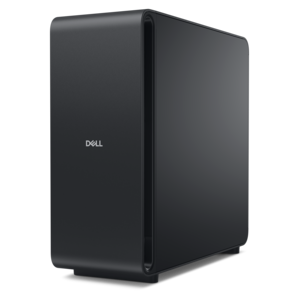
A high-performance desktop powered by the NVIDIA Grace Blackwell Ultra Desktop Superchip with MaxCool technology.
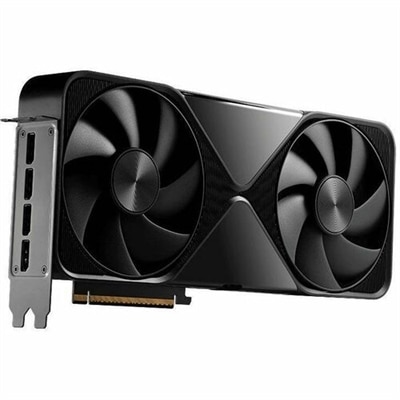
Unlock exceptional graphics performance for your PC with NVIDIA desktop GPUs. Designed to enhance gaming, creative projects, and professional workloads, these powerful graphics solutions deliver smooth visuals and responsive experiences. Explore a wide selection of NVIDIA desktop GPUs to find the perfect match for your computing needs and elevate your system’s capabilities.
A high-performance desktop powered by the NVIDIA Grace Blackwell Ultra Desktop Superchip with MaxCool technology.
NVIDIA desktop GPUs bring dedicated graphics processing to a desktop computer, giving demanding visual tasks their own specialized hardware instead of asking the central processor to handle every frame, effect and calculation alone. That distinction can make a noticeable difference when a game world loads in vivid detail, a creative project contains layers of high-resolution footage, or a three-dimensional scene needs to be viewed from several angles without a sluggish, interrupted feel. Desktop GPUs are also used for photo and video work, animation, computer-aided design, engineering visualization and other applications that benefit from fast parallel processing. For many people, the appeal is less about a single specification and more about how naturally the computer fits into everyday routines: a student can move from coursework to an immersive game, a creator can refine a sequence while monitoring a larger preview, and a hobbyist can explore digital art or 3D modeling at a comfortable pace. A desktop graphics card may be a thoughtful gift for someone who enjoys building a dedicated workspace, upgrading a gaming setup or learning a creative discipline, particularly when the recipient already has a compatible desktop and knows which types of applications they use most. During the cooler months, a well-equipped desktop can become the center of a comfortable indoor retreat, with a bright monitor, a responsive keyboard and the detailed visuals that make everything from a quiet design session to an evening gaming session feel more engaging. NVIDIA desktop GPUs are available across a range of performance levels, so the right choice depends on the balance between resolution, visual quality, creative workloads, application requirements and the rest of the computer.
Start by considering the work the GPU will perform most often. Gaming at a standard display resolution may call for a different level of graphics capability than gaming across a high-resolution monitor or several monitors, where more visual information must be rendered at once. Players who value smooth motion should pay attention to the display’s refresh rate and choose a GPU that can support the intended experience in the games they play. Creative users should think about the size and complexity of their projects, the effects they apply, the formats they work with and whether their preferred software supports GPU acceleration. Three-dimensional design, rendering and simulation can place sustained demands on graphics hardware, making performance, cooling and application compatibility especially important. Local AI experimentation and other compute-intensive workloads may also benefit from a capable NVIDIA desktop GPU, although software support and memory capacity should be checked alongside raw processing power. The graphics card should be considered as part of the complete desktop: the processor needs to keep up with the workload, the power supply must provide appropriate headroom, the chassis needs sufficient room and airflow, and the motherboard must offer the correct connection and physical clearance. Monitor connections, fan noise, desk space and accessibility for future upgrades can shape the experience just as much as benchmark figures. Someone replacing an older card should confirm the available expansion space, power connectors and operating-system support before choosing, while someone selecting a complete desktop can compare the balance of processor capability, memory, graphics performance and included features as one system. For portable computing, a separate category such as Laptop GPUs may be more appropriate, since laptop designs place different limits on power, cooling and upgradeability. Whether the goal is a focused gaming station, a home creative studio or a flexible family computer, NVIDIA desktop GPUs can help provide a responsive visual foundation when matched thoughtfully with the display, software and overall desktop design.
Add the products you would like to compare, and quickly determine which is best for your needs.