NVIDIA-Powered Workstations for AI and Rendering

NVIDIA-Powered Workstations for AI and Rendering deliver the performance and reliability creative professionals and data scientists need to tackle demanding projects. These workstations are designed to accelerate workflows in artificial intelligence, 3D rendering, and content creation, making them ideal for anyone seeking advanced computing power. Explore a range of options that support seamless multitasking and efficient processing for complex tasks. Whether developing innovative AI models or producing stunning visual effects, NVIDIA-Powered Workstations for AI and Rendering provide the foundation for exceptional results.

Filters

$3418.00

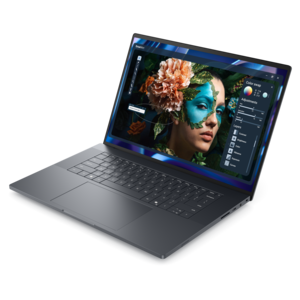
A sleek, lightweight laptop with Intel Core Ultra processors, NVIDIA graphics, and advanced on-device AI.
$3418
$160172.00

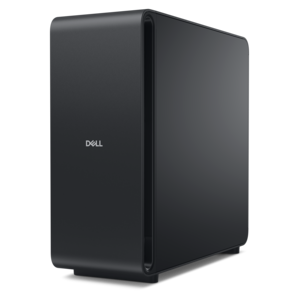
A high-performance desktop powered by the NVIDIA Grace Blackwell Ultra Desktop Superchip with MaxCool technology.

$160172
$4799.99

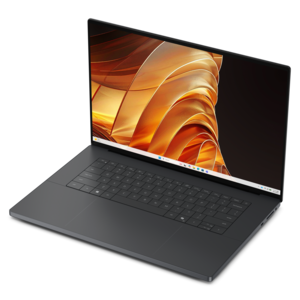
A high-performance creator laptop with NVIDIA RTX Spark™ graphics for AI, development, and gaming.

$4799.99
$5875.00

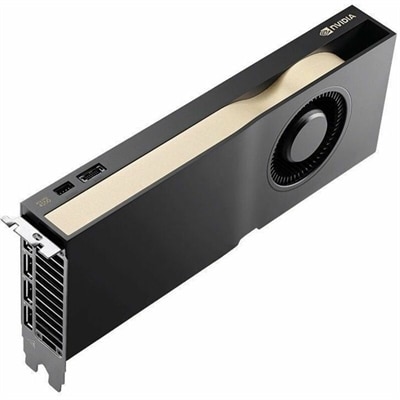
A professional graphics card with 32GB GDDR7 memory, Blackwell architecture, and advanced AI acceleration for demanding workflows.

$5875

NVIDIA-Powered Workstations for AI and Rendering

Workstations for AI and rendering are desktop and mobile computers designed to handle demanding tasks such as model development, local inference, 3D modeling, animation, and image generation. Their defining advantage is the combination of a capable processor, dedicated graphics hardware, substantial memory, and cooling suited to sustained work. For professionals exploring NVIDIA Workstations, GPU acceleration is especially relevant because many AI and rendering applications can divide calculations across thousands of parallel processing cores. In compatible software, that capability can help accelerate tasks that would otherwise place a heavy burden on the CPU. An architectural visualization artist might move from adjusting afternoon light across a kitchen floor to producing a detailed interior rendering. A product designer might inspect reflections on a curved enclosure, while a machine learning developer tests how a model responds to new examples. These activities make different demands on the same computer, so workstation performance depends on the complete configuration rather than the graphics processor alone. AI development can involve preparing datasets, experimenting with models, running inference, and fine-tuning models that fit within the available hardware resources. Rendering may involve interactive previews, ray-traced lighting, complex materials, or lengthy final-frame calculations. Neither workload has a single universal hardware requirement: scene complexity, model size, numerical precision, software support, and project settings all affect what a system can comfortably handle. A workstation that feels responsive during modeling may face a much heavier load when a detailed scene begins rendering. Similarly, a machine that runs a compact AI model smoothly may not have enough graphics memory for a larger model or a more demanding fine-tuning task. This makes these computers particularly relevant to designers, animators, engineers, researchers, developers, and students working with advanced creative or technical applications. Their value is most apparent in everyday production: keeping a detailed viewport usable, shortening repeated test cycles, and supporting the transition from an initial idea to a finished asset without requiring every task to leave the desk.

Graphics memory is one of the most important distinctions among workstations for AI and rendering. It holds information the GPU needs to access quickly, including model parameters, textures, geometry, and other working data. When a workload exceeds that capacity, the result may be reduced performance, additional compromises, or an inability to complete the task in its intended form. For AI work, memory needs also change with model architecture, context length, batch size, and whether the task involves inference or training. For rendering, a richly furnished room with high-resolution textures can be more demanding than a simple object against a plain background, even when both produce an image of the same dimensions. GPU performance and graphics memory capacity therefore deserve separate consideration. System memory serves a different role, supporting applications, project preparation, and multitasking across the broader workflow. Keeping a modeling application, reference images, a development environment, and communication tools open at once can place substantial demands on it. The processor also remains important because many preparation, simulation, compilation, and application tasks rely partly or primarily on CPU performance. Some rendering engines use the CPU, some use the GPU, and some support both, so hardware strengths need to align with the applications doing the work. Supported drivers, operating systems, plug-ins, and software versions can be just as consequential as headline specifications. Professional application certifications, where offered, can provide additional assurance for specific tested configurations, but they do not make every application or project behave identically. Multiple GPUs can benefit software designed to use them, although their memory does not automatically become one shared pool. Cooling and power delivery influence how consistently a workstation performs during extended calculations, particularly when both the processor and graphics hardware remain busy. A short preview and an overnight animation render are very different operating conditions. Systems intended for sustained workloads benefit from thermal designs that keep components within their operating limits, while fan noise and heat output remain practical considerations in a quiet studio or shared office.

The physical format of a workstation shapes how it fits into daily work. A desktop tower generally offers more room for cooling and may provide greater component expansion, depending on its chassis and internal design. A mobile workstation brings demanding applications to classrooms, client meetings, production locations, and flexible workspaces, with trade-offs involving weight, battery life, acoustics, and sustained performance. Heavy GPU workloads typically increase power consumption, and mobile performance can differ between battery operation and use with the appropriate power adapter. Compact desktops suit desks where floor space is limited, while larger enclosures need clearance for ventilation and convenient access to connections. Build quality matters in each format: rigid panels, secure ports, and well-supported components contribute to a computer that feels dependable through regular use. For portable systems, hinge construction, keyboard comfort, and the strength of the chassis are especially relevant when the computer travels frequently. Materials alone do not establish durability; assembly quality, handling, and the conditions in which a workstation operates also matter. Display choices influence the experience just as directly. Detailed modeling benefits from sufficient resolution and usable screen space, while color-sensitive work calls for attention to color coverage, calibration, and the requirements of the finished output. An external monitor can give timelines, code, and reference material more room, and a comfortable keyboard, precise mouse, or pen input device can support long working sessions. Connections need to suit those peripherals without turning the desk into a daily cable-swapping exercise. Routine care helps protect that working environment: unobstructed vents, a stable surface, and cleaning performed according to the manufacturer’s directions reduce avoidable problems. Dust around intake areas deserves attention, especially in busy studios or homes with pets. Supported software and driver updates, along with project backups, contribute to a more dependable workflow. The right workstation is ultimately one whose graphics capability, memory, thermal design, physical construction, and workspace fit match the applications and projects that make up a typical working week.

FAQs:

Add the products you would like to compare, and quickly determine which is best for your needs.

Add the products you would like to compare, and quickly determine which is best for your needs.