$44.99
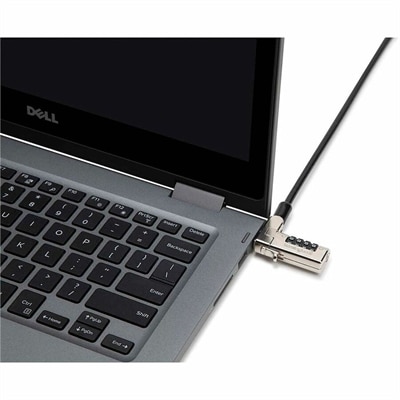
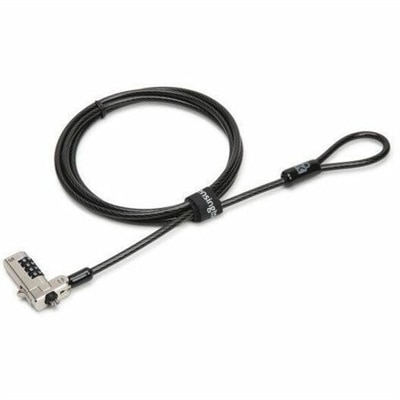
A slim serialized combination lock with carbon steel cable, pivoting head, one-handed attachment, and four-number code.
Securing your computer is a top priority, and PC locks provide an essential layer of protection against unauthorized access and theft. Whether you're in a bustling office environment or working remotely from home, these security devices offer peace of mind by safeguarding your valuable equipment. With a variety of options available, PC locks are designed to fit different types of computers and workspaces seamlessly. Explore our selection to find the perfect solution that aligns with your security needs while ensuring your technology investments remain safe and secure.
A slim serialized combination lock with carbon steel cable, pivoting head, one-handed attachment, and four-number code.
PC locks provide a practical way to help protect computers and the information displayed on them, whether a device is used at a shared desk, in a classroom, at a reception area, or in a home office. In this category, “PC lock” can refer to two different layers of protection: a physical security cable that helps deter unauthorized removal, or a screen lock that limits access when the user steps away. A physical cable typically connects to a small security slot built into a compatible laptop, desktop, or monitor and then loops around a sturdy, fixed object such as a desk frame or other immovable anchor. The goal is not to make a computer impossible to move, but to add a visible barrier and create more time, effort, and attention for anyone attempting to take it. Before choosing one, check that the computer has a compatible security slot and consider where it will be used. A compact laptop carried between rooms may benefit from a lightweight cable that coils neatly into a bag, while a monitor or desktop left in a public-facing area may call for a longer, heavier cable that can reach a substantial anchor point. Cable length matters more than it first appears: too short, and the lock may not reach a suitable anchor; too long, and excess cable can become untidy around a workspace. Keyed locks are straightforward for offices or households that prefer a physical key, while combination locks remove the need to keep track of a small key and can be convenient when several people share access. Look for a design that feels easy to secure and release without forcing the cable, bending the connector, or placing stress on the computer’s chassis. A lock is most effective when it becomes part of the everyday setup, much like closing a laptop or putting away a badge at the end of the day. For additional ways to organize, protect, and personalize a computing space, explore PC Enhancements.
PC locks can serve a wide range of users. A student may use one to keep a laptop attached to a library table during a short break, while a small business may place them on computers in a training room where visitors and employees share the same work area. They can also be useful at a front desk, in a retail counter area, in a meeting room, or in a home office where a laptop is frequently left open while the user moves between calls, paperwork, and household tasks. Families may appreciate a lock for a computer used in a common room, especially when the device stays in one place and several people pass through. They can even make a thoughtful practical gift for someone setting up a first apartment, dorm room, studio, or work-from-home nook, because a simple security accessory can protect a much larger investment. Some setups call for more than a cable for the main computer. Peripheral lock kits can help secure a keyboard or mouse to a desk, reducing the chance that essential accessories are misplaced, swapped, or removed from a shared station. When choosing among these options, consider the number of devices, the shape and thickness of the furniture, the location of the security slot, and whether the lock will be installed once or removed frequently. A keyed option may suit a dedicated workstation, especially when one person manages the key, whereas a resettable combination can be easier for a team that needs access without distributing keys. Keep the lock’s combination private, store spare keys away from the computer, and avoid attaching a cable to a lightweight or movable object that could simply be carried away. Physical locks are a deterrent rather than a replacement for sound habits, device tracking, insurance, or organizational security policies, but they can offer reassurance in the moments when a person needs to step away. The small click of a connector settling into place can become as familiar as plugging in a charger, providing a useful reminder that the device is secured before the room is left unattended.
A physical lock protects the computer from being easily removed, while a screen lock helps protect the account, files, messages, and open work from someone nearby. On a Windows PC, pressing the Windows key and L together quickly locks the screen; on a Mac, Control, Command, and Q perform the same basic function. Users can also enable an automatic lock by setting the computer to require a password after a short period of inactivity or by configuring a password-protected screen saver. These steps are especially valuable in shared homes, open-plan offices, classrooms, reception areas, and any place where a computer may remain visible after its user walks away. A cable cannot prevent someone from viewing an unlocked screen, and a password cannot stop someone from carrying away an unattended computer, so using both forms of protection creates a more complete routine. Start with a strong passcode that is not reused across accounts, and adjust the automatic lock interval to fit the setting: a shorter delay makes sense in a public or shared environment, while a home office may allow a little more time for convenience. It is also worth checking that the device resumes at the sign-in screen rather than opening directly to the previous session. For a tidy workstation, route the security cable along the back edge of the desk, leave enough slack for normal movement, and keep the connector accessible without allowing the cable to become a tripping hazard. During the cooler months, when people may spend longer stretches indoors moving between home, school, and workspaces, a dependable locking routine can help keep devices protected wherever they are used. The best choice is the one that matches the computer’s security slot, the furniture or anchor point available, the number of people who need access, and the habits of the person using it. With a physical cable, a locked screen, and automatic protection working together, a computer can remain convenient for daily use while being better prepared for the brief, ordinary moments when attention turns elsewhere.
Add the products you would like to compare, and quickly determine which is best for your needs.