$829.99
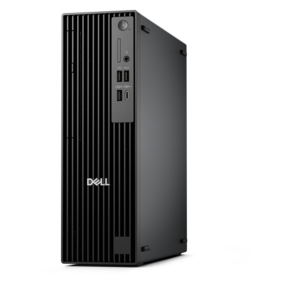
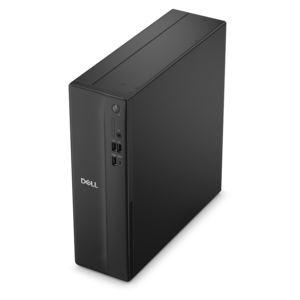
A powerful desktop designed to boost everyday productivity in a streamlined setup.
Enhance your computing experience with our diverse selection of PC software, designed to meet the needs of both casual users and professionals. From productivity tools that streamline your workflow to creative applications that unleash your imagination, our range of software solutions ensures your computer is equipped for any task. Discover the latest in security, utility, and entertainment software to keep your PC running smoothly and efficiently. Whether you're upgrading existing programs or exploring new possibilities, our PC software offerings provide the versatility and performance you need to make the most of your technology.
A powerful desktop designed to boost everyday productivity in a streamlined setup.
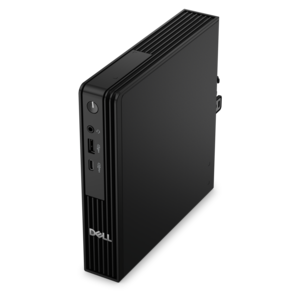
A compact, AI-ready business desktop delivering high performance, robust security, and manageability for demanding workloads.
PC software helps turn a computer into a more useful, personal, and capable tool. Whether the goal is writing a report, organizing household finances, editing photographs, watching videos, learning a new skill, or keeping files easier to manage, the right software can make everyday tasks feel more natural. A new laptop or desktop often arrives ready for basic use, but additional software can shape the experience around individual needs. Productivity software supports documents, spreadsheets, presentations, notes, calendars, and collaboration. Creative applications can help with photo adjustments, illustration, music, video, and layout work. Communication tools make it easier to stay in touch with family, classmates, coworkers, and clients, while educational programs can provide structured practice in subjects ranging from language learning to coding. Utility software may help with file organization, backups, accessibility, device customization, or system maintenance. When browsing PC software, begin with the task that matters most rather than choosing based only on a long list of features. Someone who writes occasionally may prefer a simple, uncluttered application, while a student managing several assignments may benefit from stronger organization and collaboration tools. A frequent traveler might value offline access, efficient performance, and flexible file formats. A creative user may need support for high-resolution media, detailed controls, and compatibility with other applications. Looking at the software’s operating system requirements, supported file types, storage needs, and hardware demands can prevent surprises after purchase. It is also worth checking whether the application is designed for a single computer, multiple devices, or a household, and whether the license is permanent or subscription-based. For more ways to create a comfortable setup around new software, explore PC Equipment, including computers, displays, and accessories that can complement a wide range of digital tasks.
Software can also make a thoughtful gift for a college student setting up a study routine, a family member exploring photography, a home-based professional, or a friend who enjoys creating and sharing digital projects. The most useful choice usually reflects a person’s habits. A relative who spends evenings scanning old photographs may appreciate an application with straightforward editing and organizing tools. A student working at a kitchen table may benefit from software that keeps notes, references, and assignments together without adding unnecessary complexity. Someone who enjoys recording gameplay, making tutorials, or hosting online gatherings may look for tools that support screen capture, audio control, video editing, and broadcasting. For a household computer, consider software that offers separate user profiles, clear privacy settings, and an interface that is comfortable for both experienced and occasional users. Security deserves attention as well. Look for reputable publishers, transparent privacy practices, regular updates, and clear information about what data the application collects. Avoid downloading software from unfamiliar sources, and take time to read permissions before installation. A program that asks for access unrelated to its purpose may not be the right fit. Free software can be an excellent starting point, particularly for browsing, media playback, note-taking, file compression, and basic organization, but paid applications may provide deeper controls, customer support, expanded storage, or specialized tools. Trial periods and free tiers can help someone understand the workflow before committing, provided renewal terms and account requirements are easy to identify. Keep installation files, license details, and recovery information in a safe place, especially when software will be used for schoolwork, business records, or irreplaceable creative projects. A little planning at the beginning can preserve time later, much like labeling a drawer before it fills with cables and adapters.
The best PC software is not necessarily the most complicated option; it is the one that fits naturally into the way a person works, learns, relaxes, and communicates. Before selecting an application, make a short list of must-have functions and nice-to-have extras, then compare the experience of using each option. A clean interface, useful search, keyboard shortcuts, accessible menus, and dependable export tools can matter more than an impressive feature count. Check whether updates are included, how customer support is provided, and whether files remain usable if a subscription ends. For creative and productivity work, compatibility is especially important: software should open common formats, preserve quality, and make it simple to share finished work with others. Performance matters on older computers, too, so review memory, processor, graphics, and storage requirements rather than assuming every application will run comfortably. Those requirements are particularly relevant when working with large images, long videos, complex documents, or multiple applications at once. It can also help to establish a simple routine after installation: update the application, adjust privacy and notification settings, create a practical folder structure, and back up important files. During the cooler months, when more time may be spent indoors, dependable software can support quiet personal projects, remote learning, household planning, and creative hobbies without requiring a complicated setup. As needs change, applications can be added or removed, but keeping only the tools that are genuinely useful helps a computer stay organized and responsive. From essential utilities to specialized creative suites, PC software gives laptops and desktops the flexibility to serve as study spaces, workstations, entertainment centers, and gateways to new interests. Reviewing compatibility, licensing, security, ease of use, and long-term value makes it easier to choose software that remains helpful well beyond the initial installation.
Add the products you would like to compare, and quickly determine which is best for your needs.