$116.99
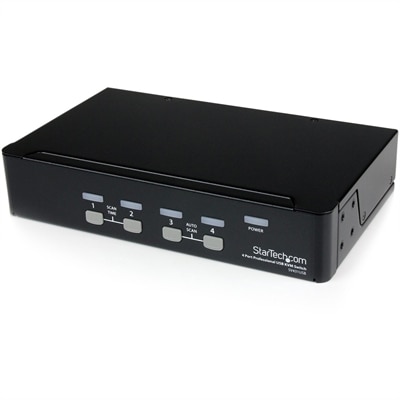
A four-port VGA USB KVM switch with integrated hub and cross-platform Windows, Mac, and Linux compatibility.
Rackmount units are essential components for optimizing space and performance in data centers and IT environments. Designed to fit neatly into standard server racks, these units provide a streamlined solution for housing multiple servers, network devices, and storage systems. Ideal for businesses looking to enhance their infrastructure, rackmount units offer a reliable and organized approach to managing critical hardware. With a variety of configurations available, they cater to diverse needs, ensuring that enterprises can efficiently scale their operations while maintaining a tidy and professional setup. Explore the possibilities with rackmount units and elevate your IT infrastructure today.
A four-port VGA USB KVM switch with integrated hub and cross-platform Windows, Mac, and Linux compatibility.
A dense, powerful rack-ready desktop engineered to optimize demanding computing environments.
Rackmount units are designed for organized installation inside a compatible metal frame or cabinet, giving businesses, studios, classrooms, laboratories and home technology workspaces a dependable way to arrange specialized hardware. Their size is measured in rack units, abbreviated as U or RU. One rack unit equals exactly 1.75 inches, or 44.45 millimeters, of vertical height, while the standard mounting width is commonly 19 inches; some larger frames use a 23-inch width. A 1U unit occupies 1.75 inches of vertical space, a 2U unit measures 3.50 inches, a 3U unit measures 5.25 inches and a 4U unit measures 7.00 inches. These measurements make it easier to compare available products and plan a clean installation before anything is placed in the frame. When browsing rackmount units, consider the total amount of vertical space available, the depth of the cabinet, the position of mounting rails and the type of hardware that will sit nearby. A shallow enclosure may suit compact electronics, while a deeper frame can accommodate larger chassis and cable connections. It is also helpful to leave some open space for airflow, service access and future additions rather than filling every available U position. A careful layout can make a noticeable difference: cables remain easier to trace, controls stay within reach and routine adjustments do not require moving several pieces of equipment. For additional planning ideas and compatible organization options, explore Computer Racks.
Rackmount units are used in a range of environments where equipment needs to remain secure, orderly and easy to access. In an office, a rack-mounted chassis may help organize compact desktop computing components, power accessories and display-related hardware without allowing a work surface to become crowded. In a classroom or training room, a properly arranged frame can keep shared technology together and simplify maintenance between sessions. Audio professionals often use rackmount formats for amplifiers, signal processors, wireless microphone receivers and other studio components. A musician setting up a home recording space may appreciate how a rack keeps frequently adjusted controls at a consistent height, while a broadcast or production team can use the format to arrange equipment in a logical sequence for recording, monitoring and playback. Industrial and laboratory environments may also benefit from the durable structure of a rack, particularly when instruments or control components need a fixed location. In each setting, compatibility matters more than appearance alone. Check whether the unit follows the required rack width, confirm that its height fits the available U space and measure front-to-back depth, including room for connectors and cable bends. Pay attention to ventilation openings, fan placement and the surrounding temperature, especially when several powered devices will operate together for long periods. Removable panels, sliding rails and front-access controls can make inspections less disruptive, while sturdy mounting hardware helps prevent movement when cables are connected or disconnected. These practical details support a cleaner workspace and can make a thoughtfully arranged rack feel as dependable as a well-organized tool cabinet.
Choosing among rackmount units also involves considering how the space will be used over time. A small installation may need only a single 1U or 2U opening, while a growing studio, office or technical workspace may benefit from a taller frame with room for expansion. Measure the usable interior height rather than relying only on the cabinet’s outside dimensions, and account for shelves, cable managers, blank panels and other accessories that may occupy part of the available space. The weight of each mounted item is another important consideration; heavier chassis should be positioned lower when possible to improve stability and reduce strain on the frame. Front-to-back clearance deserves equal attention. Connections, ventilation and service panels should not be pressed against a rear wall, and neatly routed cables should have enough slack to allow equipment to slide forward for inspection. If the rack will sit in a shared office, studio or living area, look for construction and airflow features that support a comfortable working environment, including secure doors, smooth edges and a layout that keeps indicator lights and controls visible without creating unnecessary glare. Rackmount units are generally purchased for practical installations rather than presented as gifts, although they can be a thoughtful choice for someone building a recording studio, podcast room, rehearsal space or compact technology workstation. During warmer weather and the cooler months alike, a well-planned arrangement helps protect valuable electronics from cramped conditions while making everyday use more comfortable. The right unit provides more than a place to mount hardware: it establishes a consistent structure that keeps components accessible, supports safer cable routing and leaves room for a workspace to evolve.
Add the products you would like to compare, and quickly determine which is best for your needs.