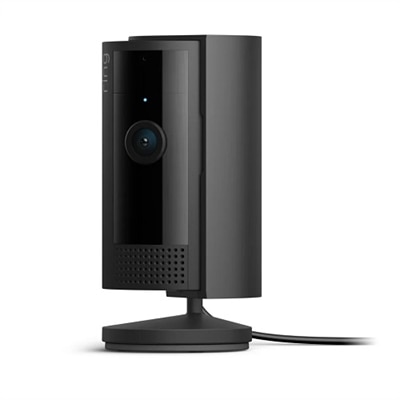
IP Surveillance Camera Systems
IP surveillance camera systems offer a reliable solution for monitoring and protecting your home or business with enhanced clarity and convenience. Designed to integrate seamlessly with your existing network, these systems provide flexible options for keeping an eye on what matters most. Whether you're looking to upgrade your current setup or install a new security system, IP surveillance camera systems deliver the connectivity and peace of mind you need. Explore a wide range of options to find the right fit for your security requirements.
This product is not available
Check out the following recommendations.




IP Surveillance Camera Systems
IP surveillance camera systems use digital IP technology to capture video and send it through a wired or wireless network connection for viewing, recording, and management. Compared with a single standalone camera, a multi-camera system can help create broader coverage across entryways, driveways, hallways, reception areas, stockrooms, workshops, and other important spaces. Many systems support high-definition or 4K video, allowing useful details such as faces, clothing, vehicle shapes, and package labels to appear more clearly when lighting and placement are appropriate. A Network Video Recorder, commonly called an NVR, acts as the central hardware hub for compatible cameras. It can record footage locally to an internal drive, organize recordings by camera and time, and provide playback when a specific event needs closer review. Some systems also support remote viewing through a phone, tablet, or computer, which can be especially helpful when checking on a property during travel, listening for activity in a business after closing, or reviewing an alert while working in another part of a building. When comparing options, start by counting the areas that need coverage rather than choosing a camera quantity based only on the advertised package. A front entrance may need one view, while a large property could benefit from overlapping angles that reduce blind spots. Consider the camera’s field of view, mounting flexibility, resolution, frame rate, and ability to perform in bright sunlight, shadows, or low light. Night vision may use infrared illumination for a black-and-white image, while full-color night viewing generally requires more available light or built-in lighting. Motion detection can help narrow attention to relevant clips, but sensitivity and activity zones should be adjusted so that passing cars, swaying branches, or changing shadows do not create constant notifications.
Power and installation are also central to choosing an IP surveillance camera system. Power over Ethernet, or PoE, can send power and video through a single Ethernet cable, helping create a clean installation with fewer separate connections. PoE is often a practical choice for permanent placements around a home office, storefront, warehouse-style workspace, or detached building, though cable length, routing, and the location of the recording hub should be planned before installation. Wireless models can be more convenient where running cable is difficult, but signal strength, power requirements, and the distance between each camera and the access point deserve careful attention. Outdoor cameras should have an enclosure rated for exposure to rain, dust, temperature changes, and blowing debris; an indoor camera placed beneath a covered porch may still need protection from humidity and seasonal wind. Look for features such as two-way audio, built-in lighting, audible alerts, privacy masking, tamper notifications, and adjustable viewing angles according to the location and the people who will use the system. Recording capacity matters as well. Higher resolution, more cameras, longer retention periods, and continuous recording all use more space, while motion-triggered recording may extend the time available for saved footage. Some systems provide local recording without requiring an ongoing cloud subscription, while others combine local recording with optional remote services. Review the system’s app compatibility, user permissions, encryption practices, firmware support, and backup options before purchase. A system that is easy to open, search, and share can be more useful than one with impressive specifications but a complicated interface. For organizations with broader coverage needs, dedicated entrance monitoring, or several buildings to oversee, explore Commercial Surveillance Camera Systems for options suited to more structured environments.
These systems can serve homeowners, renters with permission to install equipment, small-business owners, property managers, contractors, and families who want a clearer view of activity around a property. A homeowner may position cameras to watch the front walk, garage approach, side gate, and backyard access, while a shop owner may focus on the register area, customer entrance, delivery door, and spaces where inventory is received. During the cooler months, remote access can make it easier to check a seldom-used workshop, vacation property, or exterior gate without making an unnecessary trip, although cameras should complement rather than replace good lighting, secure locks, alarm equipment, and responsible supervision. They can also be a thoughtful practical gift for someone moving into a new home, opening a small business, managing a rental property, or upgrading an older monitoring setup. Before installation, check local rules and property policies concerning audio recording, shared spaces, neighboring homes, public walkways, and employee or guest privacy. Aim cameras only where monitoring is appropriate, use privacy zones when available, and give authorized users their own secure logins instead of sharing one password. Placement has a greater effect on everyday results than many shoppers expect: a camera mounted too high may capture the top of a person’s head, while one aimed directly at a bright window may produce a dark foreground. Mounting near eye level for identification, avoiding direct glare, keeping lenses clean, and testing views in both daylight and darkness can make recorded footage far more useful. Whether the goal is watching a front porch, checking on a work area, documenting deliveries, or maintaining awareness across a larger property, the strongest choice balances image quality, dependable connectivity, recording capacity, weather protection, privacy controls, and straightforward day-to-day operation.
FAQs:
IP surveillance camera systems use internet protocol to transmit high-definition video over a network, delivering superior image quality and advanced features like smart analytics and remote access. In contrast, traditional analog systems rely on older technology with lower resolution and limited functionality. IP systems can be easily scaled and integrated with other smart devices, making them a flexible choice for modern security needs.
Yes, most IP surveillance camera systems offer remote access through secure apps or web interfaces. This allows users to view live or recorded footage from anywhere with an internet connection, providing peace of mind whether you’re at work, on vacation, or simply away from the property.
IP surveillance camera systems typically support several storage options, including local hard drives, SSDs, and cloud-based storage. Some systems also use Network Video Recorders (NVRs) for centralized management and storage, allowing for easy retrieval and archiving of footage based on your preferences.
Yes, IP surveillance cameras come in a variety of styles, such as dome, bullet, and pan-tilt-zoom (PTZ) models. Dome cameras are often used indoors for their discreet appearance, while bullet cameras are popular outdoors due to their weather-resistant design. PTZ cameras offer flexible coverage with remote control of the viewing angle.
Advanced analytics in IP surveillance camera systems enable features like smart motion detection, facial recognition, and automatic alerts. These capabilities help reduce false alarms, improve incident response times, and provide valuable insights for both home and business users.