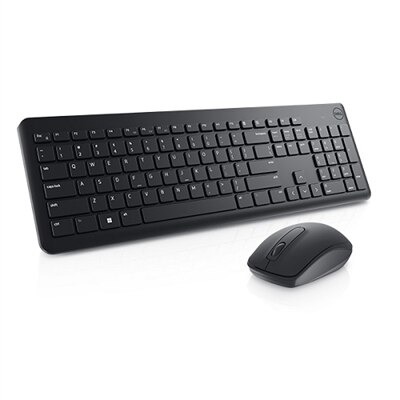
Silent Keyboards
Silent keyboards offer an ideal solution for those seeking a quieter, more focused workspace. Whether you're working from home, studying, or gaming late into the night, these keyboards help reduce distractions and maintain a peaceful environment. Explore a wide selection of silent keyboards designed to deliver comfort and efficiency while keeping noise to a minimum. Find the perfect fit for your setup and enjoy smooth, uninterrupted typing every day.
This product is not available
Check out the following recommendations.




Silent Keyboards
Silent keyboards are designed to keep typing sounds controlled without sacrificing the everyday comfort and responsiveness people expect from a desktop accessory. They can be especially useful in shared offices, bedrooms, libraries, reception areas, classrooms, and home workspaces where the repeated clatter of keycaps may distract nearby people. A quiet keyboard can also make late-night writing, studying, gaming, or email easier when others are sleeping, while reducing background noise around microphones during calls, livestreams, podcasts, and voice recordings. The way a keyboard achieves a lower sound level depends on its construction. Membrane keyboards use a rubber dome layer beneath the keys to cushion each press, making them naturally quiet and often lightweight and affordable. Scissor-switch keyboards use a compact stabilizing mechanism with shorter key travel, a style commonly associated with slim desktop keyboards and laptops. Silent mechanical keyboards use switches with internal dampening materials that soften the sound when a key is pressed and when it returns, offering a more defined key feel than many membrane designs. Some users appreciate the smooth, controlled motion of silent linear switches, while others prefer the subtle feedback of a tactile design. Dampening can sometimes make a switch feel softer or slightly less crisp than a louder mechanical alternative, so the best choice depends on whether typing feel, noise reduction, or a balance of both matters most. Browse Desktop Keyboards to compare keyboard styles and find a layout suited to your workspace.
When choosing a silent keyboard, begin with the connection type. Wired models connect directly to a computer through a cable and are useful for stationary desks, shared work areas, and setups where a consistent connection is the priority. Wireless models can create a cleaner surface with fewer cables, making them convenient for flexible workstations, living room computers, and people who move between a desk and another nearby workspace. Check how the keyboard connects, including whether it uses Bluetooth, a wireless receiver, or both, and consider battery life if portability is important. Layout is another practical choice. A full-size keyboard includes a number pad, which can be valuable for spreadsheets, accounting, inventory entry, and frequent work with numbers. Tenkeyless layouts remove the number pad to leave more room for a mouse, while compact formats reduce the footprint further for smaller desks or minimalist setups. A compact keyboard may be easier to carry, but anyone who regularly enters figures may miss the dedicated number row. Pay attention to key spacing, the shape and height of the keycaps, the presence of function controls, and whether the keyboard includes adjustable feet for a more comfortable angle. Backlighting can help with visibility in a dim room, and adjustable brightness may be useful when the space changes from a bright daytime office to a softly lit evening desk. For gaming, look for responsive key recognition, rollover support, and a layout that leaves enough room for broad mouse movement. For writing and office work, consistent key travel, stable larger keys, and a comfortable wrist position may matter more than decorative lighting. Quiet operation is helpful, but it should complement a keyboard that feels natural during long sessions.
Silent keyboards suit a wide range of people and routines. A remote worker sharing a home office may use one to keep conference calls and focused work from competing with household activity. A student can type notes in a study area without creating a steady tapping rhythm for everyone nearby. A writer, editor, programmer, or customer support professional may appreciate a quieter workspace during extended sessions, particularly when the sound of each keystroke becomes tiring over several hours. Streamers, musicians, and content creators can benefit from reduced keyboard noise near a microphone, helping spoken audio remain clearer and easier to edit. Gamers who play in shared rooms may prefer quieter switches so fast inputs do not fill the space with sharp clicks. These keyboards can also make thoughtful gifts for someone setting up a first home office, refreshing a study station, or building a more comfortable computer area during the cooler months. Before choosing one, consider the recipient’s computer, preferred layout, available desk space, connection needs, and tolerance for frequent battery charging. It is also worth remembering that no keyboard is completely soundless: keycaps, stabilizers, desk surfaces, and typing force all affect the final noise level. A desk mat can soften vibrations, and a lighter touch may reduce bottom-out sounds even further. By weighing switch style, connection, layout, lighting, comfort, and intended use together, shoppers can choose a quiet keyboard that feels dependable for everyday work, creative projects, gaming, and communication while helping the surrounding space remain calm.
FAQs:
A silent keyboard is engineered with special key switches and sound-dampening materials to minimize the noise produced when typing. Unlike traditional keyboards that use mechanical or membrane switches that can be loud, silent keyboards typically feature soft, cushioned mechanisms that absorb sound, resulting in a quieter typing experience ideal for shared or quiet environments.
Silent keyboards are especially beneficial for people who work in shared spaces, open offices, libraries, or at home where noise can be disruptive. They are also popular among students, writers, gamers, and professionals who spend long hours typing and prefer a peaceful workspace without the distraction of constant keyboard noise.
Yes, silent keyboards are versatile and can be used with both desktop computers and laptops. Many models connect via USB or Bluetooth, making them easy to integrate into any workstation. This flexibility allows users to enjoy a quieter typing experience regardless of their primary device.
Absolutely. Many silent keyboards are designed with features that appeal to gamers and creative professionals, such as responsive keys, customizable layouts, and ergonomic designs. The reduced noise makes them ideal for late-night gaming sessions or creative projects where focus and minimal distractions are important.
When selecting a silent keyboard, consider factors such as key feel (tactile vs. soft), layout (full-size or compact), connectivity options (wired or wireless), and additional features like programmable keys or backlighting. Ergonomic design and durability are also important for those who type extensively or want a keyboard that will last for years.