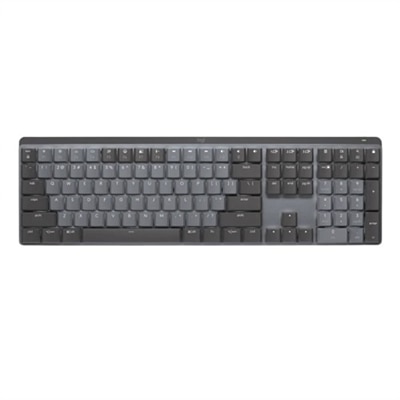
Desktop Keyboards
Upgrade your workspace with a wide selection of desktop keyboards designed to enhance your productivity and comfort. Whether you're setting up a home office, outfitting a gaming station, or simply looking to replace your current keyboard, you'll find options to suit every need. Discover desktop keyboards that combine reliable performance with sleek design, making it easy to stay efficient and connected throughout your day.
This product is not available
Check out the following recommendations.




Desktop Keyboards
Desktop keyboards shape the feel of everyday computing, from the first password entered in the morning to the last sentence of an evening project. Their main differences are switch mechanism, physical layout, and connection type, with each affecting how a keyboard fits a workspace and responds under the fingertips. Full-size keyboards typically include a dedicated number pad, making them useful for spreadsheets, bookkeeping, and repeated numeric entry. Tenkeyless keyboards omit that pad while generally retaining the function row, arrow keys, and navigation cluster, leaving more room for a mouse beside the typing area. Compact layouts save additional desk space, although some commands move to secondary layers accessed with a function key. Those distinctions matter on a narrow writing desk, where a few extra inches can separate an easy mouse movement from a collision with a notebook or coffee mug. Key feel is equally personal. Mechanical keyboards use individual mechanical switches beneath the keys; linear switches move smoothly through the stroke, tactile switches provide a noticeable bump, and clicky switches add an audible click. Membrane keyboards generally use a flexible membrane to register input, often paired with rubber domes that provide resistance and return the keys to position. Scissor mechanisms, frequently found in slim keyboards, stabilize low-profile keys and commonly work with a membrane beneath them. Membrane and scissor designs are often relatively quiet, but actual sound depends on construction, typing force, and the surface underneath. Mechanical does not automatically mean loud, just as a slim profile does not guarantee a soft touch. Writers may appreciate clear tactile feedback during long drafts, while someone sharing a home office may place greater value on muted keystrokes during calls. Within the broader range of Computer Keyboards, desktop designs accommodate everything from traditional document work to creative projects and gaming, with layouts that favor familiar controls, a smaller footprint, or a more specialized typing experience.
Connectivity determines how a desktop keyboard joins the rest of a computer setup. Wired USB keyboards draw power through their cable and avoid battery maintenance, making them straightforward companions for a fixed workstation. The connector still needs to match an accessible port, whether USB-A or USB-C, and cable length matters when the computer sits beneath the desk rather than beside the monitor. Wireless keyboards connect through Bluetooth or a compatible USB receiver, reducing visible cables and allowing more freedom to reposition the keyboard. Receiver-based connections occupy a USB port, while Bluetooth requires support from the connected computer. Wireless designs may use replaceable batteries or an internal rechargeable battery; charging connections, battery indicators, and the ability to type while charging vary by design. Some support pairing with multiple devices and provide a dedicated control for switching between them, a useful feature when a desktop handles primary work and a nearby laptop handles a separate project. Compatibility extends beyond the connection itself. Basic typing may work across several operating systems, while shortcut labels, media controls, programmable keys, and customization software can have more specific requirements. For a desk used mainly for email and documents, familiar key spacing and easily reached navigation keys may matter more than elaborate controls. For gaming, rollover describes how many simultaneous keypresses can register, while anti-ghosting helps prevent unintended inputs during supported key combinations. Those capabilities are separate from switch feel, and their implementation varies. Backlighting can make key legends easier to see in a dim room, provided the lettering is designed to let light through; decorative lighting around the keys serves a different purpose. Dedicated volume controls offer a convenient way to lower audio before answering a call, and programmable shortcuts can reduce repetitive steps in supported applications. A shared family computer may benefit from clear legends and a conventional layout that feels familiar to different users. A student balancing research, assignments, and occasional games may prefer a compact keyboard that leaves space for an open textbook without sacrificing frequently used controls.
Fit, materials, and maintenance influence how comfortably a desktop keyboard settles into daily life. Fit here is about the relationship between the keyboard, the desk, and the person using it: overall width, front-edge height, key spacing, and the distance to the mouse all contribute. A narrower keyboard can bring the mouse closer to the body, while a full-size layout keeps numeric entry within easy reach. Split or curved ergonomic designs change the angle of the typing area and may help some users maintain a more neutral hand position, although comfort varies and an unfamiliar arrangement can take practice. Adjustable feet alter the slope, but a steeper angle is not necessarily more comfortable; desk height and chair position affect whether wrists stay relatively straight. A palm rest can support the base of the hands during pauses rather than encouraging pressure directly on the wrists while typing. Keyboard housings commonly use molded plastic, metal, or a combination of both, with internal reinforcement and construction quality contributing to stability. A heavier chassis and secure rubber feet can help keep a keyboard from sliding across a smooth desktop. Keycaps are often made from ABS or PBT plastic. ABS can develop a polished surface with repeated use, while PBT typically resists that visible shine longer, though texture and durability depend on the particular formulation and finish. Legend application also matters because printed, laser-marked, and double-shot lettering wear differently. Everyday care usually involves disconnecting or powering off the keyboard, removing loose debris gently, and wiping accessible surfaces with a soft cloth lightly dampened as directed by the manufacturer. Liquid should not be sprayed into the keys, and removable keycaps should only be lifted when the design supports it. Spill resistance, when specified, is not the same as waterproofing. For frequent typists, sturdy construction and legible keys support years of routine use; for occasional users, simple controls and easy upkeep may take priority. A keyboard can also be a thoughtful gift for someone setting up a study space or refreshing a home office, especially when its layout, sound, and connection suit the way that person already works.
FAQs:
Mechanical desktop keyboards are known for their durability, tactile feedback, and satisfying keystrokes. They use individual mechanical switches for each key, which can improve typing speed and accuracy. Many users appreciate the consistent feel and audible click of mechanical keyboards, making them popular among writers, gamers, and professionals who spend long hours at the computer.
Wireless desktop keyboards typically connect to a computer using either Bluetooth technology or a USB wireless receiver (also known as a dongle). Bluetooth keyboards can pair directly with compatible devices, while keyboards with a USB receiver require you to plug the receiver into a USB port. Both options offer the convenience of a cable-free workspace and easy portability.
Yes, many desktop keyboards are specifically designed with ergonomics in mind. These models often feature split layouts, curved shapes, or adjustable tilt angles to promote a more natural hand and wrist position. Some also include cushioned wrist rests for added support, helping to reduce strain during extended typing sessions.
Certain desktop keyboards offer multi-device connectivity, allowing you to switch between computers, tablets, and smartphones with the press of a button. This feature is ideal for users who manage several devices throughout their day, as it streamlines workflow and eliminates the need for multiple keyboards.
When choosing a desktop keyboard for gaming, look for features such as customizable backlighting, programmable macro keys, anti-ghosting, and N-key rollover. These enhancements improve responsiveness and allow for more complex key combinations, giving gamers greater control and a personalized experience during gameplay.
FAQs:
When selecting a desktop keyboard for productivity, consider features such as ergonomic design, customizable function keys, quiet or tactile switches, and built-in wrist rests. Some models also offer programmable keys and multi-device connectivity for enhanced workflow.
Yes, there are desktop keyboards tailored for gaming that often include mechanical switches, customizable RGB lighting, anti-ghosting technology, and dedicated macro keys. These features can provide a more responsive and immersive gaming experience.
Many desktop keyboards are compatible with both Windows and Mac operating systems. Some models include dedicated keys for each platform or allow you to switch between layouts, making them versatile for mixed-device environments.
Wired desktop keyboards connect directly to your computer via a USB cable, offering a stable connection and no need for batteries. Wireless keyboards use Bluetooth or a USB receiver, providing more flexibility in placement and reduced cable clutter.
Multimedia keys provide quick access to functions like volume control, play/pause, and launching applications. These shortcuts can streamline your workflow and make it easier to control media playback without interrupting your tasks.