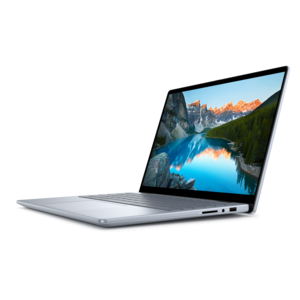
Touchscreen Laptops for Everyday Use

Touchscreen Laptops for Everyday Use combine convenience and versatility, making daily tasks smoother and more interactive. Whether you're managing work, attending online classes, or simply browsing the web, these laptops offer a user-friendly experience that adapts to your needs. Enjoy seamless navigation and enhanced productivity with devices designed to fit into your busy lifestyle. Explore a range of options that bring easy access and intuitive control to your fingertips with Touchscreen Laptops for Everyday Use.

Filters

$879.99

A versatile 2-in-1 laptop with Intel Core processors, DDR5 memory, and multiple modes for creative work.
$879.99
$1339.99

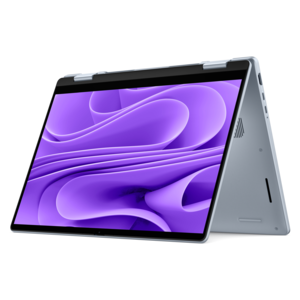
A versatile 2-in-1 laptop with AI experiences, all-day battery life, and seamless multitasking.

$1339.99

Touchscreen Laptops for Everyday Use

Touchscreen laptops for everyday use combine familiar keyboard-and-touchpad controls with direct screen interaction for browsing, email, documents, video calls, and entertainment. A quick tap can open an appointment, move through a photo collection, or pause a video without reaching for the touchpad. Touch becomes especially useful in small, ordinary moments: enlarging a map before heading out, scrolling through a recipe on the kitchen counter, or moving through a reading assignment between classes. The keyboard remains central for longer emails and spreadsheets, while the touchscreen adds another way to interact when pointing directly feels more natural. A traditional clamshell laptop keeps the screen and keyboard in a familiar arrangement, making it well suited to desk work and typing on a lap. A convertible 2-in-1 has a hinge designed for additional positions, which may include tablet, tent, and stand modes. Those configurations can make reading, watching a cooking demonstration, or sharing a presentation more comfortable, but touchscreen support alone does not mean a laptop converts into a tablet. Screen size also shapes the experience. A compact 13- or 14-inch display generally fits more easily into a commuter bag, while a 15- or 16-inch display provides more room for side-by-side windows and larger on-screen controls. Actual dimensions and weight matter as much as the diagonal measurement, especially for a laptop carried between home, work, and a coffee shop. Full HD resolution can provide clear detail for routine tasks, with higher resolutions offering finer text and images depending on screen size and scaling settings. A taller display can show more of a document or webpage before scrolling. Brightness, viewing angles, and reflections affect comfort, too; a glossy touch surface near a sunny window can feel quite different from the same screen under softer indoor lighting. Readable text, comfortable scaling, and a screen position that avoids overhead glare often matter more in daily use than an impressive specification viewed in isolation.

Everyday performance depends on how the laptop handles a complete routine, not just a single open application. Checking email with a few browser tabs is a lighter workload than joining a video meeting while editing a document, reviewing a large spreadsheet, and keeping research pages open. For basic browsing and documents, 8 GB of memory can be sufficient, while 16 GB provides more headroom for multitasking and heavier browser use. Processor capability, cooling, software requirements, and the number of active applications also influence responsiveness. A solid-state drive helps with startup, application loading, and opening local files; its capacity determines how much room remains for photos, downloaded videos, school projects, and other documents. Touch interaction does not replace the need for performance that matches those tasks, and a touchscreen by itself does not establish whether a laptop is suitable for demanding creative work or gaming. Battery life deserves similar context. Screen brightness, video calls, background applications, wireless connections, and power settings all affect time away from an outlet, so a published battery estimate may not reflect a particular household’s routine. A lightweight charger and convenient charging connection can matter during a day split between rooms or locations. USB-C capabilities vary by laptop and port: a connector with that shape does not automatically support charging or an external display. Other connections can be useful for a mouse, headset, monitor, or removable media, depending on the setup. For remote conversations, webcam placement, microphone clarity, and speaker quality help determine whether a check-in feels effortless or distracting. A physical camera shutter, when included, offers a visible way to cover the camera between calls. Keyboard spacing, key feel, and touchpad responsiveness remain important even on a touch-enabled machine. Someone writing reports for hours will use those controls differently from someone mostly reading, streaming, and managing a calendar. Backlit keys can help in a dim room, while a numeric keypad may be useful for frequent number entry, though its presence and layout depend on the laptop’s size and design.

Construction and care influence how comfortably a touchscreen laptop fits into daily life over time. Aluminum, magnesium alloy, and plastic housings can each serve different design goals, with durability depending on the overall construction rather than material alone. A firm keyboard deck, well-supported display, and hinge that holds its position can make regular typing and tapping feel more stable. Convertible hinges are designed for movement, but they still benefit from careful handling within their intended range. A padded sleeve with the right internal dimensions helps protect a laptop from scratches in a backpack, and keeping heavy objects away from the lid reduces pressure on the display. Touchscreens collect fingerprints during normal use, particularly when shared by several people. Cleaning generally starts with shutting the laptop down and wiping the screen gently with a clean microfiber cloth, following the manufacturer’s care directions for any cleaning solution. Liquid should not be sprayed directly onto the display, and abrasive materials can damage its surface. Clear ventilation openings and a firm supporting surface also help the laptop manage heat; a blanket or soft cushion can obstruct airflow. For handwritten notes or sketches, active-pen compatibility is a separate feature from touch support, and the correct pen technology matters. Palm rejection and pressure sensitivity depend on the device, pen, and application working together. These details can make a meaningful difference for someone annotating documents or marking up a project. Academic routines are another natural setting for Touchscreen Laptops For Students, where carrying weight, typing comfort, and time between charging opportunities become part of the daily experience. A touchscreen laptop can also be a practical gift for a college student, a family member managing household tasks, or someone who enjoys casual browsing and photo viewing. The most useful fit reflects the recipient’s habits: enough workspace for their activities, comfortable controls, manageable weight, and features they will use regularly rather than occasionally.

FAQs:

Add the products you would like to compare, and quickly determine which is best for your needs.

Add the products you would like to compare, and quickly determine which is best for your needs.