USB C Adapters For MacBook Pro
Upgrade your connectivity and streamline your workflow with USB-C adapters for MacBook Pro. Designed to maximize compatibility and simplify connections, these adapters make it easy to link your device to a wide range of peripherals and accessories. Whether you’re expanding your workspace or transferring data, USB-C adapters for Macbook Pro deliver flexible solutions to help you get the most out of your laptop. Explore options that support your everyday needs and keep you productive wherever you go.
This product is not available
Check out the following recommendations.
USB C Adapters For MacBook Pro
USB C adapters for MacBook Pro help turn a streamlined laptop into a more flexible workspace without requiring a collection of separate cables. A single adapter can add familiar USB-A connectivity for older accessories, HDMI for an external monitor or television, SD and microSD card slots for moving photos and video, and USB-C Power Delivery for charging while other ports are in use. This makes an adapter useful for many everyday routines: transferring files from a camera after a day outdoors, connecting a presentation display at a meeting, downloading documents from a flash drive, or adding a larger screen to a home office. It can also make a MacBook Pro more comfortable for creative work, especially when a photographer, designer, student, or video editor needs to move media from removable cards and view detailed content on a separate monitor. For more options across a range of laptop setups, explore USB C Laptop Adapters. When choosing among available options, begin by listing the devices that will be connected most often. A compact adapter with one or two essential ports may be ideal for travel, while a broader multiport hub can be better for a desk where several accessories remain connected. Think about the physical arrangement of the MacBook Pro, too. A flush-mounted adapter attaches directly to adjacent USB-C ports and creates a clean, low-profile appearance that is easy to pack in a sleeve or laptop bag. A corded adapter keeps the added ports positioned beside the computer, which can reduce pressure on the laptop’s built-in ports and offer more flexibility when a case, stand, or nearby cable makes a direct connection inconvenient. Neither design is universally better; the right choice depends on whether portability, clearance, or an organized permanent setup matters most.
Video output is another important consideration for anyone planning to connect a MacBook Pro to a monitor, television, or projector. Look for an HDMI connection that supports the resolution and refresh rate needed for the display, with 4K at 60Hz providing a smoother experience than 4K at 30Hz for compatible screens. That difference can be noticeable while moving windows, scrolling through long pages, editing images, or watching fast-moving content. It is also worth checking whether the adapter supports the particular display arrangement you have in mind, since capabilities can vary when more than one screen is connected. For charging, pass-through USB-C Power Delivery allows the laptop to receive power through the adapter while other ports remain available. Confirm that the adapter’s supported wattage is appropriate for the MacBook Pro size and configuration, including whether it is a 14-inch or 16-inch model. A lower-wattage connection may charge more slowly or may not provide enough power during demanding tasks, so matching the adapter with the computer’s charger helps maintain dependable performance. Port speed matters as well. Faster USB connections can reduce waiting when moving large photo libraries, project files, or video clips, while a basic USB-A port may be sufficient for a keyboard, mouse, printer, or small flash drive. Card readers should match the memory cards used by cameras and other devices; having both SD and microSD access can be convenient for households with several types of portable electronics. Check the placement and spacing of ports when choosing a compact design, since wide plugs and rigid cables can be difficult to use when ports sit close together. A thoughtfully arranged adapter should make connections easier, not create a new puzzle on the side of the laptop.
These accessories can be especially helpful for people who move between locations. A student may keep an adapter in a backpack to connect a classroom projector, read files from a shared drive, or attach a full-size keyboard at a study table. A remote worker can carry one between a kitchen counter, a quiet room, and a temporary work area, connecting a monitor and familiar USB accessories without rebuilding the setup from scratch. Travelers may appreciate a small adapter that fits beside a charger, while photographers and content creators may prioritize card readers, high-speed data transfer, and dependable display output. They can also be practical gifts for someone beginning a new course, setting up a first home office, upgrading a creative workspace, or replacing an older computer with a thinner model that has fewer traditional ports. During warmer travel seasons and the cooler months that follow, a well-chosen adapter can stay useful at home, in a classroom, at a studio, or on the road. Before purchasing, consider the laptop’s available USB-C ports, the charger’s wattage, the required display resolution, the accessories already in use, and whether a direct-fit or corded design will work better with the computer’s case and carrying setup. A durable exterior, secure connectors, compact dimensions, and clearly labeled ports can make a meaningful difference in daily use. The most suitable USB C adapter for MacBook Pro is the one that supports the connections you actually rely on while leaving enough flexibility for the next monitor, camera card, accessory, or workspace change.
FAQs:
A USB C adapter for MacBook Pro allows you to connect a wide range of devices, including USB-A peripherals like keyboards, mice, and external hard drives, SD and microSD cards, HDMI or DisplayPort monitors, Ethernet cables for wired internet, and even additional USB-C devices for charging or data transfer.
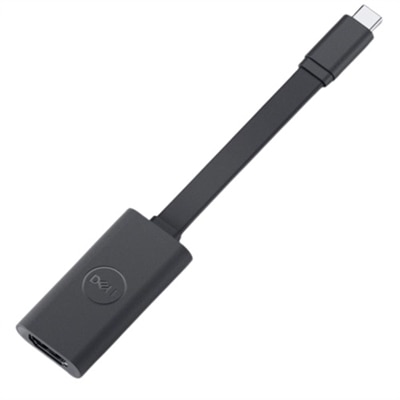
Yes, a USB to HDMI adapter is a popular choice for connecting your MacBook Pro to an external display, such as a Dell monitor. This allows you to extend your desktop, mirror your screen for presentations, or enjoy content on a larger display.
Most multiport USB C hubs are designed to be compatible with MacBook Pro models featuring Thunderbolt or standard USB-C ports. However, it's important to check that the hub supports Thunderbolt 3 or 4 if you want to take advantage of the fastest data transfer speeds and additional features.
An Ethernet adapter is useful if you require a stable and fast wired internet connection, which can be especially helpful for video conferencing, large file uploads, or environments where WiFi is unreliable or unavailable.
When selecting adapters for MacBook Pro, consider the types of ports you need (USB-A, HDMI, SD card, Ethernet), Power Delivery support for charging, compatibility with your MacBook Pro model, and whether the adapter fits with your laptop case. Compact and portable designs are ideal for travel, while robust multiport hubs are great for permanent workstations.