$3948.00
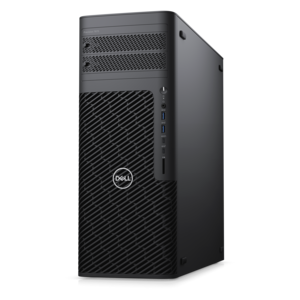
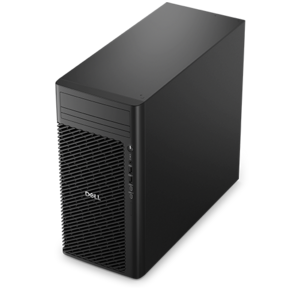
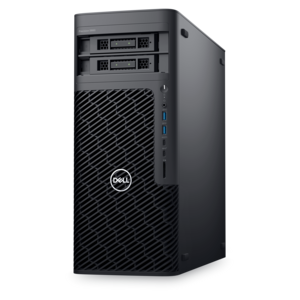
A workstation with Xeon processing, dual 300W graphics, 56TB storage, 2TB memory, and Windows 11 Pro.
Virtualization technology is revolutionizing how businesses and individuals manage their digital environments, offering unparalleled flexibility and efficiency. By creating virtual versions of hardware platforms, storage devices, and network resources, this innovative technology enables users to run multiple operating systems and applications on a single physical machine. This not only optimizes resource utilization but also simplifies IT management and reduces operational costs. Whether you're looking to streamline your business operations or enhance your personal computing experience, virtualization technology provides the tools needed to achieve unprecedented levels of productivity and scalability. Explore the possibilities and discover how this cutting-edge solution can transform your digital landscape.
A workstation with Xeon processing, dual 300W graphics, 56TB storage, 2TB memory, and Windows 11 Pro.
Virtualization technology allows one physical computer to create and run multiple independent computing environments through software. A hypervisor acts as the control layer between the physical hardware and each virtual machine, assigning portions of the processor, memory and local drive capacity to separate guest environments while the host system continues running underneath. This makes it possible to use different operating systems on the same computer, test software without changing the primary setup, or keep work, school and personal activities in distinct spaces. Virtual machines can be paused, copied, moved or removed without rebuilding the host computer, making them useful for experimentation and repeatable workflows. A developer might use one environment to build an application and another to check how it behaves under a different operating system. A student learning programming or cybersecurity can practice in an isolated workspace, while a small business may use virtual desktops to provide consistent tools across a team. Application virtualization can also allow a program to run independently from parts of the underlying operating system, helping reduce compatibility concerns. Desktop virtualization takes a different approach by delivering a user’s familiar desktop experience from a centralized computing environment, allowing access from compatible endpoint devices. These approaches are related but serve different needs, so it helps to identify whether the goal is local testing, remote access, simplified administration or the ability to run multiple environments side by side. Virtualization also forms an important foundation for cloud computing, where software-defined resources can be allocated as workloads change. For broader technology planning, explore Data Center Technologies.
When choosing a computer for virtualization, begin with the processor, memory capacity and upgrade flexibility rather than focusing on appearance alone. Hardware-assisted virtualization support is built into many modern processors, but the feature may need to be enabled in the computer’s BIOS or UEFI settings before virtualization software can use it. A system with more processor cores can handle several active tasks more smoothly, while generous memory is particularly important because every virtual machine needs its own allocation. Running one lightweight environment may be comfortable with a modest configuration; running multiple operating systems, browser sessions, development tools and testing utilities at the same time calls for substantially more headroom. Fast solid-state drive capacity can improve startup and file access, although virtual machine images can grow quickly and may require more room than expected. Buyers should also review whether the computer supports memory expansion, additional internal drive capacity or external accessories that can make a multi-environment workspace easier to manage. A clear, high-resolution monitor can be valuable when several windows are visible at once, and a comfortable keyboard, precise mouse and reliable webcam can make extended technical sessions less tiring. For a laptop, consider battery life, cooling behavior, portability and the weight of the power adapter; virtualization can place a sustained load on the processor, so efficient thermal design matters. For a desktop, look for quiet operation, accessible components and enough physical room for future upgrades. Compatibility with the chosen hypervisor is equally important. Type 1 hypervisors run directly on hardware and are typically associated with dedicated professional environments, while Type 2 hypervisors run within a conventional operating system and are often convenient for personal computers, classrooms and development work. Check the software’s supported operating systems, licensing terms, graphics requirements and backup options before committing to a setup.
Virtualization products can suit a wide range of people, from a curious learner building a first test environment to an experienced professional managing a demanding development workflow. They can also make thoughtful gifts for college students studying computer science, aspiring software developers, digital artists who need separate application environments, or anyone who enjoys exploring new operating systems without altering the computer they rely on every day. A practical setup might include a capable laptop or desktop paired with a monitor, keyboard, mouse and other accessories that create a comfortable place for testing and study. Someone working from a compact home office may value a portable computer that can move from a desk to a quiet corner, while a family sharing one workspace may prefer a desktop with a larger display and straightforward upgrade options. Virtual machines are especially useful when reliability and separation matter: an experimental installation can remain apart from important personal files, and a testing environment can be reset after a configuration change. Isolation is helpful, but it should not be treated as a complete security solution. Keep the host operating system and virtualization software updated, use strong account credentials, download operating systems and applications from trusted sources, and maintain backups of important files. Performance also depends on how each virtual machine is configured. Assigning too much memory or processor capacity to guests can leave the host sluggish, while assigning too little can make the guest frustrating to use. Begin with a modest allocation, monitor performance and adjust as needed. With suitable hardware and thoughtful configuration, virtualization technology can turn a single computer into a flexible collection of workspaces for learning, testing, productivity and creative problem-solving throughout the changing seasons.
Add the products you would like to compare, and quickly determine which is best for your needs.