VPN Firewalls
Enhance your network security and safeguard sensitive data with VPN firewalls designed to provide robust protection for home and business environments. Whether you're looking to secure remote connections or add an extra layer of defense to your digital infrastructure, VPN firewalls offer reliable solutions that help keep your information safe from unauthorized access. Explore a variety of options to find the right fit for your connectivity and security needs.
This product is not available
Check out the following recommendations.
Related Products
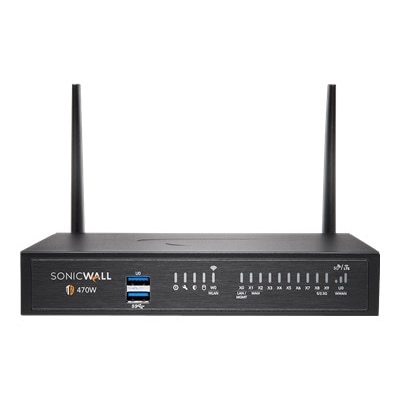
VPN Firewalls
VPN firewalls bring together two distinct security functions: a firewall controls which connections are allowed, while a virtual private network, or VPN, encrypts traffic traveling through a protected connection. For people using laptops and desktops, these capabilities address different parts of everyday computer security. A firewall applies rules to incoming and outgoing traffic, helping prevent unwanted connections and limiting communication by applications when configured to do so. A VPN protects data in transit between your device and the VPN endpoint, making that traffic harder for someone on the same local connection to intercept or read. Neither function replaces the other, and neither makes a computer completely secure on its own. The phrase “VPN firewall” can describe products with combined capabilities, so it is worth checking exactly what a listing includes rather than assuming that every option provides the same protection. Some computer security software includes both a firewall and a VPN, while other products require separate software or an existing subscription. For a broader look at traffic-control products, Network Firewalls provides a related category to explore. When choosing protection for an individual computer, the important distinction is what happens on the device and what happens to information after it leaves. Picture a laptop open on a café table, with a document uploading in the background and several browser tabs competing for attention. A properly configured firewall can restrict unexpected connection attempts; an active VPN can encrypt supported traffic across the connection to its endpoint. Secure websites still matter, as do software updates, strong passwords, and careful account management. A VPN may also replace the public IP address visible to websites with the address of its endpoint, but it does not erase cookies, prevent account-based tracking, or guarantee anonymity. Understanding those boundaries helps you choose useful protection without paying for capabilities that do not match how you actually use your computer.
For laptop and desktop users, purchase considerations start with compatibility, licensing, and the scope of protection. Check the supported operating systems and versions, along with whether the advertised features work equally across each platform. A subscription that supports several devices can be convenient for a household with multiple computers, but the number of installations may differ from the number of VPN connections allowed at once. Read both limits. Also confirm whether the purchase includes ongoing VPN access, firewall functionality, updates, and technical support, or whether some features require an additional subscription. The initial price tells only part of the story; subscription length, renewal pricing, cancellation terms, and any introductory restrictions affect the longer-term cost. If you already have security software installed, look for compatibility information before adding another product with overlapping functions. Running multiple firewall applications can create conflicts, confusing alerts, or connection problems rather than providing better protection. For a work-issued laptop, your employer’s approved security tools and access requirements should determine what you install. Performance deserves attention, too. Encryption adds processing work, and the route a VPN uses can affect speed and responsiveness. Advertised maximum speeds are not a promise of what you will experience during a video call, a large download, or an evening of online gaming. Your computer, internet connection, selected VPN location, and enabled security features all play a part. Look for clearly documented encryption protocols, supported connection methods, and information about performance testing where available. Features such as automatic connection on unfamiliar Wi-Fi and a kill switch can be useful for portable computers. A kill switch is intended to block specified traffic if the VPN connection drops, though its coverage and behavior vary by product. Split tunneling, when supported, lets selected applications or traffic use the VPN while others connect directly. That flexibility can help with compatibility, but anything excluded from the tunnel does not receive its encryption.
The best fit often becomes clear when you consider the ordinary moments in which the software needs to work. A frequent traveler may value a VPN that reconnects reliably when a laptop wakes from sleep or moves between connections. Someone working from a home office may care more about predictable performance during calls and firewall controls that do not interrupt approved applications. A college student carrying a laptop between an apartment, library, and classroom may appreciate straightforward settings and a license that remains useful when replacing a computer. For a shared desktop, clear account controls and understandable notifications can matter more than a long list of advanced options that nobody feels comfortable adjusting. Security software is usually a practical personal purchase rather than a surprise gift, although a compatible subscription can be a thoughtful addition to a new computer when the recipient wants it. Confirm their existing protection and preferences first to avoid duplicating something they already have. Day-to-day usability deserves the same attention as technical specifications. An alert that identifies the application requesting access and explains the available choices is more useful than a warning with little context. Automatic updates, accessible support, and a clear recovery process can make ownership less demanding, especially for someone who does not want computer maintenance to become a weekend project. Privacy policies also warrant a close read: examine what connection information is collected, how long it is retained, and whether independent assessments support the provider’s claims. Routing traffic through a VPN changes whom you trust with parts of your connection; it does not eliminate that trust. Finally, keep expectations grounded in the purpose of each feature. A firewall does not automatically encrypt your browsing, and a VPN does not by itself stop phishing, remove malicious software, or protect every file stored on your computer. For everyday laptop and desktop use, a suitable choice combines the right coverage with manageable settings, dependable updates, and performance that lets protection stay in the background while you get on with your day.
FAQs:
A VPN firewall combines the functions of a traditional firewall—which monitors and filters incoming and outgoing network traffic—with VPN capabilities that encrypt data for secure communication. While a standard firewall focuses solely on blocking unauthorized access and filtering traffic, a VPN firewall also ensures that your data remains private and protected, even when transmitted over public networks.
A VPN firewall is ideal for remote workers, small business owners, students, and families who want to protect sensitive information and maintain privacy online. It is also useful for anyone who regularly accesses public Wi-Fi or works with confidential data, as it helps safeguard against unauthorized access and data breaches.
An SPI (stateful packet inspection) firewall examines the state and context of each packet of data as it passes through the network, rather than just checking static rules. This allows it to recognize and block suspicious or unauthorized traffic more effectively, providing an extra layer of security for your devices.
Yes, most VPN firewalls are designed to protect entire networks rather than just individual devices. Once set up, they can secure all laptops, desktops, monitors, and accessories connected to your home or office network, ensuring comprehensive protection for everyone using the connection.
When selecting a VPN firewall appliance, consider features such as easy integration with your current devices, user-friendly management interfaces, advanced security protocols, support for multiple VPN connections, and regular firmware updates. These features help ensure your network remains secure and easy to manage as your needs evolve.