$199.99
An intelligent 4K webcam delivering vibrant, full-spectrum clarity for secure, next-level collaboration.
Web cameras are essential tools for connecting, collaborating, and communicating in today’s digital world. Whether you're working from home, attending virtual meetings, or catching up with friends and family, web cameras help you stay engaged and visible. Explore a wide range of web cameras designed to deliver clear visuals and reliable performance for any workspace or home setup. Find the right solution to enhance your video calls, online events, and streaming experiences.
An intelligent 4K webcam delivering vibrant, full-spectrum clarity for secure, next-level collaboration.
A 2K QHD webcam designed for clear, confident everyday video collaboration.
A 1080p conference camera with full-duplex speakerphone audio, autofocus, remote pan-tilt-zoom, and echo cancellation.
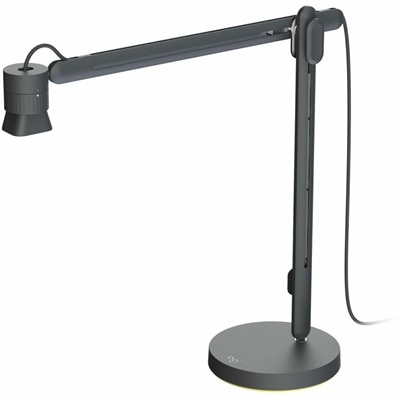
An articulating overhead camera arm with base mount, 1080p60 video, USB connectivity, and versatile pivoting controls.
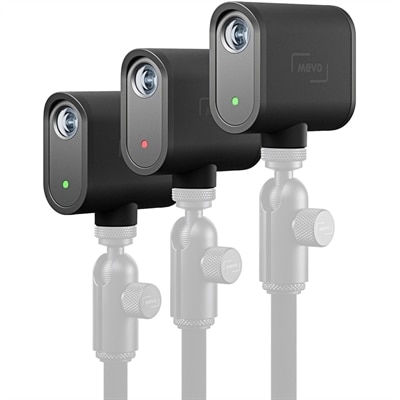
A three-camera black webcam kit delivering 1080p streaming, 12-megapixel capture, USB-C connectivity, and smartphone control.
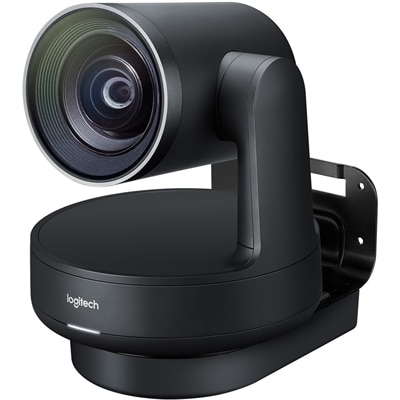
A matte-black Ultra HD PTZ camera with 4K imaging, 15X zoom, 90° coverage, and automatic framing.
Web cameras are digital video cameras that capture images and send them to a connected computer for video calls, online meetings, livestreaming, or recording. Often called webcams, these compact accessories bring face-to-face communication to a desktop setup or provide an alternative to a laptop’s built-in camera. Their everyday uses range from joining a morning team meeting to attending a college seminar, recording a presentation, or catching up with relatives across the country. An external webcam offers flexibility in placement, making it easier to position the lens near eye level rather than looking down toward a screen on a desk. Image resolution is one of the main differences among webcam types: 720p provides basic HD video, 1080p delivers Full HD detail, and 4K captures a higher-resolution image when supported by the connected hardware and software. For everyday conferencing and clear on-screen presentations, Full HD Webcams offer a resolution commonly used across work, learning, and personal communication. Higher resolution can preserve more detail when cropping an image, but it does not guarantee a better picture on its own. Lens quality, sensor performance, lighting, and video compression all influence the final result. A camera facing someone seated near soft window light may produce a more natural image than a higher-resolution camera pointed toward a bright window behind them. Frame rate also affects how movement appears. Video at 30 frames per second is generally suitable for conversation, while supported 60-frame-per-second capture can make hand gestures and other movement look smoother. The resolution and frame rate actually transmitted may be limited by the meeting application, connection quality, or computer settings. For someone explaining a sketch, demonstrating a small craft, or speaking while moving around a workspace, the balance of detail, motion, and reliable focus matters more than a single specification. Color accuracy and balanced exposure help faces, clothing, and objects look natural without overly bright highlights or deep shadows.
A webcam’s lens, field of view, and focusing system shape how comfortably it fits into a daily routine. A narrower field of view keeps attention on one person and includes less of the surrounding room, which can be useful at a desk tucked into a bedroom or shared living space. A wider view makes room for two people sitting side by side or a group gathered around a table, although it also reveals more background and can introduce distortion near the edges. Autofocus adjusts as the distance between the subject and lens changes, helping when someone leans forward or holds an object up to the camera. Fixed-focus designs can work well for a consistent seated position within their intended focusing range. Automatic exposure and white balance respond to changing light, such as clouds passing outside a window, though their effectiveness varies by camera and setting. Some webcams offer framing adjustments or image controls through companion software; those functions may depend on operating-system support and permissions on a work-managed computer. Physical fit is equally important. An adjustable clip should sit securely on the intended display without covering the screen, pressing against a delicate panel, or obstructing a built-in sensor. A tilting head or swivel mount allows small framing corrections without moving the monitor, while a compatible tripod attachment provides placement options beside the screen or above a work surface. Cable length determines whether the camera can reach a desktop positioned under the desk without pulling against its mount. USB connector type and port requirements also deserve attention, since USB-A and USB-C connections are not interchangeable without suitable support or an adapter. Many webcams support standard USB video operation, but advanced resolution settings, image adjustments, and other features may require additional software or particular connection capabilities. Built-in microphones can simplify casual calls, while a separate headset or microphone may provide clearer speech in a room with keyboard noise, echoes, or several people talking nearby.
Construction, care, and privacy features help determine how well a webcam suits repeated use. Webcam housings commonly use lightweight plastic, sometimes paired with metal components in the mount or body, while lens elements may be glass or plastic depending on the design. Housing material alone does not establish image quality or durability; hinge stability, cable strain relief, lens protection, and secure mounting also contribute to dependable performance. A camera that stays on a home-office monitor faces different demands from one packed into a bag between campus, home, and a shared workspace. For frequent travel, a compact shape, protected lens, and sturdy folding mount can make handling easier. A padded compartment helps prevent scratches, and loosely coiling the cable avoids repeated sharp bends near the connector. Lens smudges can soften the image or create distracting flare around bright lights, so gentle cleaning with a clean microfiber cloth, following the manufacturer’s care directions, helps maintain clarity. Liquids should not be sprayed directly onto the camera, and vents, seams, and connectors should remain dry. A physical privacy shutter covers the lens when video is not needed, but it does not necessarily mute the microphone or disconnect the device. Indicator lights and application permissions provide additional information and control, while disconnecting a wired webcam stops that device from capturing through the computer connection. These practical details matter in homes where a work area shares space with everyday life. Remote employees may value consistent framing for back-to-back calls, college students may need a camera that moves easily between study spaces, and creators may prioritize smooth motion and control over exposure. A webcam can also be a thoughtful gift for a graduate beginning a remote role or a relative who enjoys regular family video calls, provided its connection and software requirements match their computer. Paired with a stable mount, comfortable screen position, and light directed toward the face, a well-suited webcam helps make conversations feel more personal and recorded communication easier to follow.
Add the products you would like to compare, and quickly determine which is best for your needs.