Wide Format Color Printers

Wide format color printers are the ideal solution for businesses and creative professionals who need to produce vibrant, high-impact graphics, posters, architectural plans, and marketing materials. Designed to handle larger media sizes with precision and efficiency, these printers help bring your ideas to life in stunning detail. Explore a range of wide format color printers that deliver exceptional performance for all your large-scale printing needs.

Filters

$3295.00

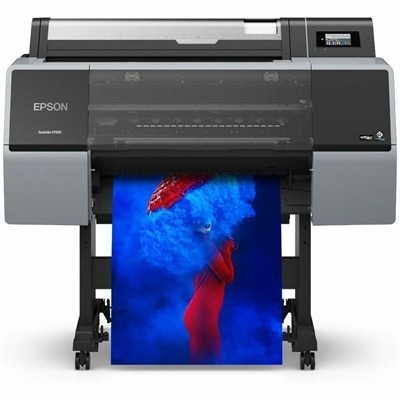
A wide-format color printer delivering exhibition-quality photography, fine-art and graphic-design prints with expanded-gamut archival pigment inks.

$3295

Wide Format Color Printers

Wide format color printers produce color documents, graphics, and images on media larger than standard letter-size paper, giving posters, photographs, drawings, and presentation materials more room to communicate. The category spans desktop machines that accommodate sheets such as 11 by 17 or 13 by 19 inches and larger equipment designed for 24-inch, 36-inch, or wider roll media. Supported dimensions vary by model, and the maximum paper width does not always equal the printable image width because some printers require margins. Sheet-fed designs suit individual prints and mixed-size office documents, while roll-fed designs can accommodate long layouts, repeated posters, and drawings whose length extends beyond common sheet sizes. Wide format and large format are overlapping terms rather than universally fixed size classifications; the related category of Large Format Color Printers includes equipment for many of the same creative and professional applications. For an architect, a larger sheet can keep room labels, dimensions, and color-coded revisions legible on a single drawing. For a photographer, it can reveal the texture of a landscape or the subtle transitions in a portrait without reducing the image to a small print. Teachers, graphic designers, property professionals, artists, and small business owners may use these printers for classroom displays, portfolios, floor plans, menus, and presentation boards. A home workspace might need occasional oversized photo prints, while a busy studio may produce multiple proofs before approving a final layout. Those differences make intended use just as important as maximum output size. A printer built around fine photographic detail serves a different purpose from one focused on quickly producing technical drawings or everyday office graphics. The physical format also shapes day-to-day convenience: a desktop unit may share a work surface with a computer, while a floor-standing roll printer usually needs a dedicated location and clear space for loading media and collecting finished prints.

Print quality depends on the relationship between the printer, its ink or toner, the source file, and the paper surface. Many wide format color printers use inkjet technology, with ink systems tailored to office documents, technical graphics, photography, or fine art. Some color laser printers support oversized office sheets, making them another option for text-heavy presentations and business documents, though their media capabilities differ from those of photographic inkjet equipment. Resolution can help describe how finely a printer places marks on the page, but a resolution figure alone does not determine the appearance of a finished print. Small lettering, smooth gradients, consistent skin tones, and solid areas of color each place different demands on the printing system. An extended ink set may improve tonal transitions or expand the range of reproducible colors, while dedicated gray inks can support more neutral black-and-white photography on compatible machines. Paper choice changes the result just as visibly. Glossy photo paper can give images a bright, polished appearance; matte paper reduces surface reflections and can suit illustrations or displays viewed under overhead lighting. Textured fine art papers add a tactile quality, while coated presentation sheets can support crisp graphics without the weight of heavier art media. Compatibility matters beyond width: paper thickness, weight, coating, and feed path all influence whether a material will move through the printer reliably. Canvas, adhesive-backed media, and specialty films require explicit support rather than an assumption that any wide printer can handle them. Pigment-based and dye-based inks have different characteristics, and resistance to fading, moisture, and handling depends on the complete ink-and-media combination and display conditions. A framed photograph away from direct sunlight faces different demands from a frequently handled presentation sheet. Indoor poster printing should not be mistaken for outdoor sign production, which may require specialized materials, protective finishing, and equipment designed for that environment.

Everyday usability becomes especially noticeable when large prints are part of a regular workflow. A printer’s rated speed may reflect a draft setting or a particular document type rather than the time needed for a detailed photograph on coated paper. Higher-quality modes, denser color coverage, and additional drying time can change how quickly a finished piece is ready to handle. Automatic cutting can simplify roll output on equipped models, while borderless printing, when supported for the chosen media and size, can reduce trimming for photographs and display graphics. Technical drawings introduce another consideration: accurate scale depends on the document settings, paper selection, and printing workflow, not simply on having a large enough sheet. For shared workspaces, supported connection methods, compatible operating systems, and the ability to send files from the devices people actually use can be more useful than features that rarely enter the daily routine. Multifunction models may add scanning and copying, but the scanner’s maximum document size can differ from the printer’s maximum output size. Physical fit also extends beyond the machine’s listed dimensions. Open trays, rear paper feeds, roll access, and output collection areas need clearance, and a long print should have somewhere clean to land without creasing against a wall or dropping onto the floor. Routine care helps preserve consistent results: inkjet equipment may need nozzle checks and occasional printhead cleaning, while all printer types benefit from paper paths kept free of dust and scraps according to the manufacturer’s directions. Flat, dry media is less likely to curl or feed unevenly, and finished prints may need drying time before stacking, framing, or transporting. Durability is best considered in terms of expected workload, recommended operating conditions, and maintenance requirements rather than exterior size alone. For occasional creative projects, straightforward setup and dependable sheet handling may matter most. For a studio producing drawings and display materials throughout the week, repeatable color, practical media changes, and output handling can have a greater effect on the working day. These differences help distinguish wide format color printers by how naturally they fit the work they are intended to produce.

FAQs:

Add the products you would like to compare, and quickly determine which is best for your needs.

Add the products you would like to compare, and quickly determine which is best for your needs.