WiFi 6 E Devices

Explore the cutting-edge world of WiFi 6E devices, designed to elevate your connectivity experience to new heights. As the latest advancement in wireless technology, WiFi 6E expands on the capabilities of its predecessor by unlocking access to the 6 GHz band, offering more bandwidth and reduced interference for smoother, faster connections. Whether you're streaming, gaming, or managing a smart home ecosystem, these devices promise enhanced performance and efficiency. Dive into our selection of WiFi 6E devices and discover how they can transform your digital lifestyle with their innovative approach to seamless connectivity.

Filters

$114.99

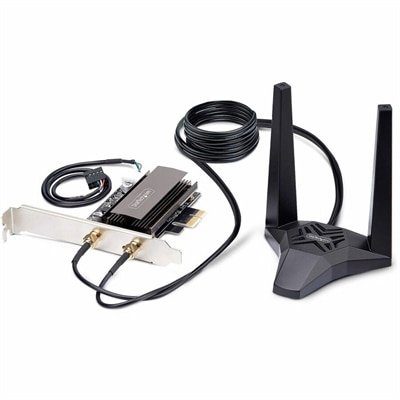
A Wi-Fi 6E PCIe network card with Bluetooth 5.3, magnetic antenna base, WPA3, and aluminum heatsink.

$114.99
$39.99

A wireless HD streaming media player with Full HD video, Wi-Fi 6, Alexa+, and 8GB storage.

$39.99
$69.99

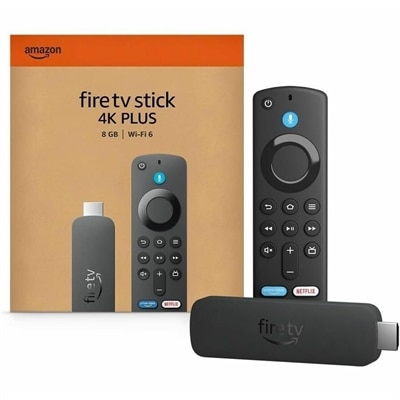
A 4K streaming stick with quad-core 1.7GHz processing, Wi-Fi 6, Dolby Vision, HDR10+, and Dolby Atmos.

$69.99
$149.99

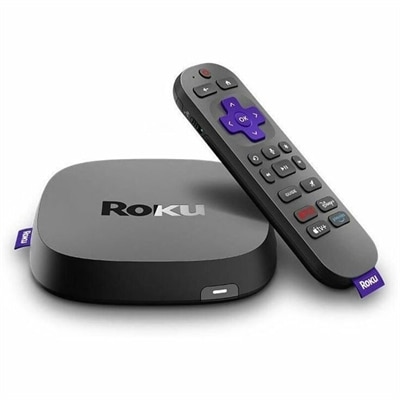
A streaming player delivering 4K HDR10+, Dolby Vision video, Dolby Atmos audio, and Wi-Fi 6 connectivity.

$149.99
$549.99

A Wi-Fi 6 cable modem router featuring DOCSIS 3.1, 1.8Gbps wireless speeds, and 2.5Gbps multi-gig connectivity.

$549.99

WiFi 6 E Devices

Wi-Fi 6E devices bring compatible laptops and desktops onto the 6 GHz wireless band, adding another way to connect beyond the familiar 2.4 GHz and 5 GHz bands. The “E” stands for “extended”: Wi-Fi 6E extends the capabilities of Wi-Fi 6 into additional spectrum rather than introducing an entirely different generation of wireless technology. That extra spectrum creates room for more wide channels, including 160 MHz channels where supported, which can help compatible computers move large files and handle demanding online activities with less congestion. In an apartment building where many nearby connections compete for airtime, access to 6 GHz can give a computer a less crowded place to communicate. Older devices that operate only on 2.4 GHz or 5 GHz cannot connect on 6 GHz, although the band is not guaranteed to be empty or free from interference. Newer compatible wireless technologies can use it, too. For everyday use, the appeal is practical: a laptop participating in a video meeting while receiving shared project files, a desktop downloading a large game, or a student accessing cloud-based coursework may benefit from the added wireless capacity. Lower latency and higher throughput are possible, but neither is automatic. Actual performance depends on the computer’s wireless hardware, compatible network support, distance, surrounding materials, and the internet connection itself. Wi-Fi 6E cannot make an internet plan faster than its service limits, and a slow website or busy remote application can still affect responsiveness. Its value lies in reducing certain local wireless bottlenecks, particularly when both the device and its connection support the additional band. For shoppers comparing Wi-Fi 6E computers, the wireless specification is therefore one part of a larger experience that also includes processing power, memory, display quality, and battery life. A balanced configuration supports both the online activity and the work happening on the computer itself.

Wi-Fi 6E laptops suit people who want capable wireless connectivity in a computer that moves between a desk, a classroom, and a kitchen table. A lightweight design can make daily commuting easier, while a larger screen provides more room for spreadsheets, research notes, or side-by-side documents. Screen size also affects how comfortably a laptop fits into a backpack or onto a narrow desk, so portability involves more than weight alone. Aluminum and other metal enclosures can provide a rigid feel, while well-designed polymer housings can keep weight manageable; durability ultimately depends on construction, hinge quality, and how the computer is handled. A padded sleeve and a bag compartment that fits without squeezing the corners help protect a portable computer during routine travel. For a stationary workspace, Wi-Fi 6E desktops offer the convenience of a wireless connection without making an Ethernet cable part of the room layout. A compact desktop may leave more space for a notebook and keyboard, while a larger enclosure can provide additional room for components and cooling, depending on its design. Wireless capability does not replace the specifications needed for the intended workload. Video editing benefits from sufficient memory and fast local storage, creative applications may need capable graphics, and frequent video calls place extra importance on the camera, microphone, and speakers. Gaming performance also depends on graphics hardware, display refresh rate, and the connection to the game’s remote systems, not just the wireless standard. For someone spending hours reading or writing, a comfortable keyboard and a clear, appropriately sized display may matter more every day than the highest theoretical wireless speed. External monitors and accessories can round out either type of setup, but their connection methods are separate considerations: a wireless mouse or keyboard does not necessarily use Wi-Fi, much less the 6 GHz band. A Wi-Fi 6E computer can anchor a flexible workspace while still supporting wired displays and peripherals through its available ports.

Compatibility and placement shape how much of Wi-Fi 6E’s potential becomes noticeable in daily use. A computer needs explicit Wi-Fi 6E or other compatible 6 GHz support to connect on that band; a specification that lists only Wi-Fi 6 does not establish 6 GHz capability. Compatible network access, operating system support, and appropriate wireless drivers are also necessary. Away from a 6 GHz connection, Wi-Fi 6E computers generally retain access to supported 2.4 GHz and 5 GHz networks, making them useful across different locations rather than only in a specially equipped room. The higher-frequency 6 GHz signal typically has a harder time passing through walls and other obstacles than lower-frequency signals, so its strongest performance is often at shorter distances with fewer obstructions. A laptop on an open desk may have a different connection experience from the same laptop behind a thick masonry wall. Desktop placement matters as well: enclosing a computer in a cabinet or crowding its antenna area with metal objects can weaken reception, and external antennas, when included, should be positioned according to the manufacturer’s directions. Routine care supports dependable use beyond connectivity. Keeping ventilation openings clear, removing dust with appropriate methods, and using a soft cloth as directed for exterior cleaning help maintain a computer without exposing it to unnecessary moisture or abrasion. Operating system and wireless driver updates can address compatibility and reliability issues, while adequate airflow helps components manage heat during sustained work. For a college student, remote worker, or household sharing a busy internet connection, a Wi-Fi 6E laptop or desktop can be a useful everyday tool and a thoughtful graduation or birthday gift when its size and capabilities match the recipient’s needs. The broader Wireless Devices category provides context for other cordless computing options, whose wireless standards and purposes may differ. Within a Wi-Fi 6E setup, the most meaningful combination is a comfortable, well-matched computer and a connection environment that lets its additional spectrum contribute to smoother everyday use.

FAQs:

Add the products you would like to compare, and quickly determine which is best for your needs.

Add the products you would like to compare, and quickly determine which is best for your needs.