$1499.99
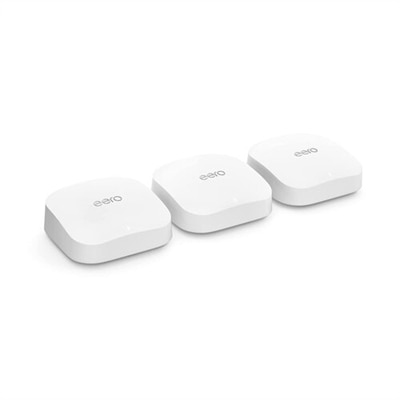
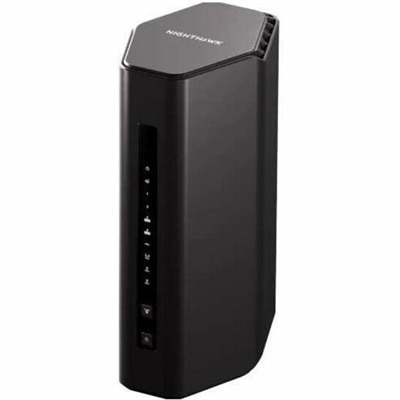
A Wi-Fi 7 router delivering up to 27Gbps, 10Gb connectivity, and coverage for 200 devices.
Enhance your connectivity and streamline your digital experience with WiFi networks designed to support your home or workspace. Whether you’re working remotely, streaming content, or connecting multiple devices, reliable WiFi networks are essential for seamless online activity. Discover solutions that help keep you connected so you can enjoy smooth browsing, clear video calls, and uninterrupted productivity throughout your day.
A Wi-Fi 7 router delivering up to 27Gbps, 10Gb connectivity, and coverage for 200 devices.
Wi-Fi networks connect compatible devices through radio waves, allowing laptops, desktops, and other personal electronics to communicate without a physical network cable. A Wi-Fi connection provides access to a local network; access to websites, cloud applications, and online entertainment also requires that network to have an internet connection. For everyday computing, the benefit is freedom to work where the task feels most comfortable: a laptop at the kitchen table for morning email, a desktop in a quiet home office, or a portable computer beside a favorite chair for an evening class. Computers with built-in Wi-Fi bring that flexibility into familiar routines without requiring a separate wireless accessory for basic connectivity. The experience depends on more than the wireless specification printed on a computer’s feature list. Distance, walls, neighboring wireless activity, the capabilities of the connected equipment, and the internet service itself all affect performance. The 2.4 GHz band generally reaches farther and passes through obstacles more effectively than higher-frequency bands, although it often has more competing traffic and less capacity. The 5 GHz band commonly supports higher throughput at shorter distances, while compatible devices can use the 6 GHz band for additional capacity where supported. Wi-Fi 6 supports operation in the 2.4 GHz and 5 GHz bands; Wi-Fi 6E extends that generation into 6 GHz, and Wi-Fi 7 introduces further improvements when supported by the computer and network. These distinctions matter in practical settings, such as a household where one person joins a video meeting while another streams a movie and a third uploads a large project. A newer wireless standard can offer useful capabilities, but it does not guarantee faster internet or stronger reception in every room. For computers used with existing WiFi Access Points, matching supported standards and frequency bands helps establish which wireless features can actually be used. Published maximum wireless rates describe theoretical capability rather than the speed every application will receive.
Laptops and desktops suited to Wi-Fi networks serve different spaces, habits, and workloads, so wireless capability belongs alongside the rest of the computing experience. A student carrying a laptop between a dorm room, library, and classroom may place particular value on manageable weight, a sturdy chassis, and battery life that suits a full schedule. Someone working from a dedicated desk may prefer a desktop with room for connected peripherals and a comfortable monitor arrangement, provided the chosen configuration includes Wi-Fi. Not every desktop has built-in wireless connectivity, and specifications should distinguish included capabilities from optional ones. For frequent video calls, a clear camera, intelligible microphone, responsive processor, and sufficient memory complement the connection; Wi-Fi alone cannot compensate for a computer struggling to run several applications at once. Creative work adds other considerations. Uploading a finished photo collection or sharing a large presentation benefits from consistent connectivity, while editing the files depends heavily on the computer’s processing power, memory, and local drive capacity. Gaming likewise involves more than download speed: latency, signal stability, and the performance of the computer all contribute to how responsive a session feels. Fit is both physical and practical. A compact laptop is easier to tuck into a shoulder bag, while a larger display can make spreadsheets, coursework, or side-by-side documents more comfortable to view. Aluminum and reinforced plastic enclosures have different weight, finish, and feel characteristics, but neither material alone establishes durability or wireless performance. Hinge construction, ventilation, antenna design, and everyday handling also matter. A sleeve or padded compartment can help protect a portable computer from scratches during travel, and an uncluttered desktop position leaves room for airflow. Where a desktop includes external antennas, their required placement and clearance are part of its physical setup. Monitors, keyboards, mice, and other accessories can complete the workspace, although their connection methods vary: many use cables or Bluetooth rather than Wi-Fi. Clear specifications help distinguish those functions without assuming every wireless accessory connects directly to the home network.
The setting in which a computer will be used often reveals the most useful features. In an apartment with neighboring networks nearby, compatibility with a less congested supported band may help, while a room separated from the connection source by several dense walls presents a different challenge. Brick, concrete, metal surfaces, and some household appliances can weaken or interfere with wireless signals, so reception may change between a sunny breakfast nook and a back bedroom even on the same computer. A lightweight laptop makes moving between those spaces convenient, but mobility also brings practical demands such as a readable screen, comfortable keyboard, secure sign-in options, and enough battery capacity for time away from an outlet. For shared households, separate user accounts help keep documents and preferences organized, while supported operating-system and wireless-driver updates contribute to ongoing reliability and security. WPA3 support is a useful security consideration, although its use depends on compatibility and configuration across the connection. No wireless standard removes the need for strong credentials, current software, and care with unfamiliar public networks. On campus, in a hotel, or at a neighborhood café, connecting may involve a browser-based sign-in page, and access conditions can differ from those at home. Those details make a versatile computer useful for commuters, remote workers, adult learners, and anyone moving between personal and shared spaces. As a gift for a college student, a recent graduate, or someone establishing a home workspace, a Wi-Fi-capable computer is most useful when its operating system, screen size, portability, and application support match the recipient’s routine. Long-term care remains straightforward: keep vents unobstructed, follow the manufacturer’s cleaning recommendations, avoid spraying liquid directly onto the device, and protect it from spills and unnecessary impacts. Wireless capability is one part of that lasting usefulness. A well-matched computer combines dependable connectivity with comfortable everyday design, appropriate performance, and the ports and accessories needed for tasks that still work best with a physical connection.
Add the products you would like to compare, and quickly determine which is best for your needs.