Windows Keyboards
Enhance your typing experience and productivity with a wide selection of Windows keyboards designed to suit every workspace. Whether you're setting up a home office, upgrading your gaming station, or simply looking for a reliable accessory, you'll find the perfect fit among our diverse range. Explore options that complement your setup and help you get the most out of your Windows devices. Discover how the right Windows keyboard can make all the difference in comfort and efficiency.
This product is not available
Check out the following recommendations.




Windows Keyboards
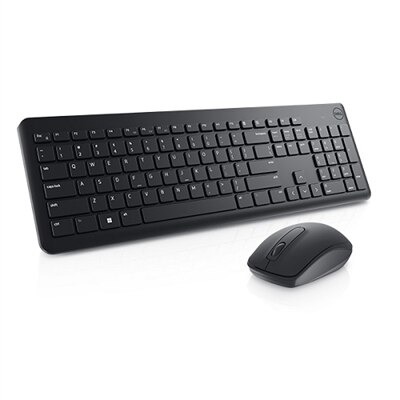
Windows keyboards are computer input devices designed around the familiar Windows layout, typically with a dedicated Windows key, Alt and Ctrl keys, and shortcuts for everyday navigation. They support everything from writing documents and answering messages to entering spreadsheet formulas, editing photos, and playing PC games. The Windows key opens the Start menu, while combinations such as Windows + E open File Explorer and Windows + L lock the computer, making routine actions accessible without reaching for a mouse. For desktop workstations and laptops connected to an external display, a separate keyboard also creates more freedom to position the screen and typing surface independently. Windows keyboards complement Windows Systems in home offices, study spaces, shared family rooms, and dedicated gaming setups. Their size and layout shape how those spaces function. A full-size keyboard includes a number pad, navigation keys, and a function row, giving frequent spreadsheet users and anyone entering long strings of numbers a familiar arrangement. A tenkeyless keyboard removes the number pad while generally retaining dedicated arrows and navigation controls, leaving more room for mouse movement. Compact layouts reduce the footprint further, although some commands move to secondary key combinations. That trade-off matters during ordinary tasks: a student writing a paper may rarely need a number pad, while someone reconciling household expenses may use it every evening. Programmers, writers, and people who regularly edit lengthy documents often value easy access to punctuation, Home, End, and Delete. Layout preferences also extend to key spacing, the shape of the Enter key, and the placement of frequently used controls. A compact frame does not necessarily mean smaller keys, but layouts vary enough that the overall width alone cannot describe the typing experience. Clearly printed legends and an arrangement that feels familiar can make a keyboard easier to share between household members. For an external laptop keyboard, the practical fit includes enough desk depth for comfortable screen placement, space for a pointing device, and a stable surface that does not shift during a busy stretch of typing.
The feel of a Windows keyboard comes from its switch mechanism, keycap shape, key travel, and construction working together. Membrane keyboards commonly have a cushioned bottom-out feel, while scissor mechanisms often provide the short, controlled movement associated with laptop typing. Mechanical keyboards use individual switches beneath the keys and can feel quite different from one another. Linear switches move smoothly through the keystroke; tactile switches provide a noticeable bump; clicky switches add an audible click. Mechanical does not automatically mean loud, and membrane does not automatically mean silent: switch design, stabilizers, the enclosure, and the force of each keystroke all affect sound. In a shared office or a room where someone is attending an online class, a subdued typing sound may matter more than a pronounced click. For a writer who spends hours revising paragraphs, consistent resistance and comfortably shaped keycaps may be more noticeable than decorative lighting. Gaming use introduces other considerations, including reliable recognition of simultaneous key presses, accessible controls, and enough space to move a mouse freely. Anti-ghosting and key rollover describe aspects of how a keyboard handles multiple inputs, but their implementation differs by design. Materials influence both everyday feel and long-term wear. Plastic housings can keep a keyboard light enough to move between rooms, while metal top plates or frames may add weight and rigidity. Keycap materials and the method used to create their legends affect surface texture and how well markings withstand repeated contact. Textured finishes can feel different from smooth surfaces, especially after a long work session. Comfort also depends on the keyboard’s front-edge height, slope, and distance from the body. Adjustable feet change the angle, but a steeper position is not necessarily more comfortable; a relaxed wrist position and an easy reach to the keys matter more. Split or curved layouts may suit some typing preferences, although unfamiliar arrangements can take time to learn. A palm support can provide a resting place between typing sessions without substituting for comfortable desk and chair positioning.
Connection type determines how a Windows keyboard fits into a daily routine. Wired USB keyboards provide a direct connection without keyboard batteries to recharge or replace, making them practical for a stationary desk or a shared computer that needs a straightforward setup. The connector still matters: a keyboard cable must match an accessible port, or the setup may require a compatible adapter. Wireless keyboards connect through Bluetooth or a separate USB receiver, reducing cable clutter and allowing more flexibility when repositioning the keyboard. Bluetooth requires a compatible computer, while receiver-based connections occupy a USB port. Wireless performance depends on the keyboard, connection method, nearby interference, and power state, so responsiveness cannot be judged by the word wireless alone. Multi-device pairing, where supported, can help someone move between a work computer and a personal laptop without keeping two keyboards on the desk. Basic typing often works through standard operating system support, but programmable buttons, lighting controls, and other advanced functions may require compatible software. Battery arrangements vary as well: replaceable batteries suit some routines, while rechargeable designs introduce charging intervals and cable requirements. Backlighting can improve key visibility in a dim room, although bright, legible key markings remain useful in daylight and illumination can affect wireless battery life. Everyday care helps preserve the typing surface and the spaces between keys. With the keyboard disconnected or powered off, loose crumbs and dust can be removed gently, and exposed surfaces can be wiped according to the manufacturer’s instructions. Liquid should not be sprayed directly onto the keyboard, and keycaps should only be removed when the design supports it. Spill resistance, when specified, is not the same as waterproofing. Durability also involves the cable, charging port, feet, and frequently pressed keys, not just a stated switch lifespan. For students, remote workers, hobbyists, and PC gamers, a keyboard can be a thoughtful gift when its layout, connection, and sound suit the recipient’s habits. A quiet, compact typing surface for a shared apartment serves a different purpose from a full-size board for daily number entry. The most useful match feels natural during those repeated, ordinary moments: drafting a message, finishing an assignment, navigating a document, or settling into an evening game.
FAQs:
When selecting a Windows keyboard for productivity, consider features such as dedicated shortcut keys for Windows functions, comfortable key spacing, ergonomic design to reduce strain during long typing sessions, and reliable connectivity options like wired USB or Bluetooth. Backlit keys and customizable function keys can also enhance your workflow, especially if you frequently multitask or work in low-light environments.
Modern wireless Windows keyboards offer reliable performance for most everyday tasks, thanks to advancements in Bluetooth and RF technology. They provide the added benefit of a clutter-free workspace and easy portability. For users who prioritize minimal input lag, such as gamers or professionals working with sensitive data, a wired connection may still be preferable. However, for general use, wireless options are highly dependable.
To guarantee compatibility, check that the keyboard is specifically designed for Windows operating systems and supports the version you’re using. Most Windows keyboards will include a Windows key and function keys mapped for Windows shortcuts. It's also helpful to verify that your device has the necessary ports or Bluetooth support for your chosen keyboard.
A dell keyboard is engineered to deliver seamless integration with Windows systems, offering a familiar layout, reliable performance, and easy access to Windows-specific shortcuts. These keyboards are tested for compatibility with a wide range of Dell devices, ensuring a smooth user experience whether you’re working, studying, or gaming.
Many modern Windows keyboards are designed with multi-device support, allowing you to switch between computers, tablets, or even smartphones with the press of a button. This is especially useful in environments where you need to manage several devices, making it easy to stay productive without juggling multiple keyboards.
FAQs:
When choosing a Windows keyboard, consider features such as dedicated Windows shortcut keys, customizable backlighting, ergonomic design, and compatibility with your device. Additional features like programmable keys, multimedia controls, and wireless connectivity can also enhance your experience.
While Windows keyboards are optimized for Windows OS, many models can also work with other operating systems such as macOS or Linux. However, some function keys or shortcuts may operate differently or require additional configuration.
Membrane keyboards use a pressure pad system for key actuation, offering a quieter and softer typing experience. Mechanical keyboards use individual switches for each key, providing tactile feedback and durability, making them popular among gamers and typists.
Windows keyboards typically include shortcut keys that allow you to quickly access features like Task View, File Explorer, and system controls. Refer to your keyboard’s manual for a list of supported shortcuts, or visit the Windows support website for more information.
Many Windows keyboards support function key customization through manufacturer software or Windows settings. This allows you to assign specific actions, macros, or shortcuts to enhance productivity and personalize your workflow.