$14.99
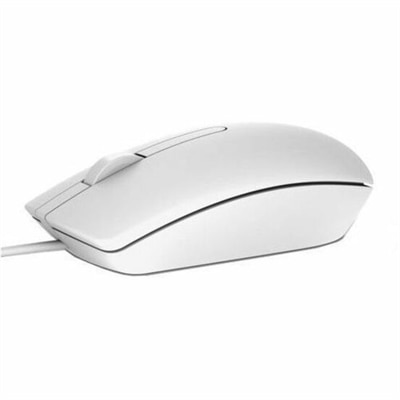
A white wired mouse featuring optical LED tracking for consistent, reliable everyday performance.
Wired optical mice are an essential accessory for anyone seeking precision and reliability in their computing experience. Perfect for both professional and personal use, these devices offer a seamless connection and responsive performance that can enhance productivity and gaming alike. With a variety of designs to suit different preferences, wired optical mice provide the accuracy and control needed for detailed tasks and smooth navigation. Explore our selection to find the ideal wired optical mouse that meets your needs and elevates your digital interactions.
A white wired mouse featuring optical LED tracking for consistent, reliable everyday performance.
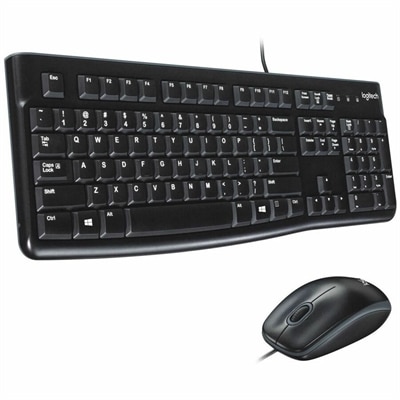
A reliable wired keyboard and ambidextrous optical mouse combo featuring USB plug-and-play connectivity and comfortable full-size designs.
Wired optical mice are practical, dependable input devices for everyday computer use. They use an optical sensor, typically an LED-based tracking system, to read movement across a desk surface and translate it into precise cursor control. A USB cable connects the mouse directly to a compatible computer, allowing it to draw power from the USB port rather than requiring disposable or rechargeable batteries. In many cases, setup is as simple as plugging the cable into an available USB-A port and beginning to work, with no charging routine, pairing process or additional software required. This plug-and-play design makes a wired optical mouse a convenient choice for home offices, classrooms, shared workspaces and family computers. It can also be useful when a dependable backup is needed for a laptop or desktop, particularly when a wireless mouse is misplaced or its battery runs low. Optical tracking performs well on most clean, flat desk surfaces, including a mouse pad, laminate desktop or finished wood table. For the most consistent movement, keep the sensor area free of dust and use a surface with enough contrast for the optical system to read accurately. Standard models often offer straightforward three-button control with a clickable scroll wheel, while other designs may include additional buttons or a shape intended for longer work sessions. An ambidextrous design can suit left- and right-handed users alike, making it a sensible option for shared spaces, computer labs and households where more than one person uses the same computer.
When choosing a wired optical mouse, consider how it will fit into the surrounding workspace as much as its technical specifications. A compact shape can be easy to carry with a laptop between rooms, a classroom or a co-working space, while a full-size shape may provide more palm support during long stretches of document editing, browsing or spreadsheet work. The cable length matters as well: a cord should reach the computer comfortably without pulling at the mouse or creating unnecessary loops across the desk. Check the computer’s available ports before purchasing, especially if the system has a limited number of USB connections or relies on a hub, adapter or docking accessory. Resolution, often expressed in DPI, describes how much the cursor moves in response to physical mouse movement. A moderate setting is generally suitable for email, web browsing, writing and routine office applications, while adjustable sensitivity can help users who move between detailed design tasks, larger displays and fast-paced games. Higher DPI does not automatically mean a better experience; smooth, predictable tracking and comfortable control are often more important for daily use. Button placement should feel natural, and the scroll wheel should provide enough resistance to move through long webpages or documents without feeling loose. A wired mouse may also appeal to users who value a steady connection for gaming and other responsive applications. Although performance depends on the computer, software and individual preferences, a direct USB connection avoids the pairing interruptions or wireless signal concerns that some users prefer to eliminate. Those who want a cable-free desk setup can explore Wireless Laptop Mice, while a wired optical model remains a strong fit for anyone who prioritizes continuous power and simple operation.
A wired optical mouse can be a thoughtful, useful addition to a home workstation or a practical gift for someone setting up a first computer, refreshing a study area or working from a temporary desk. It is especially suitable for students, remote employees, reception areas, libraries and anyone who spends time navigating documents, web pages, creative applications or communication tools. Because the connection is direct, it can be handed to another user and put into service with very little explanation. That simplicity is helpful during the cooler months, when work, study and entertainment may move indoors and a comfortable desk setup becomes part of the daily routine. Look for a shape that matches the recipient’s hand size and preferred grip, whether that is a relaxed palm grip, a fingertip grip or a more controlled claw grip. Users who switch between left and right hands may appreciate an ambidextrous profile, while those who work for extended periods may prefer gently contoured sides and a surface that is easy to clean. A responsive scroll wheel, clearly separated buttons and a flexible, well-managed cable can make small daily tasks feel more natural. Keep the mouse on a stable, reasonably smooth surface, route the cable away from areas where it may snag and disconnect it before moving the computer to help protect the port. With basic care, a wired optical mouse can provide consistent navigation for work, learning and personal computing without the maintenance associated with batteries or wireless pairing. Whether placed beside a desktop monitor, packed with a laptop for travel or kept as a reliable spare, it offers a straightforward way to control a computer with familiar, responsive movement.
Add the products you would like to compare, and quickly determine which is best for your needs.