Wireless Peripherals
Wireless peripherals offer the freedom to create a clutter-free and efficient workspace, whether at home or in the office. With a wide range of options available, finding the right wireless peripherals can help streamline daily tasks and enhance productivity. Explore keyboards, mice, headsets, and other essential accessories designed to provide flexibility and convenience without the hassle of cords. Discover how upgrading your setup with wireless peripherals can make a difference in your everyday computing experience.
This product is not available
Check out the following recommendations.




Wireless Peripherals
Wireless peripherals make it easier to create a comfortable, uncluttered computer setup by connecting keyboards, mice, headsets, and other accessories without a permanent cable between each device and your computer. Most connect through Bluetooth or a 2.4GHz USB receiver. Bluetooth is convenient for laptops and tablets because it typically avoids occupying a USB port, while a 2.4GHz receiver can provide a responsive connection that suits gaming, video calls, and everyday productivity. Some peripherals support both connection methods, allowing you to move from a home office to a shared workspace or pair with more than one compatible device. When browsing wireless peripherals, start by considering the computer or devices you plan to use, the operating systems they run, and the ports available for a receiver or charging cable. Battery life is another important factor. Rechargeable models reduce the need for disposable batteries and can be topped up between tasks, while replaceable-battery designs may be convenient when you want to resume using an accessory immediately. Look for clear battery indicators, an included charging cable when applicable, and power-saving features that help extend use between charges. Range also matters, especially when a computer is connected to a television or positioned across a larger desk. A stable connection can help keep typing, pointer movement, and audio smooth as you sit back, move around, or switch between work and relaxation.
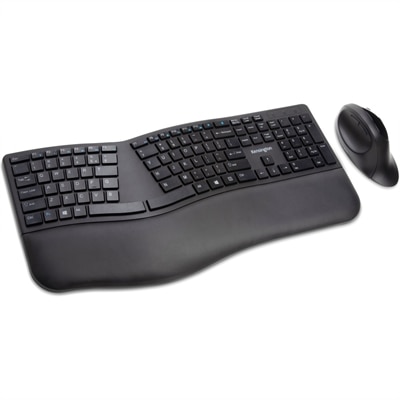
Wireless keyboards are useful for people who want a cleaner desk, a flexible workstation, or more freedom to position a display and input devices comfortably. Full-size layouts generally include a number pad and can be helpful for spreadsheets, budgeting, and frequent data entry, while compact layouts leave more room for a mouse and are easier to carry with a laptop. Pay attention to key shape, travel, backlighting, shortcut controls, and the overall feel of the keyboard. A low-profile design can feel familiar to someone who prefers a laptop-style typing experience, while more pronounced keys may offer tactile feedback for longer writing sessions. A keyboard with media controls can be helpful in a family room or entertainment area, where adjusting volume or playback from a comfortable distance is part of the experience. Some compact options include an integrated touchpad, creating a practical way to navigate menus on a television-connected computer without a separate mouse. For more information about choosing a pointer device for browsing, creative work, travel, or everyday computing, explore Wireless Mice. Wireless mice are available in different shapes and sizes, so consider hand size, grip style, button placement, sensor precision, and scroll-wheel design. A smaller mouse can fit easily in a laptop bag, while a larger contoured shape may provide more support during extended work sessions. Quiet-click models can be considerate in libraries, shared offices, and bedrooms, and adjustable sensitivity can make it easier to move between detailed creative tasks and fast navigation. For gaming, responsiveness, programmable controls, and a secure low-latency connection may be priorities; for office work, comfort and dependable tracking may matter more.
Wireless headsets and related audio accessories can round out a setup for meetings, classes, entertainment, and multiplayer gaming. A headset with a built-in microphone keeps conversations focused and avoids the extra space required by a standalone microphone, while adjustable headbands, padded earcups, and a balanced weight can make a noticeable difference during long sessions. Consider whether you need active noise cancellation, passive sound isolation, sidetone, or controls for muting and volume. A clear microphone can help colleagues and teammates hear your voice without repeated requests, particularly in a busy household or shared workspace. For casual listening, battery life and comfort may be more important than advanced controls; for gaming, low-latency audio and a reliable connection can help sounds arrive in step with what appears on screen. Wireless peripherals also make thoughtful gifts for students setting up a study area, remote workers improving a home office, travelers who want fewer cables in a bag, and family members building a flexible entertainment space. A cohesive set can turn a crowded desk into a calmer place, with room for notebooks, a cup of coffee, or a second display. During cooler months, a wireless setup can be especially convenient when a laptop is used from a comfortable chair or a television serves as a larger screen for work and streaming. Before choosing, check compatibility, connection type, charging requirements, included accessories, warranty information, and the return or support options available. Matching each peripheral to the way it will actually be used helps ensure that the setup feels natural, responsive, and easy to maintain long after it is connected.
FAQs:
Wireless peripherals provide a clutter-free environment, greater flexibility in device placement, and enhanced portability. They allow users to move freely without being tethered to a desk, making them ideal for multi-device setups, collaborative spaces, and users who frequently transition between locations.
Most wireless peripherals connect through Bluetooth or a 2.4GHz USB receiver. Bluetooth offers broad compatibility with laptops, tablets, and smartphones, while 2.4GHz USB receivers are favored for their low-latency connections, especially in gaming and professional environments.
Many modern wireless peripherals support multi-device pairing, allowing users to switch between computers, tablets, and even smartphones with the press of a button. This feature is especially useful for those who multitask across different platforms throughout the day.
Key features to consider include ergonomic design for comfort, battery life or rechargeability, customizable buttons or keys, and compatibility with your operating system. Some models also offer adjustable sensitivity, silent operation, and programmable shortcuts to enhance productivity.
Wireless peripherals are ideal for remote workers, students, gamers, and anyone seeking a more organized and flexible workspace. They also make excellent gifts for tech enthusiasts, students heading off to college, or professionals looking to enhance their home office setup.