An Error Message Referencing a Missing File Named CredDB.CEF or CredDB2.CEF Appears on Login When Dell Encryption is Installed
Zusammenfassung: On computers with Dell Encryption installed, a prompt may be seen referencing a "file not found" when a user logs in to Windows.
Dieser Artikel gilt für
Dieser Artikel gilt nicht für
Dieser Artikel ist nicht an ein bestimmtes Produkt gebunden.
In diesem Artikel werden nicht alle Produktversionen aufgeführt.
Symptome
Affected Products:
- Dell Encryption
Affected Versions:
- v8.17
- v8.17.1
- v8.17.2
- v8.18.0
With Dell Encryption installed, on login you may see a prompt with the following message:
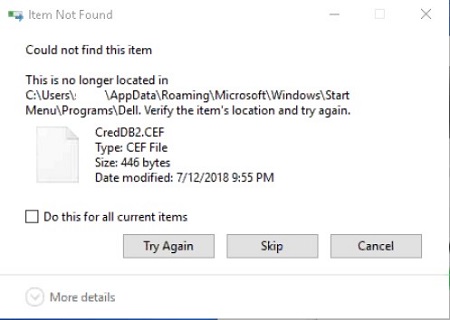
During login, various applications may attempt to read a hidden file that Dell Encryption uses to process and manage protected files. Based on changes that have been introduced to Windows by Microsoft to allow for a new method of reading files during login, Dell Encryption hides the creddb2.cef files, but are viewable by third-party applications.
Ursache
Not Applicable
Lösung
Dell Encryption has introduced a change in how files are handled during the login sequence, along with how files are synced to the computer to resolve this error. Upgrade Dell Encryption to v10.0.0.12, A31 or later to ensure resolution.
Download: https://www.dell.com/support/home/product-support/product/dell-data-protection-encryption/drivers
Betroffene Produkte
Dell EncryptionArtikeleigenschaften
Artikelnummer: 000130821
Artikeltyp: Solution
Zuletzt geändert: 17 Aug. 2026
Version: 12
Antworten auf Ihre Fragen erhalten Sie von anderen Dell NutzerInnen
Support Services
Prüfen Sie, ob Ihr Gerät durch Support Services abgedeckt ist.