No Power using Undersized AC Adapter on Precision 7680 and 7780 Mobile Workstations
Summary: The following article provides information about identifying the correct AC adapter size to avoid a No Power issue. This is seen on Precision 7680 and 7780 Mobile Workstations.
This article applies to
This article does not apply to
This article is not tied to any specific product.
Not all product versions are identified in this article.
Symptoms
Undersized AC adapter with a low battery can cause a No Power issue
Plugging in an undersized or Non-Dell AC adapter can lead to No Power issues:
No Power Issues:
- A laptop is turned off (In the off state (S5)). It does not turn on during start-up with a battery under a two percent charge and connecting an AC Adapter with less than 90 W.
- A laptop is turned off (In the off state (S5)). It does not turn on during start-up with a battery under a five percent charge and connecting a Non-Dell AC adapter.
This affects the following Precision products:
- Precision 7680 Mobile Workstation
- Precision 7780 Mobile Workstation
Cause
These products operate under the following restrictions:
- Non-Dell AC adapters do not support turning on when the main battery is under five percent.
- AC adapters that are less than 90 W do not support turning on when the main battery is under two percent.
- An AC adapter with a minimum of 90 W is required as per the Dell Power policy.
- When the laptop is turned off, it requires at least a 60 W AC adapter to charge the laptop battery.
Resolution
Use the following rules to ensure that your laptop turns on and it keeps charging:
- Use an AC adapter that is at least 90 W.
- When using an AC adapter under 90 W, ensure that the battery has over a two percent charge.
- When using a Non-Dell AC adapter, ensure that the battery has over a five percent charge.
- Ensure that your AC adapter or dock is connecting to the correct ports on the laptop:
-
There are two Type-C ports with a Thunderbolt symbol on these laptops that can take an AC adapter or dock.

-
There is one Type-C port without a Thunderbolt symbol on these laptops that cannot take an AC adapter or dock.
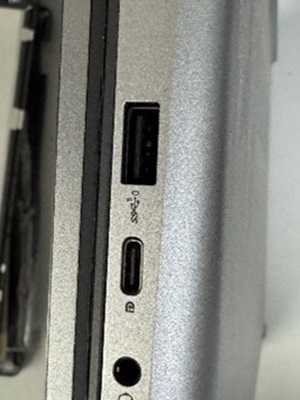
-
- When using a Dell Thunderbolt Dock (WD19TB or WD19TBD) with your laptop, ensure that the AC adapter is at least 180 W.
- When using a Dell Performance Dock (WD19DC or WS19DCS) with your laptop, ensure that the AC adapter is at least 240 W.
Note: Dell Technologies advise removing any Type-C AC adapter or docking station from the laptop's Type-C port under the following condition:
- A Dell 180 W or 240 W AC adapter with a barrel connector is connected to charge the laptop battery from below 10 percent.
Affected Products
Precision 7680, Precision 7780Article Properties
Article Number: 000323075
Article Type: Solution
Last Modified: 29 Jul 2025
Version: 2
Find answers to your questions from other Dell users
Support Services
Check if your device is covered by Support Services.