RecoverPoint for Virtual Machines: Process crashes on vRPAs causing replication impact
Summary: Consistency Groups (CGs) in error state as RecoverPoint Appliances (RPAs) are unable to access Repository (KVOL) and Journal (JVOL) volumes.
This article applies to
This article does not apply to
This article is not tied to any specific product.
Not all product versions are identified in this article.
Symptoms
In RecoverPoint for VMs (RP4VMs) environments, Consistency Groups (CGs) may go into an error state as the RPAs cannot access the Repository and the Journal volumes.
Errors in dashboard or system status output:
ERROR: Journal volume [Copy, PROD, IOFilter_JVOL_00044] cannot be accessed by: RPA 2
Possible errors in control/replication logs:
2020/02/12 23:40:02.275 - #0 - 13659/13550 - MultiPath: errno=0 PathImporter::importFinished: got MPI error: SanDiscoveryBoxMgrProxy connection lost (maybe storage process died?) a_res.error = 1
2020/02/12 23:40:02.275 - #2 - 13631/13550 - MultiPath: MPVolumeConnectingState::handleImportedPaths: requesting non-optimized:  a_volume = 0x483a04edc455f87e (StorageType=RP_VSTORAGE, revision=
2020/02/12 23:40:02.275 - #0 - 13631/13550 - MultiPath: errno=0 PathImporter::importFinished: got MPI error: SanDiscoveryBoxMgrProxy connection lost (maybe storage process died?) a_res.error = 1
2020/02/12 23:40:02.275 - #2 - 13631/13550 - MultiPath: MPVolumeConnectingState::handleImportedPaths: requesting all:  a_volume = 0x483a04edc455f87e (StorageType=RP_VSTORAGE, revision=
2020/02/12 23:40:02.275 - #0 - 13631/13550 - MultiPath: errno=0 PathImporter::importFinished: got MPI error: SanDiscoveryBoxMgrProxy connection lost (maybe storage process died?) a_res.error = 1
2020/02/12 23:40:02.275 - #2 - 13631/13550 - MultiPath: MultiIOSender::finish: IO error m_volume.getGuid() = 0x483a04edc455f87e &m_io = 0x7f5ef4887950 this = 0x7f5ef4887940 a_status = general error MPVolumeConnectingState
Storage log shows that the logging stopped prior to the current time (process not running).
Another symptom may be the replication process restarting.
The RPA kernel log (extracted
The RPA kernel log (extracted
*/files/var/log/kern.log) shows Out of memory killing of the replication process:
Nov 26 13:36:40 localhost kernel: [4545420.314953] Out of memory: Kill process 4842 (replication) score 530 or sacrifice child
Nov 26 13:36:40 localhost kernel: [4545420.354484] Out of memory: Kill process 4842 (replication) score 530 or sacrifice child
Cause
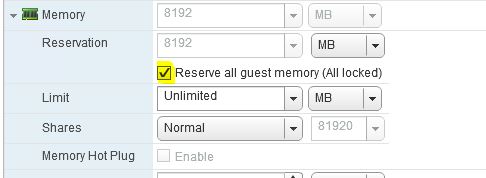
The RPA processes crash due to a lack of memory. RPA VMs did not have all memory reserved.
Resolution
Workaround:
Reboot the RPAs.
Resolution:
Verify that all the RPAs have all guest memory reserved.
Under vSphere, right-click the vRPA VM > Edit settings… > Expand the Memory section > Select Reserve all guest memory (All locked) > Click OK.
Affected Products
RecoverPointProducts
RecoverPoint, RecoverPoint for Virtual MachinesArticle Properties
Article Number: 000071407
Article Type: Solution
Last Modified: 06 Jan 2026
Version: 5
Find answers to your questions from other Dell users
Support Services
Check if your device is covered by Support Services.