IDPA: Deployment cannot proceed, with Error: ACM hostname does not match DNS for ACM IP
Summary: Deployment Configuration screen has error "ACM hostname does not match with the DNS entry for ACM IP address {0}. Refresh the page after correcting ACM hostname." due to mix up of private and public network interface. ...
This article applies to
This article does not apply to
This article is not tied to any specific product.
Not all product versions are identified in this article.
Symptoms
During IDPA deployment, the Configuration screen shows the following error:
"ACM hostname does not match with the DNS entry for ACM IP address {0}. Refresh the page after correcting ACM hostname."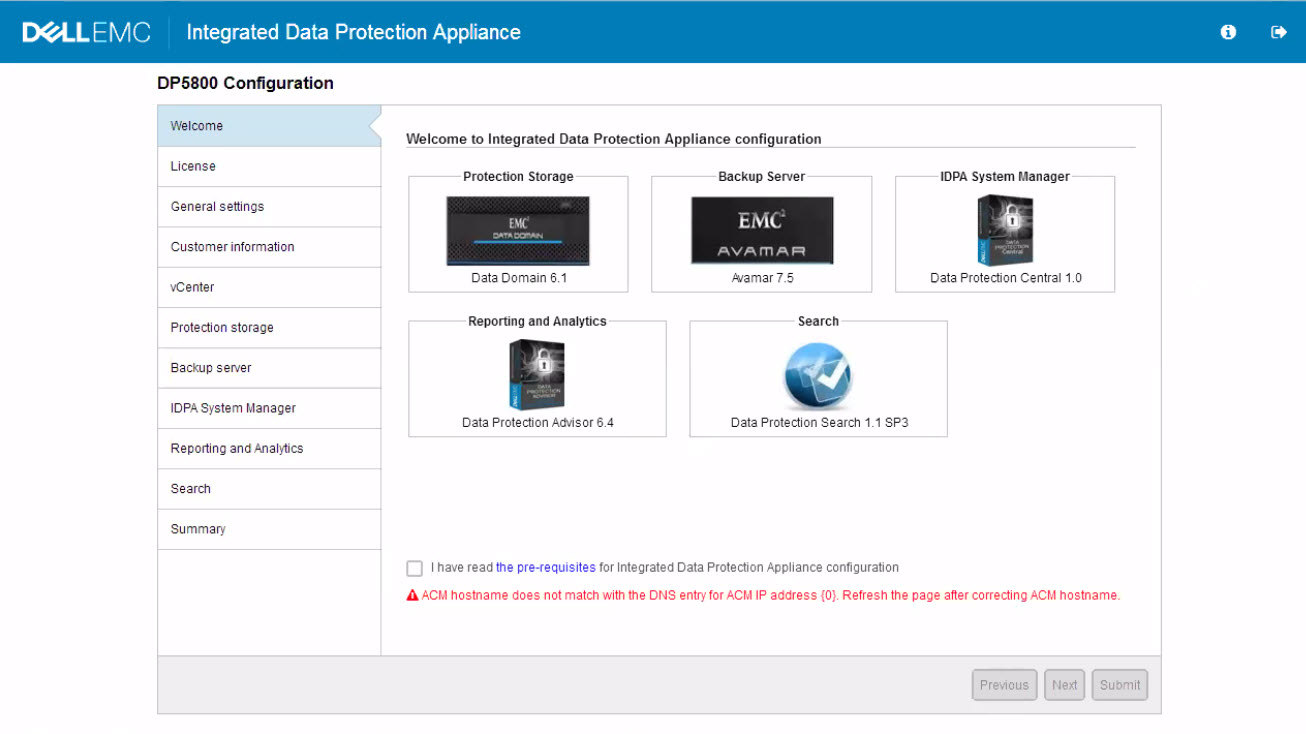
Cause
ACM is listed with Private IP for Eth1 interface instead of Public.
Resolution
Change Eth1 on ACM to Public IP and Eth2 to Private IP on ACM.
Restart WebApp service on ACM:
- Connect into ACM with putty as root
- Restart WebApp Service:
service dataprotection_webapp restart- Wait 15 minutes before logging back into ACM and should see that the error is no longer present.
Products
Integrated Data Protection Appliance FamilyArticle Properties
Article Number: 000165315
Article Type: Solution
Last Modified: 02 Apr 2025
Version: 3
Find answers to your questions from other Dell users
Support Services
Check if your device is covered by Support Services.