NVP-vProxy: Recover fails with virtual machine compatibility message
Summary: The NetWorker VMware Protection (NVP) integration is configured with the vProxy Appliance. The recover fails with "Virtual machine with MORef 'vm-###' is not properly configured. Ensure that the VM is compatible with the vSphere Environment." ...
This article applies to
This article does not apply to
This article is not tied to any specific product.
Not all product versions are identified in this article.
Symptoms
The NetWorker Management Console (NMC) or NetWorker Web User Interface (NWUI) is being used to run a virtual machine (VM) recover to a different vSphere environment. The consoles recover status and recover session log shows:
YYYY-MM-DD HH:MM:SS INFO:   [123] Disconnected from session on vCenter 'MY_VCENTER'.
YYYY-MM-DD HH:MM:SS ERROR:  [123] Failed to recover to a new VM. Unable to load VM with MORef 'vm-###'.  Virtual machine with MORef 'vm-###' is not properly configured. Ensure VM is compatible with the vSphere Environment.
The vProxy /opt/emc/vproxy/runtime/logs/vbackupd/vbackup-engine.log shows:
YYYY-MM-DD HH:MM:SS ERROR:  [123] 951eca88-1f61-48a2-98b7-4d39427e769a: Virtual machine with MORef 'vm-###' is not properly configured. Ensure VM is compatible with the vSphere Environment.
YYYY-MM-DD HH:MM:SS ERROR:  [123] 951eca88-1f61-48a2-98b7-4d39427e769a: Unable to load VM with MORef 'vm-###'.
YYYY-MM-DD HH:MM:SS ERROR:  [123] 951eca88-1f61-48a2-98b7-4d39427e769a: Error in registering VM "[DATASTORE_NAME] NEW_VM_NAME/NEW_VM_NAME.vmx". "Unable to load VM with MORef 'vm-###'.  Virtual machine with MORef 'vm-###' is not properly configured. Ensure VM is compatible with the vSphere Environment."
YYYY-MM-DD HH:MM:SS ERROR:  [123] 951eca88-1f61-48a2-98b7-4d39427e769a: Failed to recover to a new VM. Unable to load VM with MORef 'vm-###'.  Virtual machine with MORef 'vm-###' is not properly configured. Ensure VM is compatible with the vSphere Environment.
YYYY-MM-DD HH:MM:SS NOTICE: vProxy Recover engine received update for resource "951eca88-1f61-48a2-98b7-4d39427e769a". Session State: "Failure"
Cause
The source backup vSphere version is newer than the target recover vSphere environment version. For example, the source vSphere version is 8.0 and the target vSphere version is 7.0. The older vCenter database or ESX host is not recognizing some of the new vSphere VM attributes or components during the registration.
NOTE: Even if both vSphere environments are the same major release, the discrepancy must be identified at the build level.
Resolution
The VM recover should be performed to a vCenter/ESXi environment running the same (or newer) version from the source backup vSphere environment.
VMware vCenter Compatibility
Log in to the VMware vSphere web interface for both the source and target vCenter environments. Click About VMware vSphere and confirm that the target vCenter is the same (or newer) version as the source vCenter.
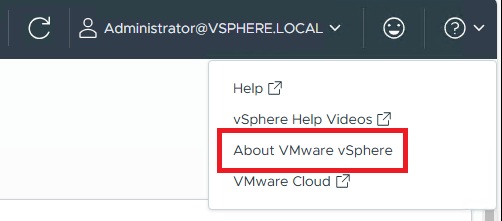
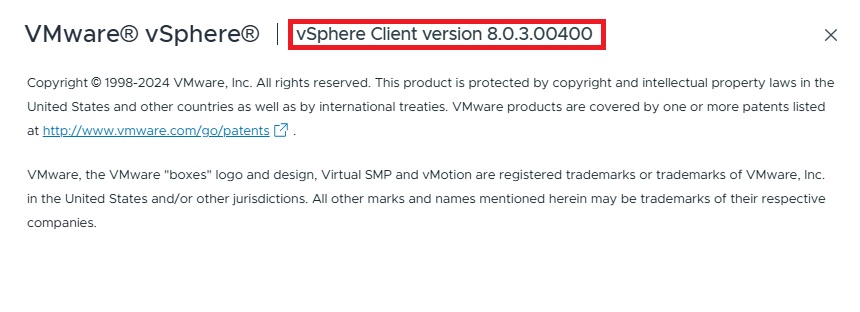
VMware ESXi Compatibility
In the vCenter environment from which the VM was backed up, check the compatibility details of the VM from the VM's Summary tab. This shows the minimum required ESXi version:
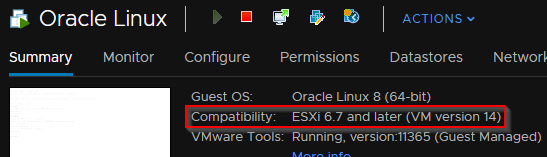
The ESXi version in the target VMware environment must be the same (or newer) version.
Additional Information
To identify build numbers, see these assets:


Article Properties
Article Number: 000200162
Article Type: Solution
Last Modified: 04 Nov 2025
Version: 8
Find answers to your questions from other Dell users
Support Services
Check if your device is covered by Support Services.