Wyse ThinOS AVD, RDSH, or RDP Session Window Temporarily Stops Responding After Network Interruption
Summary: An AVD, RDSH, or RDP session window may temporarily stop responding when the session is interrupted or disconnected due to network connectivity.
This article applies to
This article does not apply to
This article is not tied to any specific product.
Not all product versions are identified in this article.
Symptoms
An affected device is configured to connect using direct RDP, an RDSH broker, or an AVD session. While the user is working within the session, the session stops responding to input. It may display an error message that states, "Missed heartbeat threshold exceeded" with a button for OK.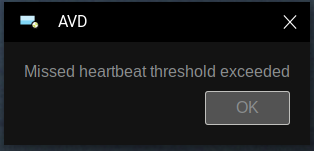
After clicking OK, the session window may not close immediately. The session window does not respond, and the user is unable to reconnect to the session for a time.
Affected Platforms:
- Latitude 3420
- OptiPlex 3000 Thin Client
- Wyse 3040
- Wyse 5070
- Wyse 5470
- Wyse 5470 All-in-One
Affected Operating Systems:
- All ThinOS 9.x versions
Cause
This is the connection-state detection mechanism of the Microsoft AVD client that is used for AVD, RDSH, and RDP sessions. When the session does not receive network data for a time, the session disconnects. Since the session does not receive new data, it does not respond to user input.
Resolution
If session shortcuts are enabled in the configuration, the user can return to the ThinOS desktop at any time. This is performed by pressing CTRL+ALT+down arrow key, then reconnect to the session.
If the user waits, the session window may close automatically. The ThinOS desktop is then displayed, and the user may reconnect the session.
ThinOS firmware and client-side packages are always being improved. Ensure that the latest ThinOS firmware and associated packages are in use.
Affected Products
Latitude 3420, OptiPlex 3000 Thin Client, Wyse 3040 Thin Client, Wyse 5070 Thin Client, Wyse 5470 All-In-One, Wyse 5470, Dell ThinOSArticle Properties
Article Number: 000202627
Article Type: Solution
Last Modified: 08 Sep 2025
Version: 5
Find answers to your questions from other Dell users
Support Services
Check if your device is covered by Support Services.