Secure Connect Gateway: Unable to modify Policy Manager settings due to account being locked
Summary: This article describes a situation when Policy Manager settings on the user interface cannot be modified after a password change on Policy Manager. Also Secure Connect Gateway Lockbox reset. ...
This article applies to
This article does not apply to
This article is not tied to any specific product.
Not all product versions are identified in this article.
Symptoms
The secure Connect Gateway user interface prompts Unknown Error when attempting to modify or disable Policy Manager and cannot save:

The policy Manager user interface is Locked:
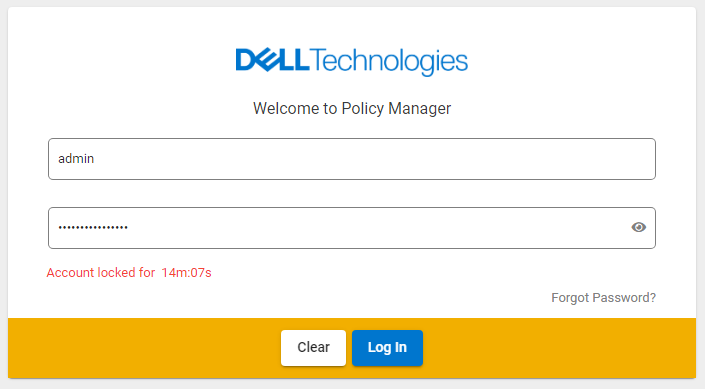
From /var/lib/docker/volumes/esrslog/_data/var/log/esrs/policymanager.log (Error code 423, text "User account is locked"):
ERROR com.dellemc.iot.platform.pmc.service.pm.PolicyManagerInteractionService [http-nio-7778-exec-9, 559af94c-d8ae-48ee-8c49-c7ad28c81564, ] Got exception from server error code is 423, and error text is User account is locked.
ERROR com.dellemc.iot.platform.pmc.controller.advise.PolicyManagerControllerAdvice [http-nio-7778-exec-9, 559af94c-d8ae-48ee-8c49-c7ad28c81564, ] Error for {}
com.dellemc.iot.platform.pmc.exception.PolicyManagerClientException: Something went wrong at Backend. Please try after sometime.
The policy Manager user interface is Locked:
Cause
- The policy Manager password is changed without disabling SCG-PM connection first.
- Secure Connect Gateway Lockbox is reset during upgrade or troubleshooting
Resolution
1, Log in to Secure Connect Gateway using SSH, issue the following command:
2, Verify from the Secure Connect Gateway user interface the Policy Manager setting is cleared,
3, Wait for Policy Manager user interface Lock time to expire, and confirm that the Policy Manager Login is working,
4, Reconfigure the Policy Manager setting on Secure Connect Gateway.
Pre 5.16: # docker exec -u postgres esrsde-app psql -U postgres -d vapp -c 'delete from policy_manager_config'

Post 5.16: # docker exec esrsde-app psql -U postgres -d vapp -c 'delete from policy_manager_config'
2, Verify from the Secure Connect Gateway user interface the Policy Manager setting is cleared,
3, Wait for Policy Manager user interface Lock time to expire, and confirm that the Policy Manager Login is working,
4, Reconfigure the Policy Manager setting on Secure Connect Gateway.
Additional Information
If the following error is encountered, use the Post 5.16 command.
# docker exec -u postgres esrsde-app psql -U postgres -d vapp -c 'select * from policy_manager_config'
psql: error: connection to server on socket "/var/run/postgresql/.s.PGSQL.5432" failed: FATAL:  Peer authentication failed for user "postgres"
Affected Products
Secure Connect Gateway - Virtual EditionArticle Properties
Article Number: 000205944
Article Type: Solution
Last Modified: 17 Jul 2024
Version: 3
Find answers to your questions from other Dell users
Support Services
Check if your device is covered by Support Services.