NetWorker Microsoft Module:無法從節點的控制台卸載或移除 NetWorker Microsoft 模組
Summary: 無法從控制台卸下 NetWorker Microsoft Module (NMM)。
This article applies to
This article does not apply to
This article is not tied to any specific product.
Not all product versions are identified in this article.
Symptoms
無法從節點卸載或卸下 NetWorker Microsoft Module (NMM) 模組。
卸載精靈隨即啟動,但在程式結束時未完成。
卸載精靈隨即啟動,但在程式結束時未完成。
Cause
有幾種原因可能會導致此征狀:
- 目前安裝的基本問題
- 64 位作業系統上的登錄機碼損毀
- 控制更新資料的登錄機碼損毀
Resolution
使用Microsoft Program Install and Uninstall
 移除程式。
移除程式。
故障診斷程式有助於解決以下問題:

圖 1:啟動 Microsoft 疑難排解程式工具
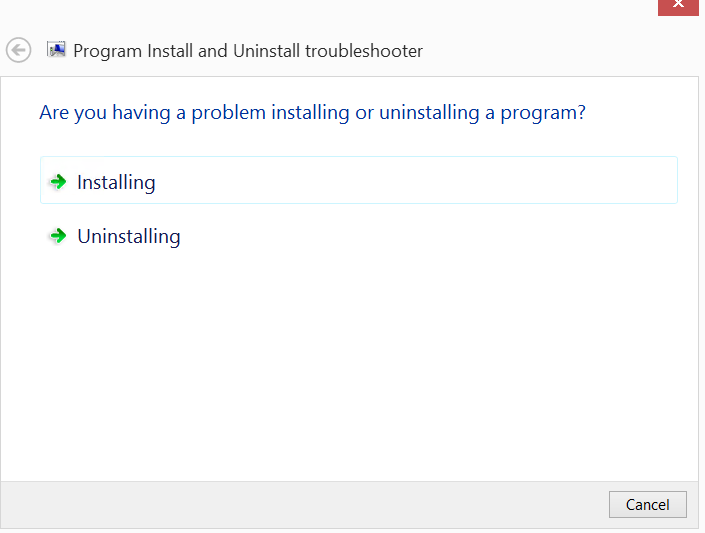
圖 2:詢問問題是否與安裝或卸載問題。

圖 3:選取「卸載」後,請要求卸載哪個程式
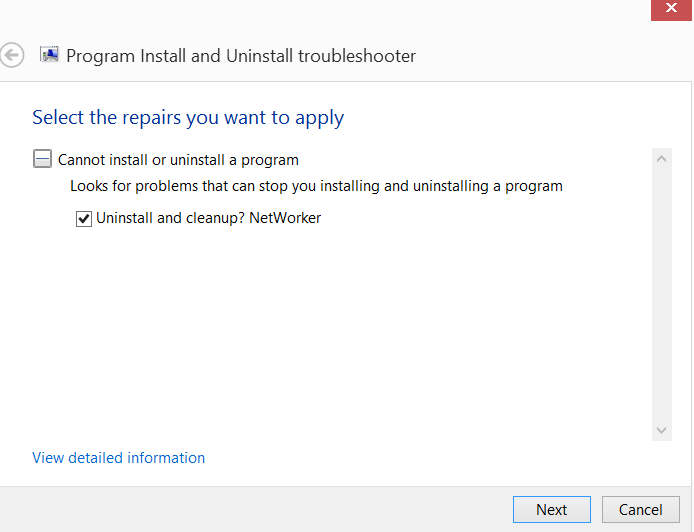
圖 4:選取嘗試執行的修復類型。
移除程式。
故障診斷程式有助於解決以下問題:
- 64 位作業系統上的登錄機碼損毀
- 控制更新資料的登錄機碼損毀
- 避免安裝新程式
- 避免現有程式卸載或更新
- 在控制台中透過新增或移除程式 (或程式與功能) 來禁止卸載程式
- 開啟 Microsoft Program Install and Uninstall Tool。
圖 1:啟動 Microsoft 疑難排解程式工具
- 選取在工具中安裝或卸載程式。
圖 2:詢問問題是否與安裝或卸載問題。
- 選取要卸載的程式。
圖 3:選取「卸載」後,請要求卸載哪個程式
- 選取要執行的修復類型。
圖 4:選取嘗試執行的修復類型。
Additional Information
另一種卸載未透過控制台卸載套件的方法,是透過 Windows Management Instrumentation Command (WMIC):
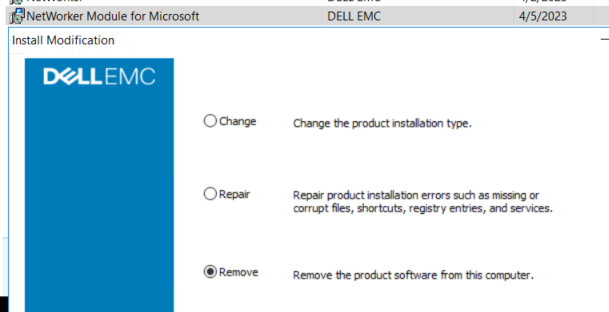
圖 5:NMM 程式和功能安裝修改
卸載應傳回成功: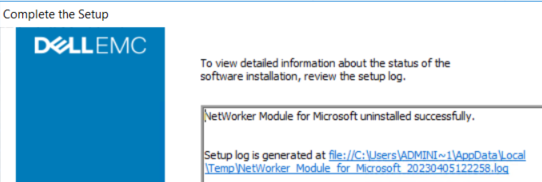
圖 6:成功傳回計畫卸載
- 在用戶端上開啟管理命令提示字元。
- 執行下列 Windows Management Instrumentation 命令以取得已安裝的 Dell 軟體清單:
wmic product where "Vendor = 'Dell EMC'" get name, IdentifyingNumber, PackageName範例:
C:\Windows\system32>wmic product where "Vendor = 'Dell EMC'" get name, IdentifyingNumber, PackageName IdentifyingNumber Name PackageName {A5BACAB0-12BC-42B0-9293-090BE5C40BF8} NetWorker Extended Client NwExtClientMsi.msi {B8D7B32E-28B3-49E2-B951-E7BD0A0C4CC8} NetWorker Module for Microsoft NMM.msi {CF37E77E-6EFE-4A46-B645-F3179661C617} NetWorker NwClientMsi.msi
注意:上述命令會為每個查詢的軟體傳回一個 IdentifyingNumber。IdentifyingNumber 可用來從命令介面 (CLI) 移除軟體。
- 使用 WMIC 使用 NMM 識別編號卸載軟體:
wmic product where "IdentifyingNumber = '{IdentifyingNumber}'" call uninstall 範例:
C:\Windows\system32>wmic product where "IdentifyingNumber = '{B8D7B32E-28B3-49E2-B951-E7BD0A0C4CC8}'" call uninstall Executing (\\WINSRVR2K16\ROOT\CIMV2:Win32_Product.IdentifyingNumber="{B8D7B32E-28B3-49E2-B951-E7BD0A0C4CC8}",Name="NetWorker Module for Microsoft",Version="19.8.0.0")->Uninstall() Method execution successful. Out Parameters: instance of __PARAMETERS { ReturnValue = 0; };
- 移至 控制台>方案與功能 ,並卸載 NetWorker Module for Microsoft:
圖 5:NMM 程式和功能安裝修改
卸載應傳回成功:
圖 6:成功傳回計畫卸載
Affected Products
NetWorker, NetWorker Module for MicrosoftArticle Properties
Article Number: 000212077
Article Type: Solution
Last Modified: 19 Apr 2023
Version: 2
Find answers to your questions from other Dell users
Support Services
Check if your device is covered by Support Services.