NetWorker: server upgraded to 19.11, backup fails reporting "Hostname resolution failed"
Summary: With the transition from NetWorker version 19.10 or earlier to version 19.11, backups fail. The backups reported "Hostname resolution failed"
This article applies to
This article does not apply to
This article is not tied to any specific product.
Not all product versions are identified in this article.
Symptoms
NetWorker was upgraded from 19.10 (or prior) to 19.11. After the upgrade, backups of NetWorker clients fail, reporting "Hostname resolution failed"

The NetWorker client cannot fully resolve the Domain Name System (DNS).
nve:~ # nslookup lnx-srvr03.networker.lan
Server:         192.168.0.2
Address:        192.168.0.2#53

Name:   lnx-srvr03.networker.lan
Address: 192.168.0.9

nve:~ # nslookup 192.168.0.9
** server can't find 9.0.168.192.in-addr.arpa: NXDOMAIN
There is no hosts file entry on the NetWorker server or client for the client's IP address and hostname aliases.
The NetWorker client's /nsr/logs/daemon.raw includes similar messaging to:
NetWorker: How to use nsr_render_log to render .raw log files
90480 MM/DD/YYYY HH:mm:SS  2 1 0 3527829312 3224523 0 client_hostname nsrexecd SYSTEM warning Unable to determine the name of address 'null': Non-recoverable failure in name resolution
90480 MM/DD/YYYY HH:mm:SS  4 6 0 3527829312 3224523 0 client_hostname nsrexecd NSR severe Unable to determine the name of address 'null': Non-recoverable failure in name resolution
If the client cannot resolve the NetWorker server's IP address, the client's backup fails with the following:
Unable to create session channel with nsrexecd on host NETWORKER_CLIENT_NAME to execute command 'savefs -s NETWORKER_SERVER_NAME -c NETWORKER_CLIENT_NAME -g NSR_GROUP_NAME -p -l full -R -v': Unable to determine the name of address 'NETWORKER_SERVER's_IP': Name or service not known

Cause
There are changes to reverse DNS functionality in 19.11. The 19.11 NetWorker client resource contains a new field called reverse DNS state. The 19.11 NetWorker Administration Guide states the following:
Reverse name resolution or reverse DNS resolves IP addresses to hostnames. NetWorker attempts to reduce reverse DNS calls whenever possible. Reverse DNS is configured on every client resource in the NSRLA resource. The attribute reverse DNS state is modified in the NSRLA resource. NetWorker can be configured to use one of the following reverse DNS states:
- Cached: Reverse DNS lookups are allowed, and the lookups can be cached within NetWorker.
- Uncached: Reverse DNS lookups are allowed, and the lookups are not cached within NetWorker.
NOTE: When the reverse DNS state is enabled (cached or uncached), it attempts to look up clients thoroughly. If reverse DNS is not configured correctly, it reports DNS lookup errors. In that case, correct the environment so that the name is resolvable. On a NetWorker server that was upgraded from version 19.10 or below, the default state is uncached unless oldauth is configured for the client. oldauth requires the reverse DNS state to be either cached or uncached. It is recommended to use nsrauth authentication and only enable oldauth authentication when two hosts cannot authenticate by using nsrauth. The oldauth authentication method is not secure. From NetWorker 19.4 and later, oldauth is removed as one of the default authentication methods for all new installations. There is no change when an upgrade is performed. When a NetWorker upgrade is performed, the value oldauth in the host's nsrladb "auth methods" continues to exist. For more information, see the NetWorker Security Configuration Guide https://www.dell.com/support/home/product-support/product/networker/docs.
- Banned: Reverse DNS lookups are not allowed. Populating the alias field on a new client creation is reduced.
Resolution
Use one of the following three options. Depending on the name resolution configuration it may be necessary to perform these actions for NetWorker Server, Storage Node Client resource, and Client resources.
1. Resolve any DNS issues preventing successful FQDN, shortname, and reverse (IP) resolution of the client host.
NetWorker: Name Resolution Troubleshooting Best Practices
2. Create hosts file entries on the NetWorker server and client including the client's IP address, FQDN, and shortname.
Linux: /etc/hosts
Windows: C:\Windows\System32\drivers\etc\hosts
NOTE: When using hosts files to resolve an IP address to a hostname, ensure that there are no conflicts. The IP address must not appear on multiple lines in the hosts file. When adding a hosts file entry, ensure that the host's FQDN and shortname aliases are included on the same line as its IP address.
3. Change the NetWorker server and client's reverse DNS state. Edit the host in the Hosts tab in NMC or use nsradmin to modify the NSRLA resource. These methods are detailed below.
WARNING: RPS enabled clones (vProxy, OAPP, and so forth) may fail if the reverse DNS state is set to banned. For more information, see: NetWorker: RPS-enabled cloning fails after upgrade to 19.11 if the Server has the reverse DNS state set to banned.
NOTE: As per the 19.11 NetWorker Cluster Integration Guide, ensure that clusters have the IP hostname lookup resolvable. If reverse DNS lookups are banned, then the entries must be placed in the hosts file. The NetWorker Cluster Integration Guide is available through: https://www.dell.com/support/home/product-support/product/networker/docs
NMC:
1. Log in to the NMC using an account with Administrative rights, for example, the default Administrator account
2. Go to the Hosts tab.
3. In the hosts list, right-click the NetWorker server, and select Configure Local Agent.
4. From the local agent properties, go to the Advanced tab.
5. Set the Reverse DNS State to banned.
2. Go to the Hosts tab.
3. In the hosts list, right-click the NetWorker server, and select Configure Local Agent.
4. From the local agent properties, go to the Advanced tab.
5. Set the Reverse DNS State to banned.
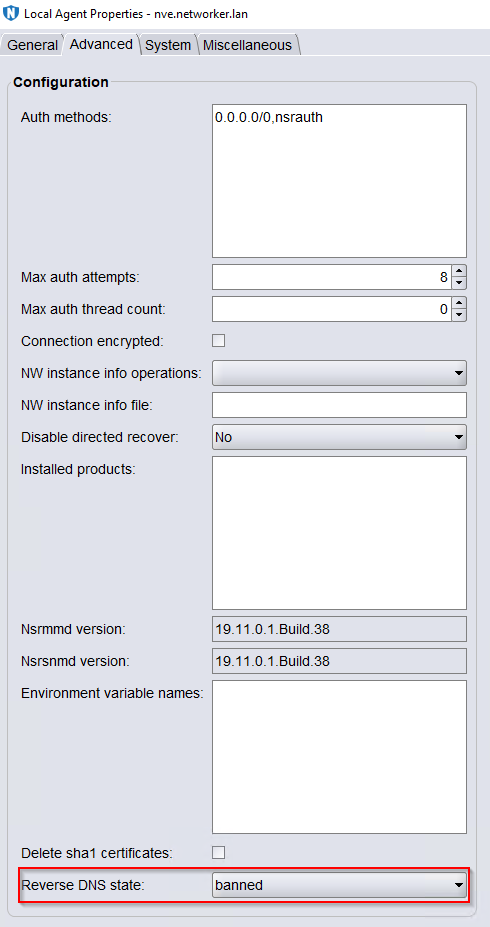
6. Perform a backup of the clients that previously reported "Hostname Resolution Failed"
nsradmin
1. Open an Administrator command prompt or root SSH session on the NetWorker server.
2. Access nsradmin against the nsrexecd process:
2. Access nsradmin against the nsrexecd process:
nsradmin -p nsrexecd3. Set the query to the nsrla resource
. type: nsrla4. Change the reverse DNS state value to banned.
update reverse DNS state: bannedConfirm the changes:
y
5. Validate the changes:
Example:
nve:~ # nsradmin -p nsrexecd
NetWorker administration program.
Use the "help" command for help, "visual" for full-screen mode.
nsradmin> . type: nsrla
Current query set
nsradmin> update reverse DNS state: banned
           reverse DNS state: banned;
Update? y
updated resource id 3.0.64.11.0.0.0.0.191.39.127.102.192.168.0.4(74)
nsradmin> print
                        type: NSRLA;
                        name: nve.networker.lan;
           reverse DNS state: banned;
              nsrmmd version: 19.11.0.1.Build.38;
             nsrsnmd version: 19.11.0.1.Build.38;
          Multi-subnet state: Disabled;
                   TCP Retry: 5;
 NW instance info operations: ;
       NW instance info file: ;
          installed products: ;
                auth methods: "0.0.0.0/0,nsrauth";
           max auth attempts: 8;
        connection encrypted: Disabled;
                 module type: ;
              module version: ;
               administrator: root, "user=nsrnmc,host=nve.networker.lan",
                              "user=root,host=nve.networker.lan";
                        arch: x86_64;
                 kernel arch: x86_64;
                    CPU type: x86_64;
                machine type: server;
                          OS: Linux 4.12.14-122.201-default;
           NetWorker version: 19.11.0.1.Build.38;
              client OS type: Linux;
                        CPUs: 4;
             client timezone: EDT;
                     MB used: 10352;
                  IP address: 192.168.0.4, 10.240.192.221,
                              "fe80::250:56ff:febb:f020",
                              "fe80::250:56ff:febb:b7c0";
  environment variable names: ;
nsradmin> quit
- Perform a backup of the clients that previously reported "Hostname Resolution Failed"
Additional Information
Depending on the environment, it may be necessary to update the failing client's nsrla resource to also include "reverse DNS state" to "banned" as well.
Affected Products
NetWorkerProducts
NetWorker Family, NetWorker SeriesArticle Properties
Article Number: 000231156
Article Type: Solution
Last Modified: 22 Oct 2025
Version: 11
Find answers to your questions from other Dell users
Support Services
Check if your device is covered by Support Services.