DM5500: Vulnerability "SSH Weak Message Authentication Code Algorithms" for SHA1 in use for the SSH server
Summary: This article describes how to disable the Secure Hash Algorithm 1 (SHA‑1) related ciphers on the SSH server of the DM5500 appliance. Disabling SHA‑1-related ciphers are required to remediate the "SSH Weak Message Authentication Code (MAC) Algorithms" vulnerability identified on PowerProtect Data Manager DM5500 systems. ...
This article applies to
This article does not apply to
This article is not tied to any specific product.
Not all product versions are identified in this article.
Symptoms
A security vulnerability scanner may report an "SSH Weak Message Authentication Code (MAC) Algorithms" alert indicating that SHA-1-based ciphers are available for SSH connections to the DM5500 appliance.
Cause
As of 1 February 2026, SHA‑1 is formally considered weak and unsuitable for cryptographic use due to its vulnerability to collision attacks. The current DM5500 software release predates this deprecation. Therefore, SHA‑1-related algorithms are still enabled in the SSH server.
In the next DM5500 software release, the SSH configuration will be strengthened, and all SHA‑1-related ciphers will be removed.
Until that update becomes available, customers should contact Dell Support to apply a workaround that disables SHA‑1 ciphers on the DM5500 SSH server.
Resolution
Note: The DM5500 is a closed appliance; the Linux-level shell access is limited to Dell employees or partners. Engage Dell Support or an authorized person to implement the following workaround if needed.
Note: In case the customer performs the System Configuration, the workaround must be applied again.
- Log in as "admin" to the DM5500 through SSH and gain access to the Linux BASH
- Check that the SHA-1 ciphers are available in the following SSH server:
sshd -T |grep -i sha1
Example output:
!!!! ppoe YOUR DATA IS IN DANGER !!!! # sshd -T |grep -i sha1 macs hmac-sha2-256-etm@openssh.com,hmac-sha2-512-etm@openssh.com,hmac-sha1-etm@openssh.com,hmac-sha2-256,hmac-sha2-512,hmac-sha1 kexalgorithms ecdh-sha2-nistp256,ecdh-sha2-nistp384,ecdh-sha2-nistp521,diffie-hellman-group-exchange-sha256,diffie-hellman-group14-sha1 !!!! ppoe YOUR DATA IS IN DANGER !!!! # - Make a copy of the
/etc/ssh/sshd_configfile using the following command:
cp -p /etc/ssh/sshd_config /etc/ssh/sshd_config.default - Add the following two lines in the
/etc/ssh/sshd_configfile below theHostKeyentry:
MACs hmac-sha2-512-etm@openssh.com,hmac-sha2-512,hmac-sha2-256-etm@openssh.com,hmac-sha2-256
kexalgorithms ecdh-sha2-nistp256,ecdh-sha2-nistp384,ecdh-sha2-nistp521,kex-strict-s-v00@openssh.com
Expected change from: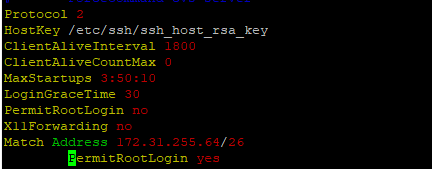
To:
- Restart the SSH server with the following command:
systemctl restart sshd - Verify that the SSH server is up (active) and running after the restart:
systemctl status sshd
Expected output:
!!!! ppoe YOUR DATA IS IN DANGER !!!! # systemctl status sshd ● sshd.service - OpenSSH Daemon Loaded: loaded (/usr/lib/systemd/system/sshd.service; enabled; vendor preset: disabled) Active: active (running) since Mon 2026-03-09 05:01:09 UTC; 5min ago Process: 54258 ExecStartPre=/usr/sbin/sshd -t $SSHD_OPTS (code=exited, status=0/SUCCESS) Process: 54255 ExecStartPre=/usr/sbin/sshd-gen-keys-start (code=exited, status=0/SUCCESS) Main PID: 54261 (sshd) Tasks: 1 Memory: 1.9M CPU: 2.939s CGroup: /system.slice/sshd.service └─54261 /usr/sbin/sshd -D ... skipped ... !!!! ppoe YOUR DATA IS IN DANGER !!!! # - Verify that SHA-1 ciphers are no longer in use:
sshd -T |grep -i sha1 - Open a new SSH session to the DM5500 to verify the user can successfully log in to the DM5500.
Affected Products
PowerProtect Data Manager Appliance, PowerProtect DM5500Article Properties
Article Number: 000436070
Article Type: Solution
Last Modified: 16 Mar 2026
Version: 1
Find answers to your questions from other Dell users
Support Services
Check if your device is covered by Support Services.