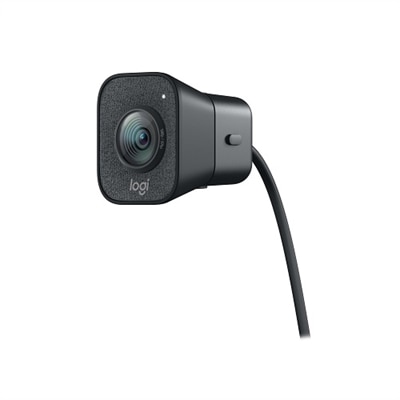
2K Webcams
Elevate your video conferencing, streaming, and online interactions with our selection of 2k webcams. Designed to deliver exceptional clarity and detail, these webcams are perfect for professionals, gamers, and content creators seeking superior image quality. Explore a range of options that cater to various needs and preferences, ensuring you find the ideal 2k webcam to enhance your digital experience. Whether you're working from home or connecting with loved ones, our 2k webcams provide the high-definition resolution you need for crystal-clear communication.
This product is not available
Check out the following recommendations.




2K Webcams
A 2K webcam, also known as a Quad HD webcam, records at 2560 x 1440 resolution, placing it between standard 1080p and 4K. That middle ground is useful for people who want a sharper, more detailed image without the larger file sizes, higher bandwidth demands, and heavier computer workload that can come with 4K video. Fine details such as facial features, hair, glasses frames, and text on a nearby whiteboard appear more defined, while the extra resolution gives you room to crop or adjust your digital framing in compatible software. A 2K webcam can be a practical choice for remote work, online classes, telehealth appointments, livestreaming, video podcasts, and everyday calls with friends and family. It can also help create a more polished appearance when your built-in laptop camera looks soft, dim, or poorly positioned. Browse the broader selection of Web Cameras to compare options for different desks, displays, and communication needs.
When choosing among 2K webcams, begin with the way you expect to use one. For frequent work meetings or presentations, look for clear image reproduction, dependable autofocus, and automatic light correction that can balance a bright window behind you or a dim room during the cooler months. A webcam with a wider field of view may be helpful when you want to include a second person, show a small workspace, or sit farther from the display, while a narrower view can keep attention centered on you and reduce distractions around the room. Frame rate matters as well: 30 frames per second is common for calls and recordings, while smoother motion may be useful for demonstrations, creative work, or streaming. Built-in microphones can simplify a tidy desk setup, particularly when they include noise reduction to soften the sound of keyboard taps, air conditioning, or activity in another room. Even so, microphone performance depends on placement and acoustics. Position the webcam near eye level, keep it close to the center of the screen, and avoid placing it directly beside a noisy fan or speaker. Features such as a physical privacy cover, an adjustable mount, a tripod thread, and a USB connection that works with your computer can make everyday use easier and more comfortable.
Lighting and placement often have as much impact on video quality as resolution. A 2K camera can capture a detailed image, but a face lit only by a bright window may look shadowed, while a ceiling light can create harsh highlights and dark areas beneath the eyes. Soft light placed in front of you, slightly above eye level, usually produces a more natural appearance. During brighter seasons, turn your desk toward indirect daylight rather than sitting with the window directly behind you; as the weather changes, a small desk lamp or monitor light can help maintain a consistent look. Autofocus is useful when you move between a seated call and a document or object held up to the camera, though fixed-focus models may be perfectly suitable for a stationary desk. Consider software compatibility, too. Most USB webcams are designed for straightforward use with common video meeting, recording, and streaming applications, but available controls for exposure, white balance, zoom, and framing can vary. A 2K webcam may be a thoughtful gift for a college student attending virtual classes, a relative who enjoys keeping in touch from home, a creative hobbyist recording tutorials, or a professional refreshing a home office. For a shared household, prioritize flexible mounting and an easy privacy solution. For a dedicated work area, consider how the camera will sit above a laptop or monitor and whether its cable length will reach without pulling against the port. With the right combination of resolution, lighting, audio, framing, and placement, a 2K webcam can make conversations feel more present, presentations look more composed, and recorded video appear crisp without demanding the resources of a 4K setup.
FAQs:
A 2K webcam offers higher resolution, resulting in sharper images, more accurate color reproduction, and greater detail in both facial features and backgrounds. This enhanced clarity makes video calls, streaming, and content creation more engaging and professional. The increased resolution is especially noticeable in group calls and presentations, where every participant and visual element is rendered with impressive precision.
Professionals working remotely, educators teaching virtual classes, content creators, streamers, and students all benefit greatly from the improved image quality and features of a dell 2k camera. It’s also ideal for families who want to stay closely connected through video calls, ensuring every moment is shared with vivid clarity.
Yes, most 2k camera web models are designed to be compatible with both laptops and desktop computers. They typically feature universal mounting clips or stands, making them easy to attach to a variety of screens and monitors. Many also offer plug-and-play functionality for seamless setup across different devices.
In addition to high resolution, consider features like autofocus, low-light correction, built-in microphones with noise cancellation, adjustable field of view, and privacy shutters. These features enhance the overall experience by ensuring you look and sound your best in any environment and lighting condition.
Yes, several 2K webcams offer wide-angle lenses, which are great for group calls, collaborative workspaces, or capturing more of your environment. To explore a range of wide-angle options, visit the Wide Angle Webcams page for more details and recommendations.