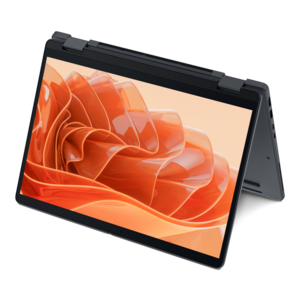
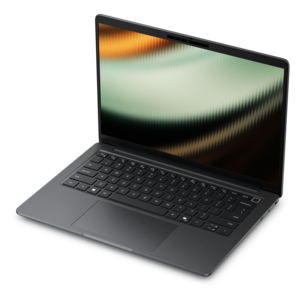
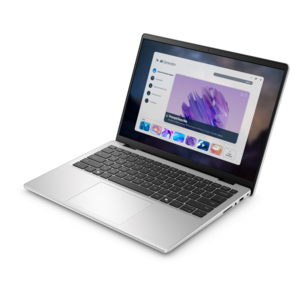
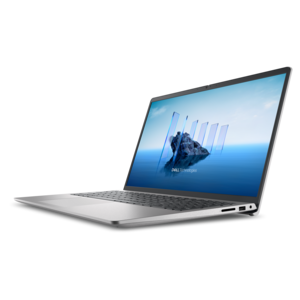
AMD Ryzen AI Laptops
Discover the next generation of computing with AMD Ryzen AI laptops, designed to elevate productivity and performance for modern users. Dell AI laptops with all-day battery life are designed with the new PC architecture combining the processing power of the CPU, GPU and NPU. Engineered for seamless multitasking and intelligent performance, these laptops harness advanced processing power to support a wide range of tasks, from creative projects to everyday work. Explore a diverse selection of AMD Ryzen AI laptops that combine cutting-edge technology with sleek designs, offering solutions tailored to both professional and personal needs.
This product is not available
Check out the following recommendations.



AMD Ryzen AI Laptops
AMD Ryzen AI laptops are portable computers built around processors that combine a central processing unit, integrated graphics, and a dedicated neural processing unit, or NPU, for compatible artificial intelligence workloads. These components serve different purposes: the CPU handles general computing, graphics hardware supports visual workloads, and the NPU accelerates supported AI tasks with an emphasis on power efficiency. That combination suits the changing rhythm of a typical day, from reviewing documents and joining video calls to organizing photos or working on a creative project. In compatible applications, AI acceleration can support features such as background effects, noise reduction, and certain image or text processing functions. The exact experience depends on the processor generation, software, operating system, and individual laptop configuration; an AI label does not mean every application uses the NPU. Some AI functions can run locally, which may reduce the need to send information to a remote service, while others still require an internet connection or cloud processing. Local processing alone does not guarantee privacy, so application permissions and data settings remain important. NPU performance is often expressed in trillions of operations per second, abbreviated TOPS, but that figure describes only one part of a computer’s capabilities. Everyday responsiveness also depends on memory, cooling, software optimization, and the demands of the task itself. For someone moving between a research document, a spreadsheet, and a call with colleagues, a balanced configuration can matter more than a single headline specification. Students, remote workers, and home users may appreciate having AI-capable hardware alongside familiar laptop functions, even when their most-used applications do not yet take advantage of the NPU. These laptops remain general-purpose computers first: their usefulness comes from how comfortably they handle the work, communication, and entertainment that fill an ordinary week. For shoppers considering a broader processor category, laptops with AMD Ryzen 5 processors provide another point of comparison, although the processor family name alone does not establish whether a laptop includes a dedicated NPU.
The physical design of an AI laptop shapes the experience just as much as its processing hardware. A compact chassis is easier to carry between lecture halls, tuck into a commuter bag, or open on a narrow train table, while a larger display gives spreadsheets, timelines, and side-by-side documents more breathing room. Screen dimensions tell only part of that story. Resolution affects text sharpness, brightness influences visibility in a sunlit room, and a matte finish can soften distracting reflections from overhead lights. For photo editing or visual design, documented color coverage and accuracy are more useful indicators than a screen that simply looks vivid. Touch input and convertible hinges can make sense for someone who annotates documents or sketches ideas, but pen compatibility depends on the particular configuration. Keyboard spacing, key feel, and touchpad size become especially noticeable during long writing sessions, and a numeric keypad can be helpful for frequent data entry. Materials also affect portability and everyday handling. Aluminum housings can feel rigid and substantial, while well-designed composite housings can balance low weight with practical durability; construction quality, hinge stability, and reinforcement matter more than material names alone. A laptop carried daily benefits from a snug, padded sleeve that protects its corners without putting pressure on the lid. Fit includes the whole carrying setup, not just the computer’s listed weight: the charger, mouse, and any adapters add to a bag’s load. At a desk, compatible monitors, keyboards, and pointing devices can turn a portable computer into a more comfortable workspace. Port selection deserves attention because similar-looking connectors do not always support the same charging, display, or data capabilities. A dependable webcam, clear microphones, and conveniently placed audio connections matter for interviews, group projects, and conversations with family. Wireless performance likewise depends on both the laptop and the surrounding network, particularly in shared homes or busy campus spaces. Together, these details determine whether the computer feels natural to use at a kitchen counter, in a quiet library corner, or beside a full-size monitor.
Performance and longevity depend on matching the configuration to the work it will actually do. Memory provides room for active applications, so heavier multitasking, large creative projects, and some local AI workloads benefit from greater capacity. Memory requirements vary by application, and upgrade options differ between designs; in some thin laptops, memory is soldered in place. An SSD helps applications launch and files open promptly, while its capacity determines how much room is left for photos, downloaded coursework, project files, and installed software. Integrated graphics can suit everyday visuals, media playback, and some lighter creative or gaming workloads, but demanding games, complex rendering, and advanced video effects may call for more capable graphics hardware. An NPU does not replace those requirements. Battery life is similarly dependent on circumstances rather than the processor name alone. Display brightness, video meetings, background applications, wireless activity, and sustained processing all influence how long a charge lasts. Compatible NPU-accelerated tasks may use less power than running those same tasks on other processing components, but that does not translate into a fixed battery-life improvement across every activity. Cooling design also affects sustained performance and fan noise, especially during exports or extended multitasking. Keeping air vents clear on a firm surface allows heat to escape more effectively than resting the computer on a blanket or cushion. Routine care is straightforward: a soft, lint-free cloth helps remove fingerprints, liquids should stay away from openings, and cleaning methods should follow the manufacturer’s recommendations for the screen and chassis. Operating system and application updates help maintain security and compatibility, while regular backups protect important work against accidental loss. For a graduation gift or a computer shared within a household, practical details such as comfortable screen size, manageable weight, accessible controls, and compatibility with essential software often have lasting value. A student preparing presentations, a parent managing household paperwork, and a hobbyist editing weekend photos may all use AI-capable laptops differently. The strongest fit brings together useful computing performance, supported AI features, and a design that remains comfortable through those everyday routines.
FAQs:
AMD Ryzen AI laptops offer enhanced performance, advanced multitasking capabilities, and integrated AI features designed to optimize productivity, creativity, and efficiency for everyday computing tasks.
AI technology on AMD Ryzen laptops can intelligently manage system resources, improve battery life, enhance video calls with background noise reduction, and enable faster content creation through accelerated workflows.
Yes, AMD Ryzen AI laptops are well-suited for creative professionals, providing powerful processing, responsive graphics, and AI-driven tools that streamline tasks such as photo editing, video production, and graphic design.
Absolutely. AMD Ryzen AI laptops deliver smooth gameplay, vivid visuals, and immersive audio, making them a great choice for gaming, streaming, and enjoying multimedia content.
AMD Ryzen AI laptops typically come equipped with modern connectivity options, including USB-C, HDMI, Wi-Fi 6, and Bluetooth, ensuring seamless integration with a wide range of devices and peripherals.