Business Class Laser Printers
Business class laser printers deliver the performance and reliability that modern offices demand. Designed to handle high-volume tasks with ease, these printers help streamline workflows and support productivity in professional environments. Whether outfitting a small office or upgrading an enterprise workspace, business class laser printers offer the efficiency and consistency needed for everyday operations. Explore a range of options to find the right fit for your organization’s unique printing needs.
This product is not available
Check out the following recommendations.




Business Class Laser Printers
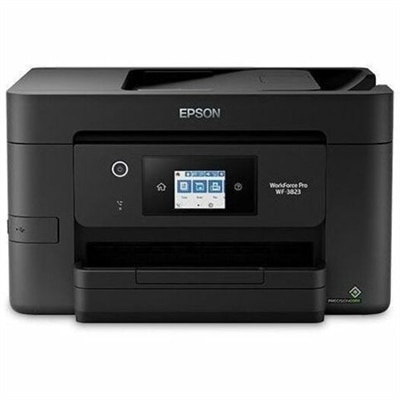
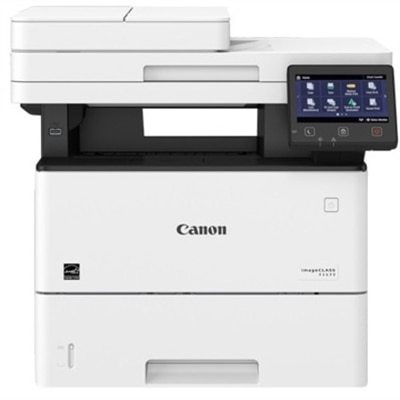
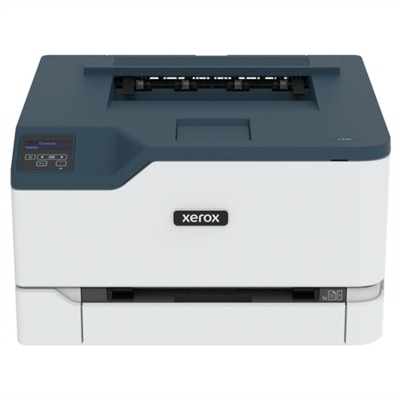
Business-class laser printers are built for the steady rhythm of a busy workplace: documents moving from a desktop to a print queue, invoices collecting in neat stacks, forms waiting beside a reception desk, and meeting materials coming together before the first attendee arrives. Compared with basic home or personal printers, these office-focused models are designed for higher print volumes, faster output, and dependable operation throughout the workday. A recommended business laser printer can be a practical fit for small businesses, home offices, classrooms, medical practices, property management teams, retail counters, and growing departments that need consistent results without slowing down when several people are printing at once. Print speed is commonly listed in pages per minute, or ppm, and is one of the clearest ways to compare models. A printer producing around 30 to 35 ppm may suit a small team with regular reports and correspondence, while a larger department handling long contracts, shipping documents, or recurring statements may benefit from a faster device. Monthly duty cycle is another important specification because it indicates the volume a printer is designed to handle. It is wise to compare that figure with the team’s typical monthly output and leave room for busier periods, rather than choosing a model that operates at its limit every day. A printer with a sturdy build, a generous paper tray, and an expandable paper capacity can reduce interruptions, especially in offices where someone may print hundreds of pages while also handling calls, customers, or deadlines. Automatic duplex printing helps conserve paper by producing two-sided documents, while a multipurpose tray can make it easier to switch between standard office paper, envelopes, labels, and other compatible media. For a closer look at models selected for professional environments, browse Business Laser Printers.
Choosing between monochrome and color depends on the kind of work the printer will perform. A black-and-white laser printer is often a strong match for text-heavy documents such as invoices, legal forms, internal notices, shipping labels, and financial records. It can keep everyday printing straightforward and may be especially efficient for teams that rarely need color. Color laser printers add impact to presentations, charts, marketing materials, branded correspondence, and visual reports, helping important details stand out when a document is placed in front of a client or colleague. Some offices need both capabilities, making a color model a versatile central printer for varied workloads. Multifunction options add scanning and copying, and certain configurations also support faxing, which can help consolidate several routine tasks into one footprint. Scanning can be particularly useful for turning signed paperwork into digital files, copying identification documents at a front counter, or sharing a paper form with a remote colleague. When evaluating a multifunction printer, consider the automatic document feeder, scan speed, two-sided scanning support, and the size of the original documents it can accommodate. A large, clear control panel may make daily tasks more approachable for a shared office, while mobile printing and common wired or wireless connectivity options can give authorized users convenient ways to send jobs from computers, tablets, and phones. Security deserves equal attention. Business-class printers may offer user authentication, secure print release, access controls, encrypted communication, firmware protections, and the ability to remove stored job data. These features are valuable in workplaces that handle payroll information, customer records, health documents, contracts, or other sensitive material. It is also worth checking whether the printer integrates with the office’s existing software and device-management practices, since an easy setup and clear administrative controls can save time long after installation.
The best fit ultimately balances performance, capacity, convenience, and the true cost of ongoing use. Review the recommended print volume, toner yield, replacement supply availability, and energy-saving features alongside the purchase price. High-yield toner can be helpful for teams that print frequently, while separate toner and imaging components may make it easier to replace only the part that needs attention. A printer that wakes quickly, processes complex files smoothly, and supports efficient sleep settings can fit comfortably into a shared workspace without unnecessary noise or power use. Physical size matters as well: measure the available surface, allow room for open trays and ventilation, and make sure the printer can be reached easily when paper or toner needs attention. Small businesses often place a business-class laser printer where one dependable device can serve several people, while larger offices may use multiple units to keep departments productive and reduce trips across the building. A new office, a growing practice, or a home workspace becoming more professional can all benefit from choosing a printer with room to handle future needs. It is also helpful to think about the people who will use it every day. An administrative assistant may value quick first-page output and intuitive controls; an accounting team may prioritize reliable duplex printing and secure handling of financial records; a design or communications group may place greater emphasis on accurate color and flexible paper support. During the warmer and cooler stretches of the year, office routines may shift as schedules, staffing, and project demands change, so a dependable printer can provide welcome consistency through busy stretches and quieter periods alike. By comparing print speed, monthly duty cycle, color capability, multifunction features, paper handling, security, connectivity, and operating costs, shoppers can select a business laser printer that feels less like another piece of office equipment and more like a reliable partner in the daily flow of work.
FAQs:
When selecting a business class laser printer, focus on features such as high print speed, robust monthly duty cycle, advanced security options, duplex printing and scanning, and flexible connectivity including Wi-Fi and Ethernet. These features ensure reliable, efficient performance for busy office environments.
Business class color laser printers offer fast, high-quality output that supports everything from detailed reports to vibrant marketing materials. Their large paper capacity, high-yield toner options, and networked printing capabilities help teams work more efficiently and reduce downtime.
Yes, most modern business laser printers support mobile printing through apps and cloud services, allowing users to print directly from smartphones, tablets, or laptops whether they are in the office or working remotely.
Business class printers are ideal for small to large organizations, workgroups with high print volumes, professionals who require secure document handling, and anyone needing reliable, fast, and high-quality printing for daily operations.
Routine maintenance for business class laser printers includes replacing toner cartridges, emptying waste toner containers, and occasionally cleaning internal components. Many models feature automated alerts and user-friendly access panels to make maintenance straightforward and minimize downtime.