$2842.29
A powerful laptop featuring a 16-inch 2.5K anti-glare display, Intel Ultra 9 processor, and 2TB SSD.
Elevate your creative projects with our top-tier selection of tools designed for business video editing. Whether you're crafting compelling marketing content or producing professional-grade presentations, our range of cutting-edge electronics and accessories provides everything you need to bring your vision to life. Discover the perfect blend of performance and reliability, ensuring seamless editing experiences that keep pace with your business's demands. Explore our curated collection tailored to meet the unique needs of video professionals and enthusiasts alike, and take your business video editing capabilities to new heights.
A powerful laptop featuring a 16-inch 2.5K anti-glare display, Intel Ultra 9 processor, and 2TB SSD.
A powerful desktop with Intel Core Ultra 7, 32GB DDR5 memory, 1TB SSD, and RTX 5060 graphics.
A high-performance workstation laptop featuring Intel Core Ultra 7, NVIDIA RTX Pro graphics, and a vibrant UHD OLED display.
A powerful 18-inch mobile workstation with QHD+ display, Intel Core Ultra 5, 16GB DDR5, and 512GB SSD.
A powerful workstation with AMD Ryzen Threadripper Pro CPUs for high core counts and processing speeds.
A powerful photo and video editing software suite with creative tools, effects, and a 3-year license.
An AI-powered creative software suite offering advanced image, video, music, and voice generation across devices.
A comprehensive software suite offering precision editing tools and unique creative content for professionals.
A feature-rich video editor for Windows offering AI enhancements, precise masking, smoother footage, and cleaner audio.
A comprehensive 12-month subscription offering 20+ creative apps for design, video, web, and more.
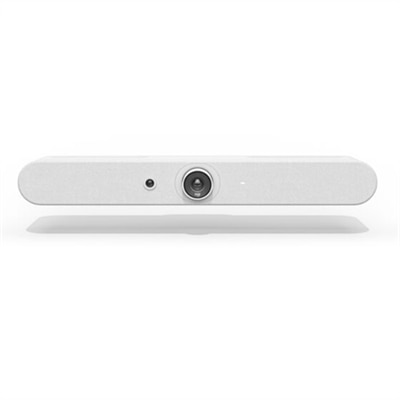
A white all-in-one video bar with AI-driven performance, ideal for small meeting rooms.
A powerful video editing software offering advanced tools, creative effects, and multi-camera editing for Windows.
A comprehensive video editing software subscription offering precise tools and user-friendly performance for one year.
An advanced video editing software for Windows with premium effects, color grading, and facial recognition.
A powerful AI-driven video editing software with guided modes, creative effects, and seamless organization for Mac and Windows.
A professional video editing software offering advanced tools, unlimited tracks, and customizable interface for precision.
A powerful photo and video editing software suite with AI features, creative effects, and easy organization tools.
An all-in-one Windows suite offering AI-powered video and photo editing, enhancement, and creative tools.
A sleek laptop featuring a 15.6" FHD display, 13th Gen Intel Core i7, and 16GB DDR5 memory.
A compact desktop PC featuring Intel Core Ultra processor, 32GB DDR5 memory, and 2TB SSD storage.
A compact AI PC featuring Intel Core Ultra processor, 16GB DDR5 memory, and 512GB SSD storage.
A lightweight 14-inch laptop with Intel Core Ultra 5, 16GB RAM, 512GB SSD, and 2.5K display.
A 40-inch curved monitor with a 5K display, 120Hz refresh rate, and Thunderbolt hub connectivity.
A business laptop featuring Intel Core Ultra 5, 16GB DDR5, 256GB SSD, and AI-powered Windows 11 Pro.
Business video editing helps companies turn everyday expertise, customer experiences and product details into clear, engaging content. A well-edited video can introduce a service, explain a process, support a sales presentation or give a social media audience a reason to stop scrolling. Promotional videos often combine concise messaging, product footage, animated text and music to create energy around an offering. How-to videos use screen recordings, demonstrations, captions and step-by-step narration to make unfamiliar tasks easier to follow. Corporate videos may introduce a team, explain a company’s approach or bring viewers behind the scenes, while testimonial videos pair customer interviews with natural B-roll to build trust. The right equipment and software can support each format, whether a small business owner is recording a quick announcement, a marketing team is producing a campaign or an internal communications group is creating training content. When choosing a business video editing setup, consider the type of footage you plan to work with, the length and resolution of your projects, and where the finished videos will be shared. A portable laptop is useful for employees who edit between offices, client meetings and home workspaces, while a desktop can provide a comfortable, dedicated environment for longer projects. A larger monitor makes it easier to arrange timelines, preview windows, audio controls and graphics without constantly switching views. Clear webcams, microphones, headsets and other accessories can also improve recording and review sessions, especially when remote contributors are part of the production. For businesses seeking an approachable starting point, Video Editing Software With Templates can help simplify the first stage of production with ready-made layouts, guided editing tools and reusable design elements.
A practical business video workflow usually begins with a simple plan: define the audience, choose one main message and outline the action viewers should take after watching. From there, editors can organize recorded clips, remove pauses and distractions, adjust the order of scenes, and add titles that reinforce the spoken content. Template-based tools are helpful for beginners and busy teams because they can provide a dependable structure for promotional clips, announcements and social posts without requiring advanced design experience. Drag-and-drop editing, built-in media libraries, stock audio, animated transitions and automatic captioning can make routine projects faster, particularly when a company needs several versions for different platforms. Browser-based editing may suit distributed teams that collaborate from multiple locations, while installed professional software can offer more detailed control over color, sound, motion graphics and layered timelines. More experienced editors may value support for high-resolution footage, precise trimming, color correction, noise reduction, multiple audio tracks and custom effects. Hardware should match the workflow as closely as possible. Look for a responsive laptop or desktop with a modern processor, ample memory and a display that presents fine detail accurately. A bright, adjustable monitor can reduce eye strain during long review sessions, and a comfortable keyboard, mouse or other input accessory can make repeated trimming and timeline navigation feel less tiring. If several people will review content, consider equipment that makes video calls, voiceovers and live feedback easy to manage. A new business video setup can also be a thoughtful professional gift for a freelancer, entrepreneur, educator or newly hired marketing specialist who is building a portfolio and needs reliable tools for turning ideas into polished content.
The best editing setup is not necessarily the most elaborate one; it is the one that helps a team publish consistent, understandable video without slowing down the creative process. Before purchasing, think about how often editing will take place, whether projects will be completed at a desk or while traveling, and how much room is available for a dedicated workspace. Portability matters for consultants, field teams and sales professionals who capture footage on location, while a larger screen and full-size desktop setup may be preferable for editors who spend hours refining interviews or assembling detailed demonstrations. It is also useful to consider file compatibility, export options, caption support and the ability to maintain visual consistency across a series of videos. Branded colors, logos, lower-third titles and recurring opening or closing sequences can help viewers recognize a company, but the message should remain easy to understand on a small phone screen as well as a larger display. For promotional content, keep the opening moments focused and show the benefit early. For tutorials, use clear chapters, on-screen instructions and pauses that give viewers time to follow along. For corporate storytelling, balance polished scenes with authentic details that convey the people behind the organization. For testimonials, let the customer’s voice feel natural and support it with relevant footage rather than excessive effects. Captions, readable typography and clean audio make content more accessible and useful in offices, public spaces and quiet viewing environments. With a capable computer, a comfortable display, suitable accessories and editing software that fits the team’s experience, businesses can create videos that inform, reassure and connect with customers throughout the year.
Add the products you would like to compare, and quickly determine which is best for your needs.