Computer Bezels
Elevate your computing experience with our diverse range of computer bezels, designed to enhance both the aesthetics and functionality of your devices. Whether you're upgrading your home office or outfitting a gaming setup, the right bezel can make all the difference in creating a sleek and modern look. Our selection caters to various styles and preferences, ensuring that you find the perfect fit for your monitor or laptop. Discover how computer bezels can transform your workspace into a more stylish and efficient environment.
This product is not available
Check out the following recommendations.



Computer Bezels
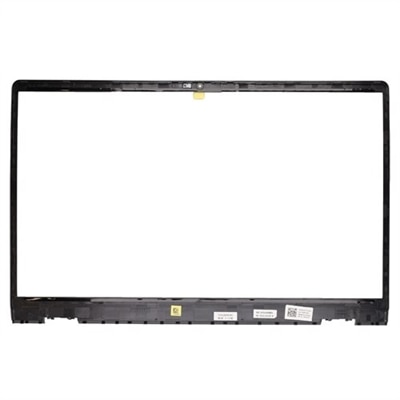
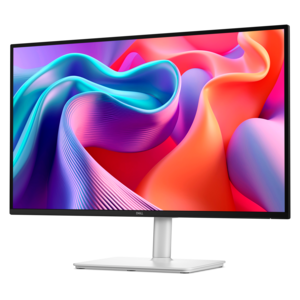
Computer bezels are the physical borders or frames surrounding a display, as well as removable front panels used on some desktop computer cases. On a laptop or monitor, the bezel sits around the LCD or LED panel, creating a protective edge between the screen and the outside world. It can help shield delicate display layers from chips, pressure, and accidental impact while also supporting the structure of the panel. Depending on the design, the bezel may provide a fitted housing for a webcam, microphone, speakers, status lights, hinges, or other small components. On a desktop tower, a bezel typically serves as the front cover, concealing empty drive bays and internal openings while leaving access to practical features such as the power button, audio connections, USB ports, card readers, or an optical drive. These parts may look simple, but a well-fitted bezel helps a computer feel complete, protects exposed edges, and maintains the clean appearance of a workspace. Thin bezels have become especially popular because they reduce the visual border around the image, allowing more of the screen area to take center stage. A narrow frame can make a compact display feel more expansive, help multiple screens sit closer together, and create a tidy look on a desk in a home office, classroom, studio, or shared family space. For an overview of slim-frame display options, browse Monitors With Thin Bezels.
When choosing a computer bezel or a computer that uses a particular bezel design, compatibility should be the first consideration. A replacement frame needs to match the exact computer model, screen size, panel shape, mounting points, hinge placement, and camera or microphone openings. Even small differences in screw locations, cable routing, corner curves, or surface finish can prevent a part from sitting flush. Check the model number printed on the computer, the original documentation, or the manufacturer’s parts information before ordering, and compare photographs carefully when the bezel is being used as a replacement. For desktop case front panels, confirm the case family and the placement of ports, buttons, ventilation openings, and drive bays. A panel designed for a similar-looking tower may not align with the internal clips or connections. Material and finish also matter. Durable plastic can keep weight down and resist everyday scuffs, while a textured surface may do a better job of disguising fingerprints in a busy household. Smooth finishes can complement a minimalist desk, although they may show dust more easily. Ventilation openings should remain unobstructed, particularly on a desktop computer where airflow around the front of the case supports consistent operation. Installation is often straightforward when the replacement is an exact match, but the work still calls for patience. Power the computer down, disconnect accessories, work on a clean, well-lit surface, and keep track of screws and clips. Avoid pressing directly on the display panel, pulling on camera or microphone cables, or forcing a bezel that does not release easily. For delicate or tightly integrated designs, professional service may be the safest choice.
Computer bezels can appeal to many kinds of users because they combine practical protection with a visible improvement in fit and finish. A student may need a replacement frame after a laptop has been carried between a library, classroom, and kitchen table, where a small crack or loose corner can gradually become more distracting. Someone working from home may prefer a monitor with a slimmer border to create a more comfortable dual-screen arrangement without a wide strip separating the images. A creative professional, remote worker, or enthusiast who spends long hours at a desk may appreciate how a narrow bezel keeps attention on the content while giving the workspace a more open, organized feel. Desktop builders can use a front bezel to refresh the appearance of an older tower, cover unused bays, or restore access to ports after a panel has been damaged or misplaced. These parts can also make thoughtful gifts for a person who enjoys maintaining a computer, improving a study area, or giving an aging setup a clean, finished look; the most useful gift is selected with the recipient’s exact model and measurements in mind. During the cooler months, when more work, study, and entertainment may move indoors, a well-matched bezel can help a computer blend naturally into a home office or living space rather than looking worn around the edges. Whether the goal is replacing a damaged frame, protecting a screen’s perimeter, concealing desktop components, or choosing a modern display style, focus on precise compatibility, sturdy construction, accessible ports, unobstructed ventilation, and a finish that suits the way the computer is used.
FAQs:
A computer bezel serves as the frame surrounding the screen or front panel of a device, providing structural support, protecting internal components, and enhancing the overall aesthetic of laptops, monitors, and desktops.
Thin bezels create a more immersive viewing experience by maximizing the screen area while keeping the device compact. This design is especially beneficial for multi-monitor setups, portable devices, and users who prefer a modern, streamlined appearance.
Laptop bezel replacement is ideal for users whose original bezel is damaged, cracked, or worn. It helps restore the look and function of the device, making it a practical solution for students, professionals, and anyone who relies heavily on their laptop.
When selecting a replacement bezel, it's important to ensure compatibility with your specific laptop or monitor model, as well as consider the material, color, and finish to match your device’s original design and durability requirements.
Opting for a bezel dell accessory ensures a seamless fit and quality that matches your Dell device. These accessories are designed to maintain the integrity, appearance, and functionality of your system, making them a reliable choice for upgrades or repairs.