$299.99
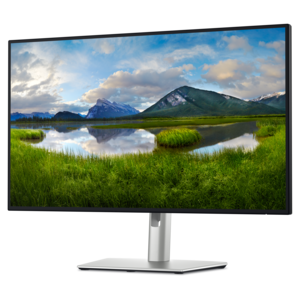
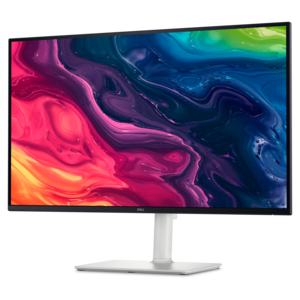
A 4K monitor with up to 120Hz refresh rate and dual 5W speakers for elevated entertainment.
High refresh rate 4K monitors deliver an ultra-smooth and visually stunning experience, making them a top choice for gamers, creative professionals, and multitaskers alike. With exceptional clarity and fluid motion, these displays enhance productivity and entertainment by bringing every detail to life. Explore a wide selection of high refresh rate 4K monitors designed to elevate your viewing experience with vibrant colors and seamless performance.
A 4K monitor with up to 120Hz refresh rate and dual 5W speakers for elevated entertainment.
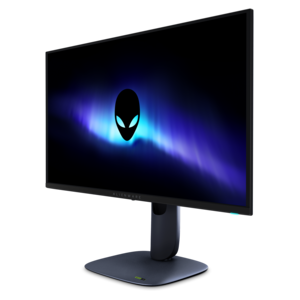
A 4K QD-OLED gaming monitor with 240Hz refresh rate, high pixel density, and Dolby Vision.
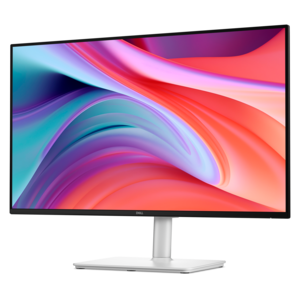
A 4K monitor with IPS Black, 3000:1 contrast, 120Hz refresh, ambient light sensing, and eye comfort.
High refresh rate 4K monitors combine a resolution of 3840 × 2160 pixels with a refresh rate above the standard 60Hz, bringing fine detail and smoother motion to the same screen. Common high refresh rate options include 120Hz, 144Hz, 165Hz, and 240Hz, although the supported rate depends on the display and its connection to the source device. Resolution describes how many pixels form the image; refresh rate describes how many times the screen can update that image each second. Together, they can make distant scenery look more defined while keeping a fast camera pan easier to follow. For gaming, that combination suits everything from tracking an opponent across an open landscape to watching roadside details stream past in a racing simulator. Outside games, a higher refresh rate also makes scrolling documents, moving windows, and navigating a busy timeline feel more fluid. The benefit is most noticeable when the computer can deliver enough frames to match the screen’s capabilities. Rendering a demanding game at native 4K and a high frame rate requires substantial graphics performance, and results vary with the game, visual settings, and hardware. A 240Hz screen does not automatically make a game run at 240 frames per second. Adaptive sync can help reduce tearing and uneven motion by coordinating the display’s refresh cycle with the graphics output within a supported range. Pixel response time is a separate consideration: it describes how quickly pixels change, rather than how often the screen refreshes. Fast transitions help preserve clarity in motion, but advertised response times are measured under different conditions and do not tell the whole story about input lag or visible artifacts. For a desk that handles competitive play in the evening and detailed work during the day, the appeal is a display that balances sharpness, responsiveness, and comfortable everyday viewing rather than relying on one specification alone.
Screen size and panel technology shape how that balance feels in practice. A 27-inch 4K monitor packs its pixels into a relatively compact surface, making fine text and image details look crisp at typical desk distances. A 32-inch 4K monitor spreads the same resolution across a larger area, giving games more visual presence and making individual interface elements larger at the same scaling setting. Both can accommodate multiple windows, although operating system scaling determines how much content fits comfortably on screen. For someone comparing reference images beside a design file, or keeping a spreadsheet open next to a video call, readable text matters as much as the total pixel count. IPS LCD panels are often valued for wide viewing angles and consistent color, while OLED panels use self-emissive pixels to produce deep blacks and strong contrast without a separate backlight. QD-OLED is an OLED variation that uses quantum dots for color conversion. These technologies have different strengths: OLED’s rapid pixel transitions can make motion look particularly clean, while an IPS LCD can suit long sessions with fixed toolbars and static documents without the same burn-in considerations. OLED text rendering varies with pixel structure, software, and viewing distance, and prolonged static content can contribute to uneven pixel wear. Screen finish matters, too. A matte surface helps diffuse reflections from windows and overhead lighting, while a glossy surface may make reflections more distinct. HDR performance depends on brightness, black levels, color capability, and, for LCDs, the quality of local dimming; accepting an HDR signal alone does not guarantee a dramatic improvement. For photography, illustration, and video work, useful attributes include appropriate color gamut coverage, accurate color modes, and calibration options. A curved screen can bring the edges of a larger display slightly closer to the viewer, while a flat screen may feel more familiar for layouts and side-by-side displays. Room lighting, desk depth, and the types of content viewed all influence how these differences appear.
Connectivity and physical fit help a high refresh rate 4K monitor work smoothly as part of a complete setup. The maximum usable resolution and refresh rate depend on the monitor input, graphics output, cable, and selected color settings, not just the connector’s shape. HDMI and DisplayPort connections can support demanding display modes, but their capabilities vary by implementation; some combinations use Display Stream Compression to carry high-resolution, high-refresh-rate signals. A compatible cable and a direct connection can prevent a dock or adapter from limiting performance. Console use has its own requirements, including support for the intended 4K output, refresh rate, and variable refresh rate mode. USB-C can simplify a laptop desk when the monitor supports video input and sufficient power delivery, though those features are not universal. Built-in USB hubs, audio connections, and switching features can also be useful when the same screen serves more than one computer. For a broader view of motion-focused displays across resolutions, Gaming Monitors With High Refresh Rate provides a related category to explore. On the desk itself, a stable base, manageable stand footprint, and height and tilt adjustments make a practical difference during longer sessions. A compatible mounting arm can free space, provided its mounting pattern and weight capacity match the display. Housing materials vary, but sturdy joints, secure mounting points, and well-supported cables matter more to everyday durability than a decorative finish. Screen coatings need gentle care: a clean microfiber cloth and the manufacturer’s recommended cleaning method help protect the surface, while excessive pressure and liquid sprayed directly onto the panel can cause damage. Keeping ventilation openings clear and using supported panel-care features also helps with ongoing upkeep. As a gift for a gamer, student, or creative professional, this category makes the most sense when the recipient’s computer, workspace, and preferred activities can benefit from both the added detail of 4K and the smoother movement of a high refresh rate.
Add the products you would like to compare, and quickly determine which is best for your needs.