$2282.99
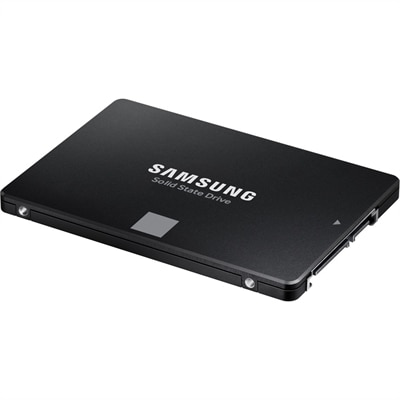
A high-performance 4TB internal SSD with SATA connectivity, 560/530MB/s speeds, durable V-NAND, and broad compatibility.
Internal SATA hard drives are essential components for anyone looking to enhance their computer's storage capacity and performance. These drives offer a reliable solution for storing vast amounts of data, from high-definition videos to extensive software applications. Whether you're upgrading your existing system or building a new one from scratch, internal SATA hard drives provide the speed and efficiency needed for a seamless computing experience. Explore a variety of options that cater to different storage needs and find the perfect fit for your setup.
A high-performance 4TB internal SSD with SATA connectivity, 560/530MB/s speeds, durable V-NAND, and broad compatibility.
Internal SATA hard drives are practical additions for compatible desktop computers and older laptops that need more room for documents, photos, music, video files, applications, and game libraries. These traditional drives use spinning magnetic platters to record information, making them a familiar choice for people who value generous capacity and dependable everyday performance. A Serial ATA connection links the drive to the computer’s motherboard, with compatible interfaces supporting transfer rates of up to 6 Gb/s. Actual performance depends on the computer, controller, cable, drive speed, and the type of files being accessed, but the interface remains widely supported across many desktop builds. For a family computer, an internal SATA hard drive can provide a convenient home for years of photographs and downloaded media. For a student or remote worker, it can separate personal files from the operating system and everyday applications. For someone who enjoys building or refreshing a PC, it can add useful capacity without replacing the existing boot drive. Before choosing, consider how much room you need today and how quickly your collection is likely to grow. A modest capacity may suit documents and occasional backups, while a larger option can be more comfortable for high-resolution photos, recorded video, large creative projects, and multiple game installations. It is often easier to leave extra headroom than to reorganize folders when a drive approaches its limit. Shoppers comparing options in this category may also want to review Internal 2 TB Hard Drives when a balanced amount of space is the goal.
Compatibility is the most important consideration before placing an internal SATA hard drive in a computer. Desktop PCs commonly use a 3.5-inch drive bay, while many older laptops and compact systems are designed for a 2.5-inch form factor. The physical dimensions, mounting points, connector placement, and available clearance all matter, so check the computer’s documentation or inspect the open bay before ordering. A desktop may have room for several drives, whereas a slim laptop may require a specific thickness and a suitable mounting bracket. You should also confirm that the motherboard has an available SATA data connection and that the power supply includes a compatible SATA power connector. Bare internal drives frequently do not include SATA data or power cables, and some installations require mounting screws, rails, trays, or an adapter. These small details can make the difference between a smooth afternoon upgrade and a project paused while waiting for an extra part. It is helpful to shut down the computer, disconnect power, ground yourself, and handle the drive by its edges during installation. Once secured, connect the data cable to an open motherboard port and the power cable to the drive, then check the system’s firmware and operating system to confirm that the new capacity is recognized. A newly installed drive may need to be initialized and formatted before it appears in the file browser. If it will hold important photographs, work files, or creative projects, create a backup elsewhere rather than treating one internal drive as the only copy. A second copy on a separate device can provide reassurance when a family archive, tax folder, or years of travel pictures would be difficult to recreate.
The right internal SATA hard drive depends on the computer, the workload, and the way you prefer to organize files. Capacity is only one part of the decision. Look at rotational speed, cache size, warranty information, operating noise, power requirements, and the manufacturer’s intended use, while remembering that specifications should be considered alongside the limits of the computer itself. Drives designed for ordinary desktop use may suit documents, media collections, application libraries, and periodic backups, while a computer that runs for long stretches or handles repeated read-and-write activity may call for a model rated for that environment. Traditional hard drives are often a sensible choice when ample room matters more than the quick response associated with solid-state storage. Many people use one as a secondary drive: a faster primary drive handles the operating system and frequently opened applications, while the SATA hard drive holds photos, archived projects, recordings, and less frequently used games. Others install one as the main drive in an older desktop that needs a straightforward capacity refresh. During the cooler months, a quiet home office can be a good setting for sorting folders, moving family pictures, and planning a clean backup routine, but the benefits remain useful throughout the year. An internal drive can also be a thoughtful practical gift for a PC enthusiast, student, photographer, or household member whose computer is running short of room, provided the recipient’s system supports the correct size and connection. Keep the drive in a well-ventilated enclosure, avoid unnecessary movement while it is operating, and monitor available capacity over time. With careful compatibility checks and a sensible backup plan, an internal SATA hard drive can give a familiar computer more breathing room for everyday work, entertainment, and personal files.
Add the products you would like to compare, and quickly determine which is best for your needs.