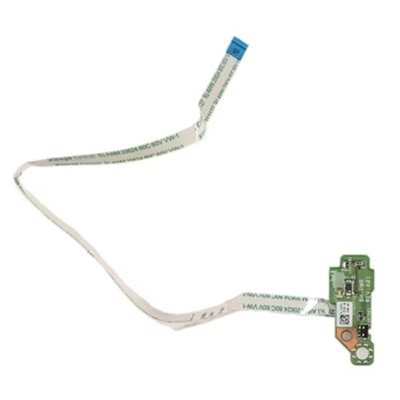
Laptop Buttons
Laptop buttons are essential components that significantly enhance the functionality and user experience of your device. Whether you're typing up reports, coding, or gaming, the responsiveness and layout of these buttons can make a world of difference in your daily tasks. From sleek designs to ergonomic configurations, laptop buttons come in various styles to suit diverse needs and preferences. Explore our range to find the perfect match for your laptop, ensuring both efficiency and comfort in every keystroke.
This product is not available
Check out the following recommendations.




Laptop Buttons
Laptop buttons support nearly every interaction with a computer, from entering a password and writing a message to adjusting screen brightness, muting audio, navigating a document, or turning the system on and off. A typical laptop keyboard includes alphanumeric keys for letters and numbers, punctuation keys, modifier keys such as Shift, Ctrl, Alt, and Fn, navigation controls including the arrow keys, Home, End, Page Up, and Page Down, and a top row of function keys labeled F1 through F12. Depending on the laptop design, the top row may provide quick access to volume, media playback, wireless connectivity, display settings, and other everyday controls. Some computers also include a dedicated power button, a fingerprint-reader button, or a small pointing stick placed among the letter keys. When browsing laptop buttons, start by identifying the exact laptop manufacturer, series, model number, and keyboard layout. Two laptops that look nearly identical can use different keycap shapes, hinge mechanisms, connector placements, or function markings. The position of the Enter, Shift, Backspace, and spacebar keys may also vary between US and international layouts. Matching the replacement to the original keyboard is especially important for larger keys, which often use stabilizer bars or more than one retaining point. A clear photograph of the keyboard, the underside of the loose keycap, and the label on the laptop can help confirm compatibility before a purchase. For broader replacement and upgrade options, browse Laptop Keyboards, where keyboard styles and layouts can be compared in one place.
Individual laptop buttons are often made up of several small parts rather than a single piece. The visible plastic keycap carries the letter, symbol, or icon; beneath it sits a scissor-style hinge or retaining clip that controls the key’s movement; and below that is a flexible rubber dome that registers the press against the keyboard membrane. A key may feel loose, tilt to one side, fail to spring back, or stop registering because one of these components has cracked, shifted, collected debris, or become worn. A replacement kit may include the keycap, hinge clip, and rubber cup, while some options provide only the visible cap. Check what is included and compare the shape of the hinge with the mechanism still attached to the keyboard base. Before attempting a repair, shut down the laptop, disconnect its charger, and work on a clean, well-lit surface. A soft brush or a few careful bursts of air can remove dust around the affected area. If the hinge is intact and only the cap has come off, the cap may press gently back into place; if the hinge is broken, forcing the cap can damage the membrane or keyboard frame. Use a plastic pick rather than a sharp metal tool, avoid pulling on nearby keys, and stop if the underlying mechanism will not align naturally. Large keys such as Space, Enter, Shift, and Backspace can be more involved because of their stabilizer bars. A power button deserves extra caution as well: on some laptops it is part of a separate board or connected to the system through a delicate cable, so a complete replacement assembly may be more appropriate than an individual button.
Laptop buttons are useful for people who rely on a computer every day and want to restore a comfortable, familiar typing experience without replacing the entire device. A writer who spends hours moving between notes and documents may notice one unreliable punctuation key long before the rest of the laptop shows wear. A student working in a quiet library may need a fully functioning Backspace or Enter key for accurate assignments, while a remote professional may depend on dependable function-row controls for microphone muting, camera access, and volume changes during calls. These small replacement parts can also be a practical gift for someone who maintains equipment, travels with a laptop, or prefers to repair rather than discard a well-loved computer. They are easy to store in a desk drawer or travel case and can be especially helpful when a frequently used key becomes damaged by crumbs, repeated pressure, or an accidental spill. Consider the color, finish, printed character, backlighting support, and texture of the replacement so it blends with the surrounding keyboard. Backlit keyboards may require translucent markings and precisely aligned openings, while textured or coated keycaps can feel noticeably different from standard plastic. It is also worth checking return policies, installation requirements, and whether the part is intended for a full keyboard assembly or a particular key position. During the warmer and cooler parts of the year, laptops often move between home offices, classrooms, cafés, and travel bags, making compact repair parts convenient to keep nearby. The right match can restore the familiar rhythm of a keyboard—the soft rebound of the spacebar, the crisp response of an arrow key, and the reassuring click of Enter—while helping extend the useful life of the laptop already in hand.
FAQs:
Laptop buttons, or computer keyboard keys, are typically divided into typing keys (letters, numbers, and symbols), function keys (F1-F12) for program-specific actions, control keys (such as Ctrl, Alt, and Shift) for shortcuts, navigation keys (arrow keys, Home, End, Page Up, Page Down), and the Fn key, which activates secondary functions like adjusting volume or screen brightness.
Laptop shortcuts combine control keys like Ctrl, Alt, and Shift with other keys to perform common actions quickly, such as copying text with Ctrl+C or switching windows with Alt+Tab. Familiarizing yourself with these shortcuts can make tasks like editing documents, managing files, and browsing the web much faster and more intuitive.
The Fn (Function) key on a laptop keyboard allows you to access secondary functions of other keys. For example, holding down the Fn key while pressing another key can adjust screen brightness, control media playback, or toggle wireless connectivity, depending on your laptop model.
Anyone who uses a laptop regularly—students, professionals, gamers, and creatives—can benefit from understanding laptop button functions. Mastering laptop shortcuts and key board navigation can streamline daily tasks, enhance productivity, and make using your device more comfortable and efficient.
For additional details and a wider selection of products related to laptop buttons and computer keyboard keys, visit our dedicated Computer Buttons page, where you'll find a range of tools and accessories designed to enhance your laptop experience.