$798.00
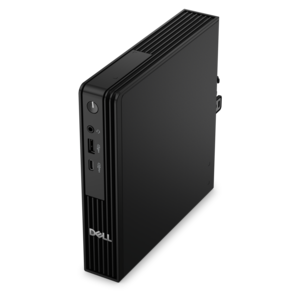
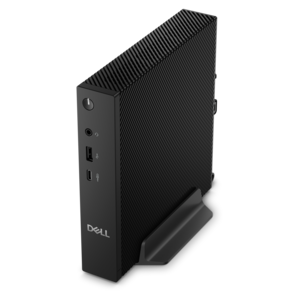
A compact thin client supporting cloud software, ThinOS, Windows 11 IoT Enterprise, or no operating system.
Enhance your connectivity and streamline your digital infrastructure with top-tier network clients, designed to meet the dynamic demands of modern businesses. Whether you're expanding an existing network or setting up a new one, finding the right network clients is essential for seamless integration and optimal performance. Explore a diverse range of options tailored to support efficient data management, secure communications, and robust networking capabilities. From small startups to large enterprises, discover solutions that empower your organization to stay connected and productive in today's fast-paced digital landscape.
A compact thin client supporting cloud software, ThinOS, Windows 11 IoT Enterprise, or no operating system.
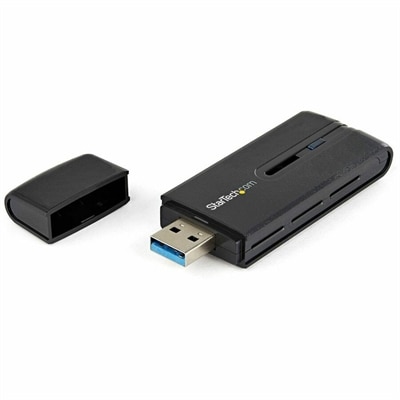
A dual-band USB 3.0 Wireless-AC adapter delivering up to 867 Mbps with WPS and backward compatibility.
A network client is a computer or application that initiates a connection to request information or use a shared service, then presents the results to the person using it. In everyday computing, that role belongs to familiar devices such as laptops and desktops, along with the software running on them. Opening a web page, checking email, joining a video meeting, and accessing a shared document all involve client activity. For a page focused on computing hardware, network clients are the user-facing devices that make those activities possible: the screen, keyboard, processing resources, and operating environment through which work gets done. The distinction between a thin client and a full-featured computer lies largely in where applications run and how much processing takes place on the device itself. Thin clients typically rely more heavily on remotely delivered applications or virtual desktops, while traditional laptops and desktops can run substantial workloads locally as well as access connected services. Neither approach is inherently right for every setting. A receptionist moving between appointment calendars and messages has different requirements from a designer editing large image files or an analyst working with complex spreadsheets. A lightweight application environment may suit repetitive, clearly defined tasks, while broader local computing capabilities support a more varied mix of software and offline work. Even within the same office, different roles can benefit from different client configurations. What matters is the relationship between the device, the applications people use, and the place where those applications perform their work. Responsiveness also depends on more than the client alone: connection quality, application demands, and the remote environment can all affect the experience. Understanding that balance gives context to the hardware without treating every computer as interchangeable. The most useful client is one that fits its intended tasks comfortably, whether it supports a quiet home workspace, a busy reception desk, or an employee who moves between locations throughout the week.
Network client hardware varies in size, construction, processing capability, and workspace requirements. Compact desktop designs can leave more room for paperwork and peripherals, while laptops combine a display, keyboard, and battery in a form that travels between a kitchen table, an office desk, and a meeting room. A stationary setup may favor easy access to connections and support for multiple monitors; a mobile setup places more emphasis on weight, hinge construction, battery runtime, and a power adapter that is practical to carry. Exterior materials, including plastics and metals, affect how a device feels and how much it weighs, but material alone does not establish durability. Assembly quality, ventilation, hinge design, and any documented durability testing provide more meaningful context for repeated daily use. A computer that is opened and closed several times a day faces different wear from one that stays mounted beside a display. Physical fit matters just as much as specifications. Cables need clearance, air vents need breathing room, and a compact device should not crowd the keyboard or force an awkward monitor position. Memory and processor capability influence local multitasking, while local storage capacity matters more when files and applications remain on the device. For a thin client, compatibility with the intended virtual desktop environment may be more important than having substantial local storage. Display support deserves attention when work involves a document on one screen and a scheduling or communication application on another. Ports determine whether existing monitors, headsets, keyboards, and other accessories connect directly or require additional adapters. Wireless capabilities and wired connection options should match the intended working environment, especially where reliable video calls or frequent access to shared files are part of the routine. The related Network Controllers category concerns a different function: enabling or managing a device’s network connection rather than describing the complete computer people use. Compatibility across the computer, operating system, applications, and peripherals is what brings these individual details together into a dependable daily setup.
The experience of using a network client is shaped by the people and routines around it. At a shared workstation, several employees may use the same hardware during different shifts, making straightforward sign-in, predictable application access, and an easy-to-clean workspace especially useful. In a home office, a comfortable display arrangement, clear audio, and quiet operation can matter throughout a day of calls and focused work. Students accessing browser-based coursework may value portability and a readable screen, while administrative staff may spend hours moving between forms, records, and communication tools. These scenarios place different demands on the same broad category of computing devices. Accessibility features, keyboard comfort, text scaling, and support for preferred input devices can make a meaningful difference during long sessions. Camera and microphone requirements also vary: occasional check-ins call for a different setup from frequent presentations or customer conversations. For organizations, supported operating systems, management capabilities, and a clear update process help keep client devices consistent over time. Security depends on both device features and everyday practices, including appropriate account access, timely updates, and protection for any information stored locally. Thin-client designs may reduce the amount of data kept on the endpoint, but that does not remove the need to protect user accounts or maintain the device. Day-to-day care remains practical and physical as well. Dust around vents, tightly bent cables, and drinks placed beside a keyboard can undermine an otherwise well-suited workstation. Cleaning should follow the manufacturer’s directions, with suitable materials for screens and exterior surfaces and no liquid sprayed directly into openings. Clear airflow and sensible cable routing help preserve a usable workspace, while accessible connections make routine changes less disruptive. Over a longer period, documented software support, warranty terms, and repair or replacement options help determine how well a client will continue to serve its purpose. Network clients work best as part of a coherent personal workspace: hardware that supports the required applications, fits the available space, and stays comfortable to use through the ordinary demands of each day.
Add the products you would like to compare, and quickly determine which is best for your needs.